Workflow automation for a car rental business means letting software handle the repeatable steps between a customer's first inquiry and the final invoice: availability checks, contracts, payments, reminders, vehicle handoffs and maintenance triggers. Done well, your team stops retyping data and chasing paperwork and spends its time on customers and on getting cars back on the road. This guide shows which workflows to automate first, what results operators report, and where automation projects go wrong.
TL;DR
- Automate in the order a rental moves: booking and availability, identity checks and contracts, payment, vehicle handoff, return and turnaround.
- Most US operators are still in the middle: only 16% have fully integrated digital workflows, while 67% run partially integrated systems.
- Operators who invest in integrated rental technology report fewer missed rentals, higher utilization and less admin time.
- Clean data at the booking stage matters more than the software brand you pick. Telematics and payments both need rules defined before launch.
- A single platform with open integrations beats a stack of disconnected tools.
Table of Contents
What a rental workflow actually is
Every rental follows the same chain, whether you run 12 cars or 1,200:
- A customer asks for a vehicle on certain dates.
- You confirm that a suitable car is free.
- You verify the driver and issue a contract.
- You collect payment and a deposit.
- The customer picks up the car.
- The car comes back, is inspected, cleaned and serviced.
- You close the invoice, settle any extras and release the car for the next booking.
Each handoff is a place where a spreadsheet, a text message or a paper form can fail. Automation replaces those handoffs with rules: when X happens, the system does Y and tells the right person only if something needs a human decision.
The industry is moving this way for practical reasons. Analysts at Frost & Sullivan describe a shift from counter-based processes, such as manual ID checks and paper contracts, toward end-to-end digital journeys, driven by rising operating costs and labor shortages rather than convenience alone.
Where US operators stand today
The 2025 State of Tech report from Quipli puts the gap in numbers: as of Q4 2024, only 16% of rental operators had fully integrated digital workflows. Another 67% were partially integrated, mixing manual data entry with software that does not talk to each other. The same research projects the market for these solutions growing from $731 million in 2025 to more than $2.47 billion by 2035.
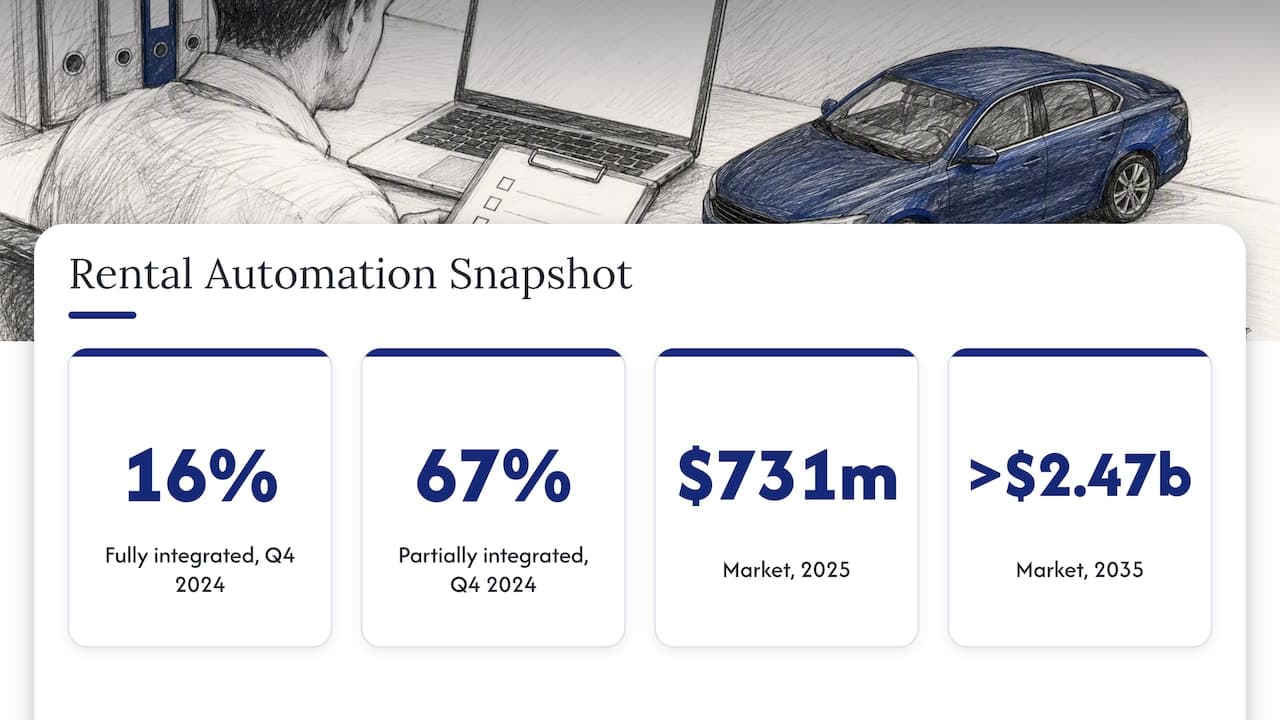
If you recognize your business in the 67%, you are in the majority. The practical question is which seams to close first.
The workflows worth automating, in order
1. Booking and availability
This is the highest-value starting point because mistakes here are visible to customers. Double bookings happen when reservations live in more than one place: a calendar, an inbox, a marketplace listing, a phone notebook. A single reservation engine with real-time availability removes the conflict at the source. Buffers for cleaning and transfers can be built into the availability rules so a car is never promised the minute it returns.
We cover the mechanics in detail in our guide to automating rental bookings.
2. Identity verification and contracts
The counter is where time is lost: a customer waits while staff photocopy a license, fill in a form and explain the terms. Moving verification before arrival and generating the contract automatically from reservation data shortens pickup to a signature and a key handoff. Industry commentary identifies automated contract generation and biometric verification among the features driving this transformation. For a step-by-step look at verification, see our piece on four identity verification steps that speed up pickups.
3. Payments and deposits
Payment is the step with the most manual follow-up: sending links, matching transfers, releasing deposits, billing for fuel or tolls. Automated payment flows charge at the right moment, record the transaction against the contract and release or capture deposits by rule. Our automated car rental payments page explains how this works inside Nomora.
There is a compliance angle you should settle early; it is covered below.
4. Pricing
Once bookings and payments are reliable, pricing rules become the next lever. Dynamic pricing adjusts rates to vehicle availability and demand instead of relying on a static rate card. Frost & Sullivan lists it among the key digital features reshaping the industry, and we walk through the approach in dynamic pricing strategies for fleet profitability and demand forecasting. Start here only when your availability data is trustworthy; a pricing rule fed by wrong inventory simply automates a bad decision.
5. Vehicle handoff, return and turnaround
The same Frost & Sullivan analysis notes that fleet readiness, the ability to turn vehicles around quickly, is becoming a bigger competitive advantage than total fleet size. Automation helps here by creating the cleaning, inspection and service tasks the moment a return is logged, and by blocking the car from new reservations until the checklist is complete.
What results to expect
Be cautious with any vendor promise of a specific percentage. The best independent figures come from operators surveyed about integrated rental management technology. In the Quipli report:
| Reported outcome | Share of companies |
|---|
| Fewer missed rentals | 57% |
| Higher fleet utilization | 43% |
| Time saved on administrative overhead | 64% |
The same report says time savings come mainly from maintenance scheduling and data entry. Note that these are shares of companies reporting a benefit, not the size of the benefit. Your own gain depends on how manual your starting point is, so measure before you automate: hours spent on admin per week, double bookings per month, idle days per vehicle.
Telematics: automate the fleet, not just the booking
GPS and telematics turn the vehicle itself into a workflow trigger: mileage for service intervals, location for returns and transfers, fault codes for maintenance holds. Operators quoted by Auto Rental News say independent and regional fleets often find telematics easier to deploy than large players, because they carry less legacy IT. The same piece warns against treating telematics as only a recovery tool; its real value is maximizing the dollar utilization of each vehicle.
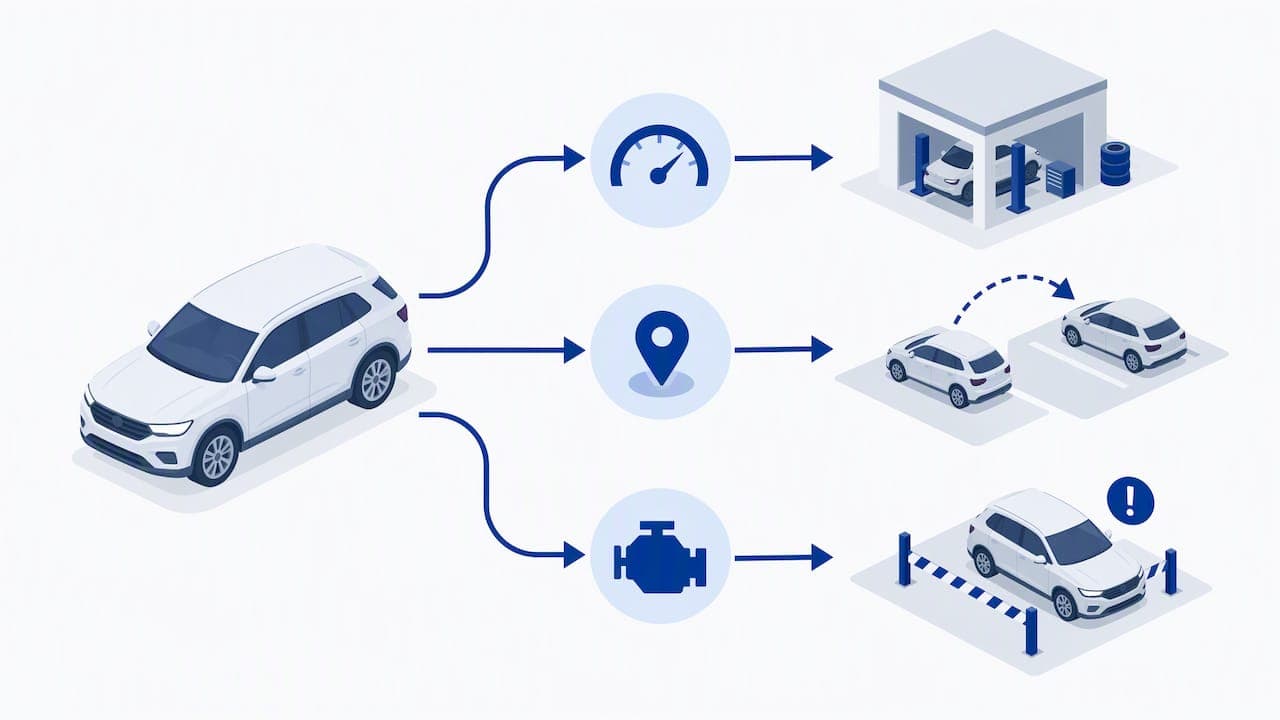
One caution: telematics is not set-and-forget. Industry reporting stresses defining geofences and driver behavior rules before deployment, otherwise you drown in thousands of meaningless alerts. The most mature operations use the data to decide which vehicles get serviced first, which directly improves turnaround and availability. For a broader primer on why utilization and productivity are the point of fleet tracking, this explainer on how fleet management works and saves costs is a useful read, even though it comes from the coach-bus side of the industry.
To see what real-time data changes for managers day to day, read the benefits of real-time rental data.
The data discipline behind every automation
Automation multiplies whatever you feed it. If a customer's license number is mistyped at booking, the contract, the payment record and the damage claim all inherit the error. Industry practitioners cited in the Quipli report say the hardest part of moving from gut-feel fleet management to a data-driven model is not choosing software but keeping data accurate at every stage, from first customer capture to live telematics updates.
Practical rules that help:
- Capture once. Customer details entered at booking should flow into the contract, invoice and verification without retyping.
- Use required fields. Make the system refuse a reservation without the data later steps depend on.
- Give every vehicle one status. Available, reserved, on rent, in cleaning, in service. No free-text statuses.
- Review exceptions weekly. Look at bookings that needed manual fixes and ask which rule would have prevented them.
Once the data is clean, analytics become reliable; our guide to rental data analytics shows what to track, and the inventory management guide covers utilization in more depth.
Payment security: do not assume the gateway covers you
A common misunderstanding among small business owners is that using a payment gateway automatically takes you out of PCI DSS scope. The PCI Security Standards Council's tokenization guidance says tokenization and de-tokenization should occur only within a clearly defined tokenization system. In practice, if card data passes through your own fleet or reservation platform before it is tokenized, that platform can remain in scope. Ask any software provider how card data is tokenized and where raw numbers could touch your systems, and confirm your obligations with your payment processor or a qualified security assessor.
Integration beats isolation
Frost & Sullivan advises managers to judge software on how well it fits the wider transport ecosystem rather than as an isolated reservation tool. When you compare options, check for:
- GPS and telematics connections
- Payment gateways
- Accounting export or sync
- Website and marketplace booking channels
- An open API for anything you add later
Our integrations guide and the roundup of top car rental integrations explain what to connect first.
Our perspective
We think of rental software as the central nervous system of the operation: it receives signals from every part of the business and triggers the right response. When that system is a patchwork of spreadsheets, inboxes and card terminals, signals get lost, and your team becomes the nervous system by hand.
Three convictions shape how we build Nomora:
- Speed to value matters. An automation project that takes months stalls. Our onboarding is designed so a business is operational in 24 to 48 hours, and every plan includes all features, so you do not discover a locked module mid-rollout.
- One record per rental. Reservation, contract, payment, vehicle and customer sit together, which is what makes conflict-free booking possible.
- Start narrow, then expand. Automate booking and contracts first, then payments, then telematics and pricing. Each layer is easier when the one below it is clean.
The operators who gain most are rarely the ones with the most tools. They are the ones who decided what a standard rental should look like and let the system enforce it.
— Dizzy
How Nomora fits
Nomora is cloud-based car rental management software covering reservations, fleet management with GPS tracking, automated contracts, integrated payments and customer data. It suits small and mid-sized rental companies, luxury and specialty vehicle renters and corporate fleet managers.
Published pricing: Starter is €45 per month, Business is €2.80 per month per vehicle and Fleet is €2.20 per month per vehicle. Enterprise pricing is not published, and payment processing fees are listed separately on the pricing page. To see how the platform maps to your type of business, browse the use cases or the full car rental software overview.
A 30-day rollout plan
- Week 1: map and measure. Write down your current rental steps and note where staff retype data. Record baseline numbers: admin hours, double bookings, average pickup time.
- Week 2: set up bookings and contracts. Load your fleet, define statuses and buffers, and switch contract generation to automatic.
- Week 3: add payments and verification. Connect payments, set deposit rules and move ID checks before pickup.
- Week 4: connect vehicles. Add GPS, define geofences and alert thresholds, and link maintenance triggers to vehicle status.
- Day 30: review. Compare against your baseline and list the exceptions that still needed manual work. Each one is your next rule.
Staff buy-in is part of the plan. Show the team which tasks disappear, such as retyping and chasing signatures, so automation is seen as relief rather than surveillance.
FAQ
What is the first workflow a small rental company should automate?
Bookings and availability. A single reservation system with real-time availability removes double bookings, and it supplies the clean data that contracts, payments and pricing rely on. Most other automations build on it.
Will automation replace my counter staff?
It changes their work more than it removes it. Paperwork, data entry and payment chasing shrink, while customer handling, exceptions and vehicle condition checks remain human tasks. Frost & Sullivan ties digital journeys to labor shortages, which suggests the aim is to cover scarce hours, not cut people.
Do I need telematics to automate my rental workflow?
No. You can automate reservations, contracts and payments without it. Telematics adds mileage-based service triggers and location data, and it works best once you have defined geofences and alert rules.
Does using a payment gateway make my business PCI compliant?
Not automatically. If card data touches your own systems before tokenization, those systems can stay in PCI scope. Ask your provider how tokenization works and confirm your obligations with your payment processor.
Sources
Recommended
Ready to streamline your car rental business?
Book 30 minutes with the founder. We set up everything in this guide on your own vehicles, and migrate you out of Excel for free.



