In car rental, a blackout date is a date on which a rate, promotion or vehicle is not available. Managing them well means deciding which dates to block, for which vehicles and locations, recording each block in one calendar, and telling customers before they book rather than after. This guide shows how to do that, from the first rule you write to the booking that arrives on a blocked day anyway.
You will leave with a framework you can apply this week: two kinds of blackout, a short list of what usually deserves a block, a change routine, and a plan for the exceptions.
TL;DR
- Two different things share the name. A promotional blackout removes a discount on certain dates. An operational block takes a vehicle off the calendar entirely. Manage them with separate rules.
- Block by vehicle, model, date and location, not with one blanket rule. Narrow blocks protect revenue.
- Keep one calendar as the source of truth. Every channel that sells your cars should read from it, because delayed syncing is how blocked cars get booked.
- Have an exception script ready. When a conflict happens, contact the customer with a comparable vehicle or alternative date already lined up.
- Review blocks on a schedule, before each peak season and after each maintenance cycle.
Table of Contents
What blackout dates mean in car rental
The term is used in two ways, and mixing them up is the most common source of confusion for both staff and customers.
Promotional blackout dates are limits in the fine print of an offer. The U.S. Federal Trade Commission describes blackout dates in car rental promotions as dates on which the promotional or sale price is not available, and advises consumers to read those limits before booking. A rental brand's own FAQ gives the same picture: discounts and promotions are typically unavailable around major holidays or peak travel seasons. The car can still be rented on those days. Only the discounted price is off the table.
Operational blocks are different. They remove a specific vehicle, or a whole category, from the bookable calendar because you cannot hand it over: it is in the shop, being winterized, held for another use, or already committed. Nobody can book it at any price.
A third meaning is worth ruling out. The FTC also uses the word "block" for the authorization hold a rental company places on a customer's debit or credit card. That is a payment matter and has nothing to do with your availability calendar. Keep it out of your blackout rules and out of your staff training on this topic.
Because the two real meanings behave differently, we recommend keeping them as separate lists in your process, even if your software shows both on one calendar:
| Promotional blackout | Operational block |
|---|
| What it removes | A discounted rate or special offer | The vehicle itself |
| Can the customer still rent? | Yes, at the standard rate | No |
| Typical reason | Protect margin when demand is high | Maintenance, repair, internal use, seasonal prep |
| Scope | Dates, locations, vehicle groups | Single vehicle or a whole model |
| Who needs to know | Marketing, sales, front desk | Dispatch, workshop, front desk |
The reason is simple. A discount that fills a quiet Tuesday in February earns its place. The same discount on the Friday before a holiday weekend gives away money on a car you would have rented at full price anyway.
A large U.S. rental brand publishes a blackout table for its corporate and partnership rates. It is a useful model because it shows how granular a rule can be. Each row ties a holiday or event to a date range, a geographic zone and a vehicle group. The listed examples include the Super Bowl, Presidents' Day, Easter, Memorial Day, Independence Day, Labor Day, Thanksgiving and Christmas, and some rows apply to "All Cars" while others cover only special equipment such as SUVs and minivans.
You do not need that scale, but you can copy the structure. Every promotional blackout should answer four questions:
- Which dates? Include the lead-in and the return days, not just the holiday itself. Travelers pick up before and return after.
- Which location? Demand around a ski town, an airport or a stadium differs from your suburban branch.
- Which vehicle group? SUVs and minivans fill first around family holidays. Compact cars may still need a discount.
- Which offers? A corporate rate, a coupon and a weekly special may each need a different rule.
If you answer all four for each blackout, customers see a clear rule and your staff can explain it without improvising.
Which vehicles and dates to block for operations
Operational blocks are less visible but cost more when they are wrong. A car that is listed as available while it sits on a lift produces a failed handover, an apology and often a refund.
The usual candidates are:
- Scheduled maintenance: oil changes, tire rotations, inspections.
- Repairs: body work, mechanical faults, recall work.
- Seasonal preparation: winterization, installing winter tires on a set of models.
- Internal use: a vehicle held for the owner, staff, a promotion shoot or a corporate account.
- Cleaning and turnaround buffers after long or messy rentals.
- Transfers between branches.
The block should match the problem. If one car has a cracked windshield, block that car. If every SUV in the fleet needs winter tires, block by model for the days the work takes, ideally staggered so you are never down to zero units. Blocking too widely is a quiet revenue leak, and blocking too narrowly is how you lose control of availability.
Maintenance blocks work best when they come from a plan rather than from breakdowns. Our guides on fleet maintenance scheduling and a 30/60/90 day preventive maintenance plan show how to turn service intervals into calendar blocks that are known weeks ahead. For the bigger picture, see fleet maintenance management and uptime.
Luxury and specialty vehicles need their own rules
If you rent exotic cars, vans, trucks or event vehicles, a general fleet rule rarely fits. Three things differ.
Demand is event-driven. A convertible is worth more on a wedding weekend than on a random weekday. Blocking promotional rates around local events, and sometimes setting minimum rental lengths, can protect your best-earning units.

Each unit is a larger share of revenue. With a fleet of 15, one car in the shop is under 7% of your capacity. With a fleet of 5, it is 20%. Operational blocks should be planned earlier and communicated more carefully.
Customers book further ahead. A client planning a milestone event may reserve months out. A block added later, such as a long repair, collides with those reservations. That is why specialty fleets benefit most from a calendar that shows conflicts before they happen.
The structure the large rental brands use, with rules by vehicle group as well as date and location, applies directly here. Treat each specialty category as its own group, not as part of "all cars."
How to add, change or remove a blackout date
The mechanics depend on your software, but the routine should be the same whichever tool you use. Written down, it is short.
Adding a block
- Check existing reservations first. Before you block a date, look for bookings that already sit on it. A block over a confirmed rental does not cancel it, and it creates a conflict you must resolve.
- Pick the scope. One vehicle, one model, one location or the whole fleet.
- Enter start and end, with buffers. Include the time needed for return, cleaning and inspection.
- Record the reason. "Brake service" or "holiday rate blackout" lets the next person know whether the block can be moved.
- Confirm it shows everywhere. Check your website, your marketplace listings and your staff view.
Changing a block
Most changes are extensions: the repair takes longer than expected. Treat an extension as a new block and re-run the check for existing reservations over the extra days. Shortening a block is easier but should be followed by a prompt review of the waitlist or any customers you had to turn away.
Removing a block
Remove it only when the vehicle is truly ready: work is complete, the car is inspected and cleaned, and the odometer and fuel are recorded. Releasing a car early to catch a booking is how breakdowns happen on the road.

Audit on a schedule
Old blocks are as harmful as missing ones. A car marked unavailable "until further notice" that was fixed weeks ago earns nothing. Review every active block weekly, and review promotional blackouts before each peak season. Our fleet scheduling guide goes deeper on keeping the calendar clean.
Keeping blackout dates in sync across channels
A block only works if every place that sells your cars knows about it. If you take bookings through your own website, a marketplace, a phone line and a walk-in counter, a block entered in one place must reach the others quickly.
The risk is delay. Some connections update almost immediately, while others refresh on a timer, which leaves a window in which a blocked vehicle still looks available. Anyone who books in that window creates a double booking. The more channels you sell through, the more often the window opens.
To reduce the exposure:
- Use one master calendar and push availability out from it, rather than editing each channel by hand.
- Prefer direct, two-way integrations over timed calendar feeds wherever they are offered.
- Test after every change. Create a test block and confirm it appears on each channel. Do this after adding a channel, not just once.
- Block early for busy days. If a long block starts on a Friday, enter it earlier in the week so slow channels catch up.
We cover the details in our 48 hour calendar sync checklist and in our guides on preventing double bookings and preventing double bookings in your rental business.
When a blocked date gets booked anyway
Even good systems fail occasionally. A block is entered late, a channel lags, or a vehicle fails inspection the morning of a handover. What matters is how you respond.
A workable order of action:
- Find the cause quickly. Is it a sync delay, a missed block or a manual error? Fixing the cause matters as much as fixing the booking.
- Look for a way to keep the booking. Is there a comparable vehicle? A same-class upgrade at no extra charge is usually the cheapest fix.
- If not, contact the customer who booked last. Do it by phone or message, as early as possible, and have the solution ready: a comparable unit, a different date, or a referral to another provider.
- Apologize plainly and own it. Do not blame the system or the customer. Offering a clear alternative works better than explaining.
- Record it. Log the incident and the cause, and review the log monthly for patterns.
The same logic applies to promotions. If a customer books through a channel that still shows a discounted rate on a blackout date, decide on a policy in advance: honor it once and fix the listing, or correct the price before confirming. Whichever you choose, make it consistent so staff are not deciding case by case.
Our perspective: the calendar is the nervous system of the operation
We think of rental software as the central nervous system of a rental business. Reservations, vehicles, contracts and payments are separate organs, but they only behave like one body when signals travel between them. A blackout date is a good test of this. If a block lives in a spreadsheet, a text message to the front desk or someone's memory, the signal never reaches the website, and the first sign of trouble is a customer at the counter.
What we see repeatedly in small and mid-sized rental companies is that the problem is rarely the rule. Most owners know that Memorial Day needs a different rate or that a van is out for brakes. The failure is in how the information moves. It is entered once, copied by hand and forgotten when plans change.
Our advice is practical:
- Keep one calendar that every channel reads from.
- Separate promotional rules from operational blocks, and give each an owner.
- Tie maintenance blocks to a service schedule, so they are planned rather than reactive.
- Make the exception script part of onboarding for every new team member.
Nomora was built around this idea: real-time visibility, conflict-free booking, and fleet management in one place, so that a change made once is true everywhere.
— Dizzy
Building blackout dates into your daily workflow
Rules only help if they are in people's routines. Here is a simple cadence that works for small and medium fleets.
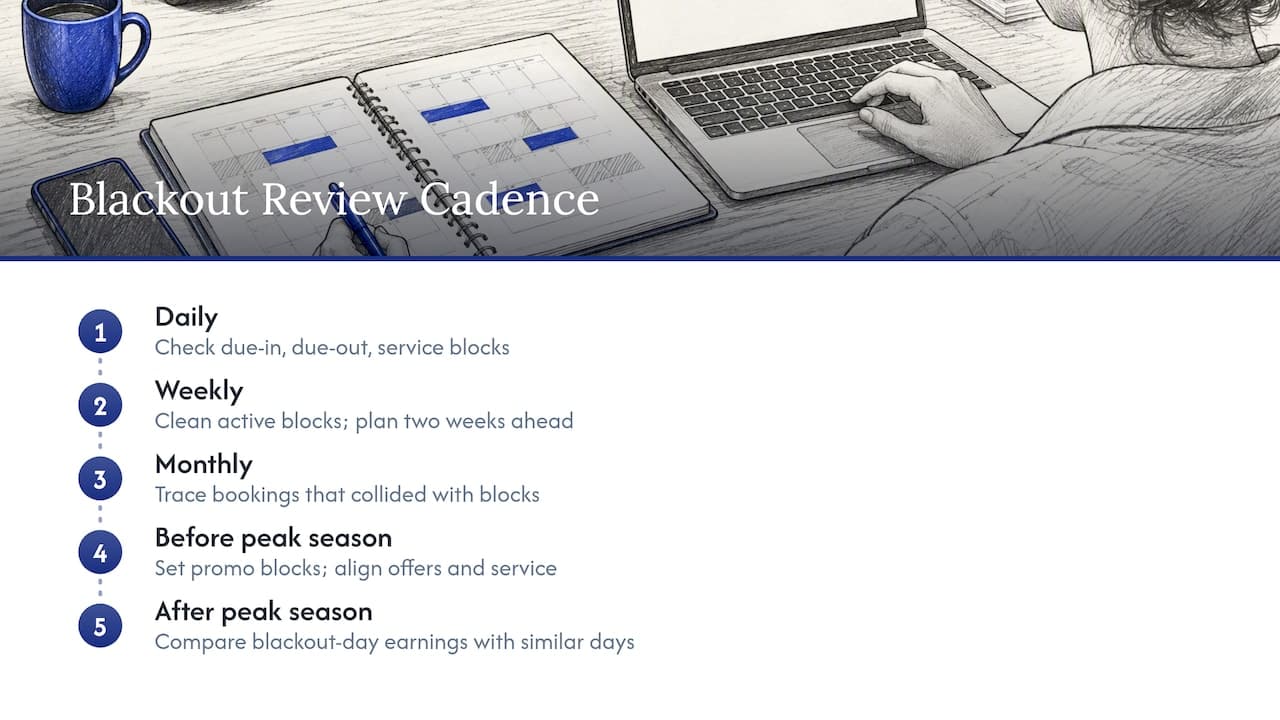
Daily: At the start of the day, check vehicles due back, vehicles due out and any vehicles flagged for service. Confirm that each flagged vehicle has a block that covers the full work time.
Weekly: Review all active operational blocks. Remove stale ones, extend the ones that are running long, and look ahead two weeks for maintenance that needs scheduling.
Monthly: Review incidents where a booking collided with a block. Look at which channel or step caused it.
Before each peak season: Write the promotional blackout list by date, location and vehicle group. Share it with everyone who quotes prices, and update your website's offer terms to match. Check your fleet for service due before the rush, so cars are not pulled during the busiest weekend.
After each peak season: Compare what you earned on blackout days against comparable days. If utilization was already near full without discounts, the blackout did its job. If cars sat idle, the rule may have been too wide. Our guide to rental inventory management and fleet utilization shows how to read those numbers, and the vehicle rental checklist for small and medium fleets gives a handover routine that keeps vehicles ready. For a broader view, read our vehicle fleet management guide.
Common mistakes to avoid
- One rule for the whole fleet. It is simple, but it blocks cars that could be earning.
- No reason recorded. Six weeks later nobody knows whether a block can be lifted.
- Forgetting buffers. A car returned late on the last day of a block is not ready the next morning.
- Treating a card hold as a blackout. It is a different process entirely.
- Hidden terms. The FTC advises consumers to check offer limits before booking, so state your blackout dates plainly where the offer appears. Clear terms prevent disputes.
- Never reviewing. Blocks that outlive their purpose cost real revenue.
Where software fits
Spreadsheets can hold a list of blocked dates. What they cannot do is stop a booking, warn you of an overlap or update a website. As soon as you have more than a handful of vehicles or more than one booking channel, the manual approach starts to cost more than it saves.
Nomora is cloud-based car rental management software that keeps reservations, fleet, contracts, payments and customer data in one system, with real-time availability and conflict-free booking tools, plus GPS tracking and integrations. Every plan includes all features, and onboarding typically takes 24 to 48 hours. Pricing is published: Starter is €45 per month, Business is €2.80 per vehicle per month and Fleet is €2.20 per vehicle per month, with an Enterprise plan for larger networks. You can see how it fits your type of business on our use cases page, or read more about Nomora car rental software.
FAQ
What is the difference between blackout dates and blocked dates in car rental?
Blackout dates usually refer to days when a promotion or discounted rate is unavailable, so the car can still be rented at the standard price. Blocked dates remove a vehicle from the calendar altogether, for example for maintenance. Managing them as two separate lists avoids most confusion.
How far ahead should I set blackout dates?
Set promotional blackouts before each peak season and publish them wherever the offer appears. Operational blocks should be entered as soon as the work is scheduled, ideally with extra time for return and cleaning. The earlier a block is in the calendar, the fewer customers are affected.
What should I do if a customer has already booked a date I need to block?
Contact the customer promptly, own the issue and have a solution ready: a comparable vehicle, a different date or a referral. Do not wait for them to arrive. Then review why the conflict happened so it does not repeat.
Should I block a single vehicle or a whole model?
Block the narrowest scope that matches the problem. Use a single-vehicle block for an individual repair, and a model-level block for work that affects every unit, such as seasonal tire changes. Stagger model-level work so you always have units available.
Do blackout dates apply to luxury and specialty vehicles differently?
Usually yes. Specialty vehicles are tied to events and fewer units carry more revenue, so rules by vehicle group, date and location work better than a fleet-wide rule. Plan their maintenance blocks earlier, because customers often book them far in advance.
Sources
Recommended