The fastest way to stop double-bookings is to centralize every channel's calendar into one system rather than checking each platform by hand. Import all channel iCal feeds into a rental management platform, or use one that natively centralizes them. The catch: iCal is not real-time, so you still need buffers and a way to verify propagation. Nomora offers this centralization as a built-in feature.
TL;DR:
- iCal refresh delays can cause double bookings lasting several hours, especially with larger fleets or multiple channels.
- Manual iCal management remains viable only for very small operations with one or two channels due to its lack of real-time updates and buffers.
- Centralized platforms like Nomora automatically enforce buffers, alert on feed failures, and significantly reduce booking conflicts within 24 to 48 hours.
- Calculating the cost of double bookings against a platform’s monthly fee helps determine if switching to centralized sync is financially justified.
- Peak-season monitoring and daily status checks are essential to maintaining reliable calendar synchronization and avoiding booking errors.
Table of Contents
Calendar sync means connecting every booking channel so a reservation on one platform automatically blocks that vehicle everywhere else. The benefit is simple: no staff member has to manually cross-check five spreadsheets before confirming a booking.
There are two real approaches, and they behave very differently:
- iCal feed imports: One-way or two-way exchange of .ics links between platforms. Cheap, widely supported, but limited by refresh delays.
- Native or API-based integrations: Direct connections between your rental system and a channel's booking engine, often near real-time and capable of pushing rate and availability changes back out.
Choosing between them comes down to a short checklist: fleet size, number of channels you list on, how tight your peak-season turnaround is, and whether you have staff who can babysit calendars daily. A three-vehicle operation on one channel can survive on iCal. A 40-vehicle fleet across four booking sites cannot.
How iCal/ICS Sync Works and Where It Breaks Down
An iCal feed is just a .ics file living at a URL. Your rental platform or a booking channel polls that URL on a set schedule, reads the events inside, and blocks the matching dates. Nothing pushes; everything pulls, on a timer.
That timer is the problem. Booking.com tells partners that calendar connections may take up to two hours to refresh, and Airbnb updates connected calendars automatically about every three hours, with a manual refresh option when a host needs it sooner.
A booking made on Channel A can sit invisible on Channel B for several hours, depending on the platform's polling schedule. During that window, a second renter can book the same vehicle for overlapping dates and both confirmations will look valid.
Feeds also come in three flavors: import-only (you pull others' calendars into yours but can't export), export-only (others can pull from you, but you can't import), and true two-way sync. Know which state each connection is in, because import-only feeds give you visibility but zero protection against outbound conflicts.
Manual iCal vs. Centralized Sync: What's the Real Trade-off?
Manual iCal management costs nothing beyond the time to set it up, and for a single-vehicle operator, that math usually works. But every added channel multiplies the refresh windows you're exposed to, and nobody is watching four feeds simultaneously at 11 p.m. on a Friday.
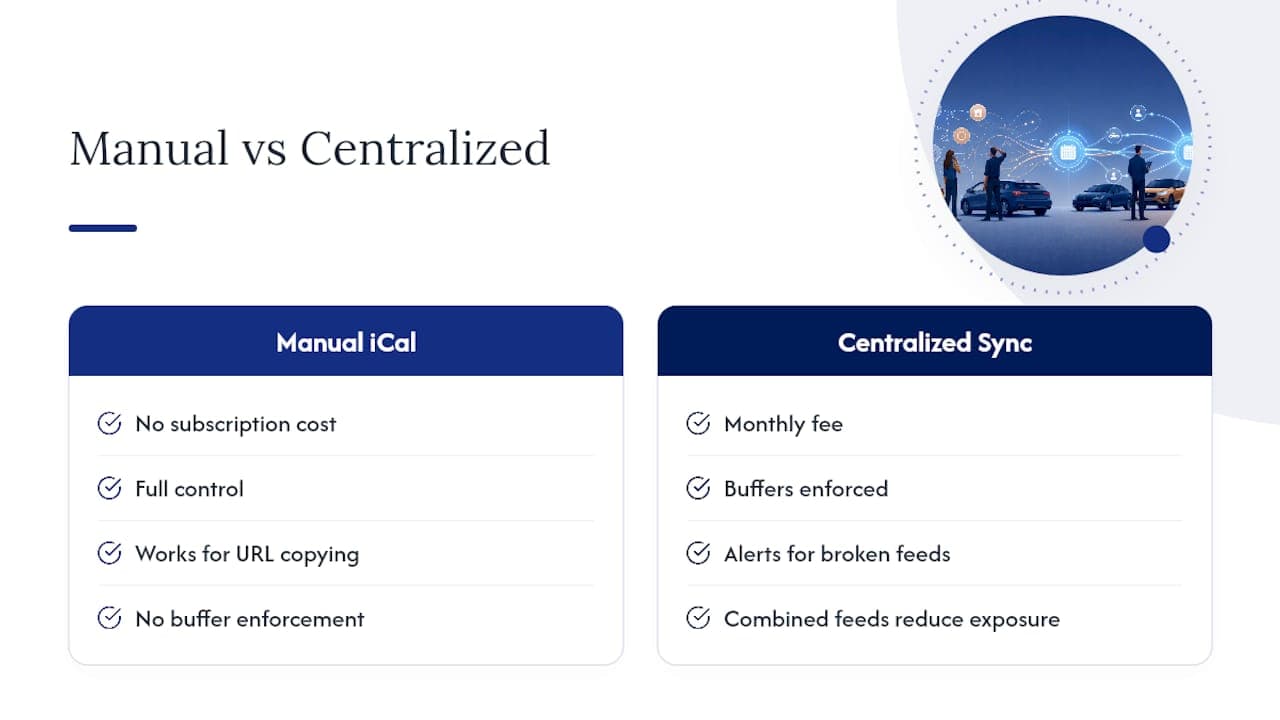
Benefits of staying manual: no subscription cost, full control, works for anyone comfortable copying URLs between settings pages.
Drawbacks: no buffer enforcement, no alerts when a feed breaks silently, and the 1 to 3-hour lag compounds with every extra channel.
Benefits of centralizing: buffers, alerts, and combined feeds reduce the exposure window; one dashboard replaces five logins.
Drawbacks: monthly cost, and a short setup period to migrate feeds.
Run the ROI math with three questions: How many bookings do you process monthly? What does one double-booked rental cost you in refunds, reassignment, and reputation? Would a platform's monthly fee be cheaper than losing even one weekend rental to an overlap?
Pro Tip: Calculate your break-even by dividing a centralized platform's monthly fee by your average daily rental rate. If it costs less than two lost rental days a month, the math usually favors switching.
Blocking out an afternoon is enough to get a working sync in place. Follow this order:
- Inventory every channel where a vehicle can be booked, including your own website, marketplaces, and any walk-in booking tool.
- Find each platform's .ics export link, usually buried in calendar or availability settings; the URL typically ends in ".ics" and sometimes includes a unique token identifying your account.
- Pick your authoritative calendar. This is the single source of truth, ideally your rental management system, not a spreadsheet.
- Import every channel's feed into that authoritative calendar, and export its combined availability back out to each channel that supports it.
- Build a merged feed if you're juggling three or more channels. A combined iCal tool collapses multiple sources into one export URL, which cuts down how many separate feeds each platform has to poll and shrinks the odds of overlapping updates.
- Run a test booking. Reserve a low-demand date on one channel, then time how long it takes to appear as blocked everywhere else. Repeat during a peak period to capture your worst-case lag.
- Document the propagation time you measured, and set your buffers around that number, not around wishful thinking.
Setting Buffers and Handling Extensions and Cancellations
A calendar that blocks dates but ignores turnaround time still creates conflicts, just of a different kind. A vehicle marked "available" the moment a rental ends gives your detailing crew zero time to clean it or your mechanic zero time to check tire wear.
- Pre-buffer: block 1 to 2 hours before a rental starts for prep and paperwork.
- Post-buffer: block 2 to 4 hours after return for cleaning and inspection; extend to a full day for larger vehicles or long-term rentals.
- Extension rule: any extension request should trigger a check against the next reservation before confirming, not after.
- Cancellation rule: a canceled booking should release its buffer automatically, not just the rental window itself.
A midsize sedan fleet running 3-hour post-buffers typically sees far fewer same-day turnaround complaints than fleets running zero buffer.
Pro Tip: Set buffers as a fixed rule per vehicle class rather than negotiating them case by case. Larger vehicles generally need longer post-buffers than compact cars because inspection and refueling take more time.
Monitoring Sync Health and Fixing Common Errors
Every major platform reports a connection status, and knowing what each one means saves you from discovering a broken feed only after a double-booking happens. Booking.com lists statuses including activating, ok, import only, export only, and service error.
Common failure points and fixes:
- Bad or expired URL: the feed link changed on the source platform; regenerate and re-paste it.
- Import-only when you expected two-way: check the source platform's eligibility rules; some channels restrict export access.
- Service error: usually temporary, but if it persists past a day, contact that platform's support directly.
- Stale data despite "ok" status: the refresh interval simply hasn't elapsed yet; don't panic before the documented window passes.
Check connection status daily during peak season and weekly otherwise, and escalate anything sitting in error status for more than 24 hours.
How Nomora Centralizes Calendar Sync Across Channels
Nomora pulls every channel's calendar into one dashboard, applies buffer rules automatically, and generates contracts and payment records the moment a booking is confirmed. Role-based access means your front desk sees the same live calendar as your maintenance lead, with a log of every change.
Onboarding takes 24 to 48 hours, which matters when a broken manual feed is actively costing you bookings right now. Fleet managers moving off spreadsheets typically report fewer manual calendar edits and steadier utilization once every channel reports into a single source, an outcome consistent with how centralized schedule management is designed to reduce avoidable conflicts.
Centralizing calendar sync pays off in more than fewer overlapping bookings. It creates predictable staffing windows, automates turnover tasks like notifying a cleaner or scheduling maintenance, and gives you utilization numbers you can actually trust.
That combination of automated downstream tasks is often what makes the platform cost pay for itself within a season.
When to Stick With iCal and When to Scale Up
Keep manual iCal if you run one or two vehicles on a single channel. Past that, the math flips fast. A combined feed, a shared team calendar, and a routine test booking each week are the cheapest guardrails you'll find. Just don't bet a peak-weekend fleet on a free feed that only refreshes every few hours.
— Dizzy
Get Your Rental Calendars Synced in Under Two Days
Nomora replaces the patchwork of iCal feeds and manual double-checking with one dashboard that centralizes every channel, enforces your buffer rules automatically, and generates contracts and payment records the instant a booking confirms, just like the ZONT Booking Kiosk for Hotels streamlines reservation connectivity through partner integrations.

Fleet managers already juggling multiple booking sites can see exactly how the platform fits their business type on the use cases page, covering everything from independent single-location operators to corporate fleet management. Onboarding runs 24 to 48 hours, so a fleet stuck on manual spreadsheets can be running centralized, conflict-free bookings by the end of the week. Request a demo to see your own channel list mapped into one live calendar before you commit.
Sources
Recommended
Ready to streamline your car rental business?
Book 30 minutes with the founder. We set up everything in this guide on your own vehicles, and migrate you out of Excel for free.