Fleet scheduling is the reservation-driven assignment of specific vehicles to bookings, combined with automated turnaround and transfer logic to keep availability conflict-free and maximize sellable time. Think of it as the central nervous system of your rental operation: every reservation, every return, every cleaning cycle, and every cross-location transfer runs through it.
Three steps to take right now:
- Audit your data first. Confirm your reservation statuses, vehicle conditions, and location assignments are clean before touching any software.
- Run a single-site pilot. Pick your busiest location and map your turn-time steps (check-in, cleaning, QA) before scaling.
- Request a Nomora demo. The platform uses vehicle allocation rules and an events database architecture to run conflict-free scheduling from day one, with setup in 24–48 hours.
The optimization logic behind modern fleet scheduling draws on minimum-cost network flow modeling, a simulation-validated approach that has shown material efficiency gains for multi-site fleets.
Key Takeaways
Effective fleet scheduling combines conflict-free booking logic, automated turnaround queuing, and cost-aware transfer rules to maximize sellable time across every location you operate.
| Point | Details |
|---|
| Definition | Fleet scheduling assigns vehicles to bookings and automates turnaround and transfers to keep availability conflict-free. |
| Turn-time benchmark | Target 30–60 minutes from return to ready; measure check-in, cleaning, and QA separately to find bottlenecks. |
| Data quality first | Clean vehicle statuses and mapped transfer lanes matter more than software features for accurate scheduling outputs. |
| 90-day rollout | Run a single-site pilot in days —, then scale; assign an ops lead, data owner, and IT integration owner from the start. |
| Nomora | Nomora delivers conflict-free bookings, allocation guardrails, and events database architecture with 24–48 hour setup. |
Table of Contents
What does fleet scheduling actually cover for rental operators?
Fleet scheduling in car rental covers four interconnected tasks: conflict-free booking management, vehicle pre-assignment, cleaning and maintenance turnaround queuing, and cross-location transfers. It also includes real-time availability visibility across all sites and API integration with your reservation management system (RMS), telematics, and payment gateway.
What it does not cover: corporate driver dispatch, freight routing, shift rostering, or any form of route planning. Those belong to a different discipline entirely. A useful contrast: blocking a vehicle for a scheduled service before a high-demand weekend is fleet scheduling. Routing a delivery driver to a customer address is not.
Why fleet scheduling improves your bottom line
The KPIs that fleet scheduling directly moves are the ones that determine whether you're profitable or just busy.
- Fleet utilization: the percentage of your sellable fleet actually on rent. Higher utilization means fewer idle days eating into holding costs.
- Turn time: the minutes from vehicle return to ready-to-rent. Many operators target 30–60 minutes under normal conditions, measured step by step through check-in, cleaning, and QA.
- RevPAC/ADR: revenue per available car and average daily rate. Scheduling protects premium stock from unnecessary downgrades, which directly defends ADR.
- Double-booking rate: the frequency of conflicting reservations on the same unit. Automated guardrails push this toward zero.
- Idle days and days out of service (DOS): unscheduled downtime caused by maintenance conflicts or poor allocation.
Operational wins often come from improving turn time and capturing return data accurately at the point of check-in, not from buying more vehicles. Fleet sizing, rotation, and maintenance coordination are the practical levers that protect availability and revenue.
What core features must fleet-scheduling software provide?
A solid fleet scheduler needs to do more than block calendars. The table below maps each required feature to its daily operational impact.
| Feature | Daily operational impact |
|---|
| Conflict-free booking engine | Prevents double-bookings at the reservation level, not after the fact |
| Vehicle pre-assignment rules | Reduces pickup delays by matching the right unit before the customer arrives |
| Turn-time queue management | Sequences cleaning and maintenance so no unit sits idle between steps |
| Transfer recommendations | Flags cross-location moves before gaps appear, not after demand spikes |
| One-way and multi-site inventory view | Lets you see and act on imbalances across all depots in one screen |
| Upgrade/downgrade guardrails | Protects ADR by enforcing allowable substitution rules automatically |
| Events database and audit trail | Separates live event streams (check-ins, returns, transfers) from static fleet master data |
| API integrations | Connects RMS, telematics, payment processing, and maintenance work orders |
Integration priority order: start with your RMS (reservations are the demand signal), then telematics (real-time vehicle status), then payments, then your maintenance or work-order system. Each layer adds fidelity to the scheduling engine.
Pro Tip: Set up your events database architecture before you integrate telematics. Keeping static fleet master data separate from live event streams, as recommended in short-term car rental logistics research, makes it far easier to validate your scheduling plans by simulation later.

How does short-term fleet optimization actually work?
Scheduling balances supply and demand across time and locations using cost-aware transfers and substitution rules. Here is the logic in plain terms:
- Demand signal: every confirmed reservation creates a time-bounded claim on a vehicle class at a specific location.
- Supply mapping: the system maps available units by class, condition, and location against those claims across a 3–14 day planning horizon.
- Cost-aware transfer logic: when supply and demand are misaligned across locations, the system calculates whether a transfer is cheaper than losing the booking or substituting a higher-value unit. Lane-based transfer logic and forecast-aware suggestions reduce repositioning cost and increase availability when paired with directional pricing.
- Substitution rules: if a reserved class is unavailable, the system applies pre-defined upgrade or downgrade rules rather than leaving the decision to a frontline agent under pressure.
- Simulation validation: the plan is tested against historical pacing and event data before it goes live, catching conflicts before they reach the customer.
The underlying methodology, minimum-cost network flow applied to multi-period car rental planning, is simulation-validated and scales to hundreds of stations and thousands of daily rentals. The output is concrete: suggested transfers, blocked allocations, and preserved premium stock.
How to roll out fleet scheduling in 90 days
A phased approach reduces risk and gives you real performance data before you commit to full deployment.
Step-by-step onboarding checklist:
- Canonicalize vehicle statuses across all locations before importing data.
- Map your fleet master data: classes, substitution rules, transfer lanes, and maintenance schedules.
- Prioritize integrations: RMS first, then telematics, then payments.
- Define KPI targets for utilization, turn time, and DOS before the pilot starts.
- Train frontline staff on the new SOP for check-in scanning and status updates.
- Run a two-week pilot at your highest-volume location and measure against your baseline.
- Review and adjust substitution rules and transfer thresholds before expanding.
This 90-day structure aligns with proven implementation roadmaps for car rental inventory management.
What should you monitor weekly and monthly?
Your daily operations cockpit should show: utilization by class and location, units due back versus cleaning capacity, and open DOS by cause. That view catches problems before they affect the next day's pickups.
Weekly, review pacing versus the same period last year, RevPAC trend by class, and transfer cost versus benefit. Monthly, produce an executive summary covering utilization trend, ADR impact from substitutions, and DOS reduction progress.
Benchmark: Many operators target a 30–60 minute turn time from return to ready under normal conditions. Tracking each step (check-in, cleaning, QA) separately reveals exactly where the bottleneck sits.
DOS budgeting by class and daily operations cockpit design are covered in depth in Nomora's fleet management best practices guide.
Common problems and how scheduling software resolves them
- Overbooking: automated booking guardrails cap reservations per class per time window. Override attempts trigger an alert rather than a silent conflict.
- Late returns: surge-clean capacity rules automatically reprioritize the cleaning queue when returns cluster. Pair this with SMS alerts to the next customer when a delay is confirmed.
- One-way imbalances: directional pricing incentives and automated transfer suggestions, triggered by forecasted gaps, reduce the cost of repositioning. Pre-positioning inventory before peak windows is far cheaper than reactive moves.
- Substitutions under pressure: pre-defined upgrade and downgrade rules with overbooking caps and contingency plans remove the ADR erosion that comes from ad hoc agent decisions.
- Unexpected maintenance: emergency reallocation rules flag affected bookings immediately and suggest the nearest available substitute unit.
Human override remains necessary for unusual situations, such as a VIP customer requiring a specific unit or a safety recall. Every override should be logged in the audit trail with a reason code so you can identify patterns and tighten rules over time.
Why Nomora is the recommended solution for rental operators
Nomora maps directly to every capability in the feature checklist above. Conflict-free bookings, vehicle allocation rules, an events database architecture, transfer recommendations, and integrations with telematics and maintenance systems are all built into the platform.
Setup takes 24–48 hours for most operators. A typical pilot covers one or two locations, with data mapping and integration scoping handled during onboarding. Nomora is GDPR-ready and built on a cloud security posture designed for multi-location access, so your data is protected whether your team is at the counter or working remotely.
Explore how Nomora configures for different rental business types to see which feature set fits your operation.
How user roles and permissions work inside fleet-scheduling software
Role-based access is not optional in a multi-location rental business. A frontline agent needs to update vehicle status and process check-ins. A location manager needs to view utilization and approve transfers. An ops director needs cross-site reporting and the ability to modify allocation rules. An IT integration owner needs API credentials without touching live booking data.
Good fleet-scheduling software enforces these boundaries at the data level, not just the UI level. That means an agent cannot accidentally override an allocation rule, and a manager cannot inadvertently expose customer payment data while pulling a utilization report. Audit trails tied to user IDs make it possible to trace every status change, override, and rule modification back to the person who made it.
Change management strategies that actually work
Technology rarely fails at the software level. It fails when frontline staff revert to the old process because the new one feels unfamiliar.
Start with a small, visible win. Run the pilot at your busiest location with your most adaptable team lead. When that team hits the turn-time target and the double-booking rate drops, the result speaks for itself to skeptics at other sites.
Train in context, not in a conference room. Walk agents through the check-in scanning workflow at the actual return lane, not on a projected slide. Pair each new SOP with a one-page quick-reference card posted at the workstation.
Set a go-live freeze period. For the first two weeks of each new site's rollout, no one modifies allocation rules or integration settings without ops lead approval. This prevents well-intentioned tweaks from introducing conflicts during the stabilization window.
How to scale fleet scheduling as your business grows or contracts
A well-designed fleet scheduler should scale in both directions without a full re-implementation. Adding a new location means mapping its vehicle statuses, transfer lanes, and integration endpoints, then running a two-week parallel test before going live. Contracting, whether seasonal or permanent, means adjusting DOS budgets by class and updating transfer thresholds so the system does not try to balance inventory across a depot you have temporarily closed.
The architecture that supports this is the same events database model described earlier: because live event streams are separated from static fleet master data, you can add or remove a location without rebuilding the core scheduling logic. Multi-location fleet management requires lane-based transfer logic that updates automatically when your network changes, not manual reconfiguration every time you open a new site.
How to evaluate fleet-scheduling software vendors
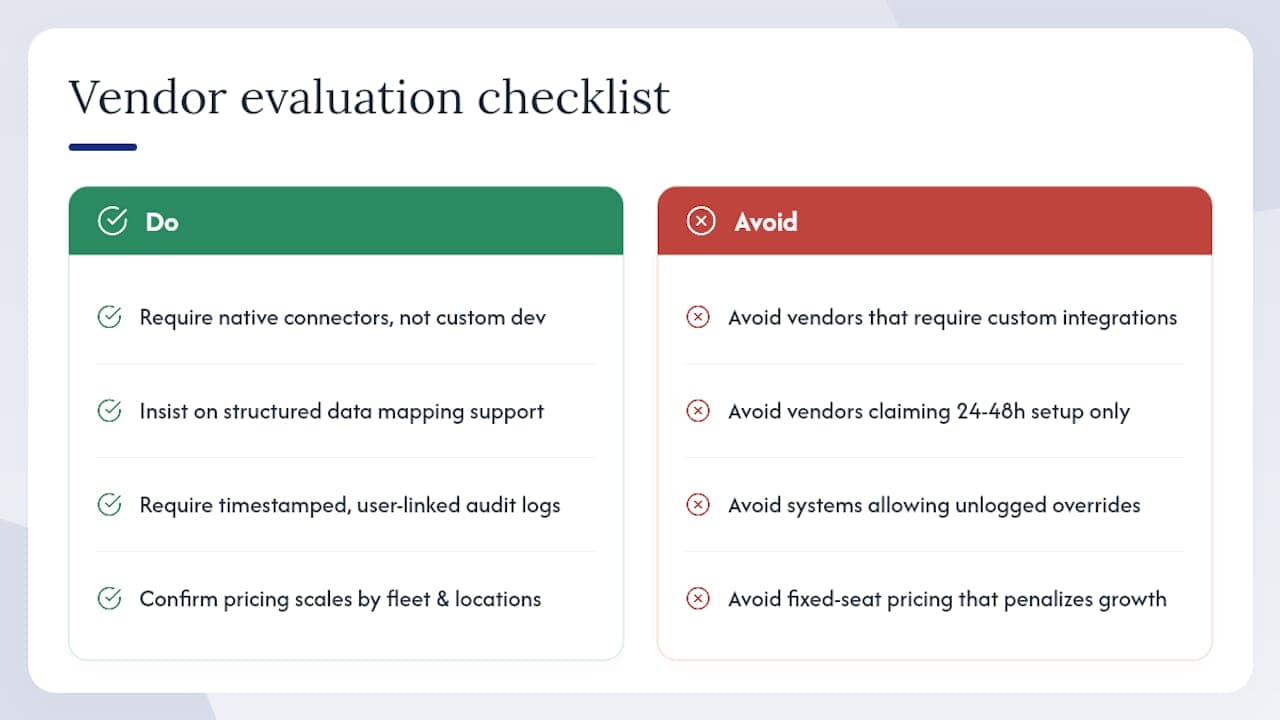
Beyond features, four criteria separate platforms that work in production from those that look good in a demo.
Integration depth: does the vendor offer native connectors for your RMS and telematics provider, or does every integration require custom development? Ask for a specific list of supported APIs and the typical time to activate each one.
Onboarding and support model: a 24–48 hour setup claim is meaningful only if the vendor provides structured data mapping support, not just documentation. Ask who owns the onboarding process and what happens when a data conflict surfaces mid-migration.
Audit trail and override logging: any platform that allows manual overrides without logging them is a liability. Confirm that every status change, rule modification, and booking override is timestamped and tied to a user ID.
Scalability and pricing model: subscription tiers should scale with your fleet size and location count, not lock you into a fixed seat count that penalizes growth. Ask specifically how pricing changes when you add a location mid-contract.
The part of fleet scheduling most operators underestimate
The technology is the easy part. The hard part is the data that feeds it.
Most operators who struggle with fleet scheduling are not running bad software. They are running good software on dirty data: inconsistent vehicle statuses, unmapped transfer lanes, and substitution rules that were set up during onboarding and never revisited. The system optimizes whatever it is given. If the inputs are stale, the outputs will be wrong in ways that are difficult to diagnose.
The operators who get the most out of scheduling software treat data quality as an ongoing operational discipline, not a one-time setup task. They assign a data owner, run a monthly status audit, and review allocation rules quarterly. That discipline, more than any feature, is what separates a fleet that runs at high utilization from one that is always scrambling.
Ready to run a smarter rental operation with Nomora?
Spreadsheets and manual allocation are a ceiling on your growth. Nomora removes that ceiling by replacing reactive processes with a scheduling engine that keeps every booking conflict-free, every turnaround on time, and every location balanced.

Setup takes 24–48 hours. A pilot at one or two locations is all you need to see the utilization and turn-time impact before committing to a full rollout. Nomora's onboarding team handles data mapping and integration scoping so you are not starting from scratch. See the full platform and request a demo to get your pilot scoped today.
Sources
Recommended