To integrate WordPress with a car rental business, keep one system as the source of truth for vehicles, rates, availability and reservations. Then let the website show and send that data through a plugin, an API connection or an embedded booking flow. WordPress should be the storefront. Your rental management software should be the engine behind it. This guide covers how to choose between the three approaches, what data must sync, how to test for double bookings, and which security checks to make before you go live.
TL;DR
- Pick one system as the source of truth. The rental software owns fleet, pricing, availability and reservations. WordPress presents them.
- Three routes exist: a booking plugin, an API connection, or an embedded booking flow. Fewer moving parts means fewer failures.
- Sync availability in near real time and write every reservation back to one place, or you will get double bookings.
- Payments are the riskiest part. Outsourcing card handling does not remove your PCI DSS responsibility.
- Test cancellations, date changes and simultaneous bookings before launch, not after.
Table of Contents
Why the website and the rental system must not be two separate worlds
Most small rental companies start the same way. A WordPress site with a contact form or a standalone booking plugin brings in requests. A spreadsheet, a calendar or a separate rental tool holds the real fleet schedule. Someone retypes bookings from one to the other.
That gap is where the damage happens. A car booked by phone stays available on the website. A price changed in the back office stays old on the site. A cancelled reservation never frees the vehicle for the next customer.
Think of your rental software as the central nervous system of the operation. The website is one of several limbs that sends and receives signals from it, alongside the counter, the phone, the GPS units and the payment gateway. If the limbs keep their own memory, they will contradict the brain sooner or later. A good integration removes the second memory.
The three integration approaches
There is no single correct answer. The right route depends on how much design control you need, who maintains the site, and how many vehicles and locations you run.
1. A WordPress booking plugin
A rental plugin or theme adds fleet pages, a booking calendar and a checkout inside WordPress. It is fast to launch and needs little code. The catch is that the plugin usually keeps its own bookings database inside your WordPress install. If your rental software holds another version of the schedule, you are back to retyping or to a fragile sync.
This route fits a very small operation that is happy to run the whole business from WordPress. It is a weaker fit once you have a dedicated rental management system, GPS tracking, contracts and invoicing in one place.
2. An API connection
With an API, WordPress asks the rental system for what it needs: which vehicles are free for these dates, at what price, with which extras. It then sends the reservation back. Your developer builds the pages and the booking form to match your brand exactly.
This gives the most control and the cleanest data, because there is only one bookings database. It also costs the most to build and maintain. Someone must own authentication, error handling and updates when either side changes.
If your developer is exploring this route, our guides on how to approach car rental API integration and on mapping API use cases to exact calls cover the planning in detail.
3. An embedded booking flow
Here the rental software supplies the booking widget or hosted booking pages. You place them on a WordPress page, usually with an embed or a link from your fleet pages. Availability, pricing and reservations are handled by the rental system, so there is nothing to sync.
This is often the best balance for small and mid-sized rental companies. You keep WordPress for content, SEO and branding, and you avoid a custom build. The trade-off is less control over the exact look and flow of checkout than a fully custom API build gives you.
Which one should you choose?
| Criterion | Booking plugin | API connection | Embedded booking flow |
|---|
| Setup effort | Low | High (developer needed) | Low to medium |
| Single source of truth | Only if WordPress is your whole system | Yes | Yes |
| Design control | Theme dependent | Full | Partial |
| Ongoing maintenance | Plugin updates, bookings stored on your site | Your code, both sides' updates | Mostly handled by the software vendor |
| Best for | Very small, simple operations | Custom brands, multi-location, unusual rules | Most small and mid-sized fleets |
A practical rule: start with the embedded flow. Move to an API only when you have a clear requirement the embed cannot meet, such as a custom quote builder or a loyalty program on your own site.
What data should sync between WordPress and the rental system
Before anyone writes code or installs anything, decide which data moves, in which direction, and how often. Here is a working checklist.
Read from the rental system, show on WordPress:
- Vehicle categories and individual models, with photos, specs, seats, transmission and fuel type
- Rates by season, duration and location, plus taxes and mandatory fees
- Real-time availability for the requested dates and pickup location
- Optional extras such as child seats, additional drivers and insurance products
- Rental terms, deposit amounts, age and license requirements
Write from WordPress, store in the rental system:
- The reservation itself: dates, location, vehicle category, extras
- Customer details and driver license information
- Marketing consent and accepted terms, with a timestamp
- Payment status or a payment token returned by the processor
Do not duplicate:
- Raw card numbers, anywhere on WordPress
- A second copy of the availability calendar
- Customer records stored in a plugin database as well as in the rental system
For a wider look at what rental operators connect beyond the website, such as payments, GPS and accounting, see our car rental software integrations guide.
Fleet content versus fleet data
A useful split is to treat descriptive content as WordPress material and operational data as rental system material. Your editorial pages about the SUV class, airport pickup or winter driving tips belong in WordPress, where you can optimize them for search. Live availability, rates and bookings belong in the rental system. Linking the two by vehicle category keeps both clean.
Preventing double bookings and handling changes
Double bookings are the failure customers remember. Most of them come from one of three causes: two systems holding separate calendars, a delay between a booking and the availability update, or a change made in one place and not the other.
- Check availability at the moment of booking, not only when the page loads. A customer may browse for ten minutes while another one books the last car. The final step must confirm availability again on the rental system's side.
- Make the rental system the only writer of availability. WordPress can request a reservation. It should not mark a vehicle as taken by itself.
- Define what happens when sync fails. If the connection drops mid-checkout, the customer should see a clear message, and your staff should get an alert. A silent failure is worse than an error.
- Route changes and cancellations through the same path as new bookings. If customers can modify dates on the site, the change must be processed by the rental system, which recalculates price and frees or reserves the vehicle.
- Decide your buffer rules. Cleaning and turnaround time between rentals should live in the rental software, so the website never offers a car that cannot be ready.
A test plan before launch
Run these scenarios on a staging copy of your site and a test environment of your rental system:
- Two testers book the last available vehicle at the same time.
- A customer books, then changes the pickup date to one when the car is unavailable.
- A customer cancels inside and outside the free cancellation window.
- A booking is made while the rental system connection is deliberately interrupted.
- A rate is changed in the back office, and you check how fast the website shows it.
- A one-way rental between two locations with different opening hours.
Write down the expected result for each before you run it. Repeat the whole list after any major update to WordPress, your plugins or the rental software. For a deeper view of reservation logic, our vehicle reservation system guide walks through the moving parts.
Security and compliance checks before launch
A rental website takes personal data, driver license details and payments. Treat the integration as part of your security perimeter.
Payments and PCI DSS
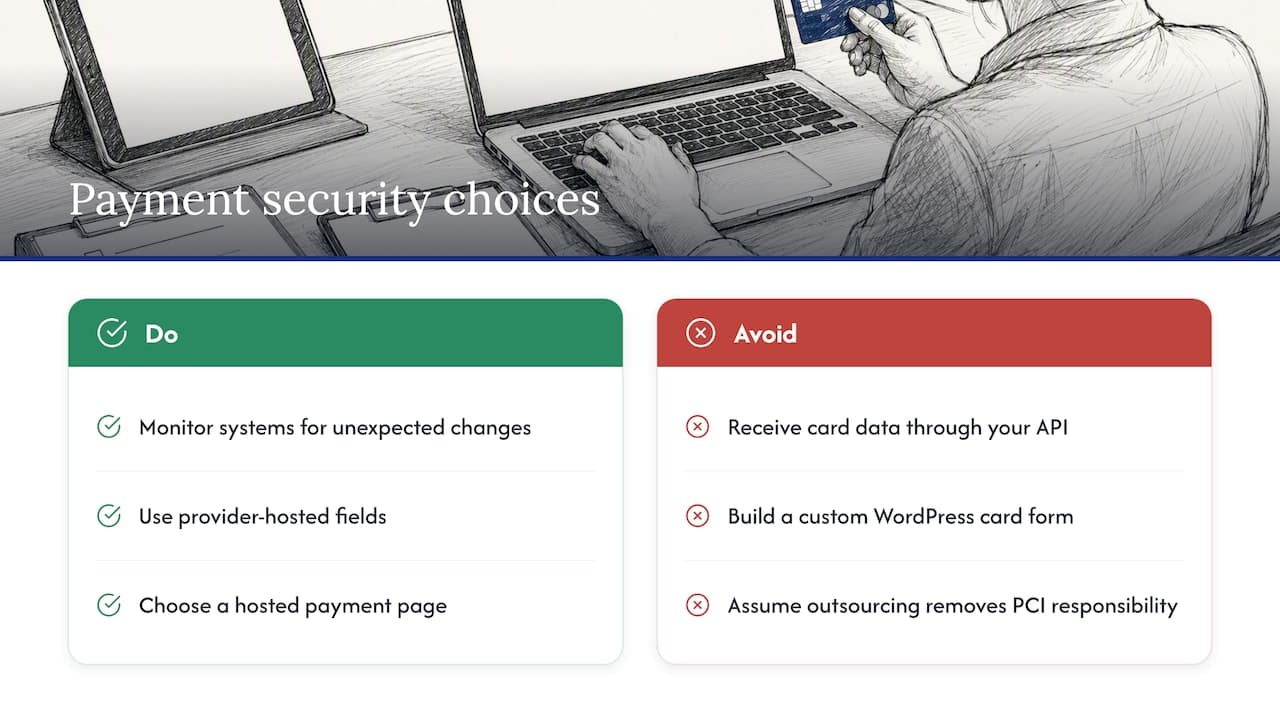
The PCI Security Standards Council's e-commerce guidance says that outsourcing does not remove a merchant's PCI DSS responsibility. The same guidance notes that merchants should monitor their systems for unexpected changes, and that shared hosting carries its own security risks. For a WordPress site, this means your hosting plan, plugins and theme matter, not only your payment provider.
How the payment form is built changes your burden. The Council's later guidance advises that an API design where your website receives cardholder data creates substantially greater responsibility, and that smaller merchants should prefer flows where the payment provider receives the card data directly. In practice, that points toward a hosted payment page or provider-hosted fields rather than a custom card form in WordPress.
The self-assessment questionnaire you complete also depends on your setup. The SAQ A-EP eligibility criteria include e-commerce-only transactions, outsourced processing by PCI DSS-validated providers, no card data received by your site, and compliant payment-page elements and hosting. Your acquirer or a qualified assessor can confirm which questionnaire applies to you.
For a step-by-step view, read our guide to choosing the right SAQ for a car rental business and our payment security tips for rentals.
WordPress access and API security
If you connect by API, the connection needs authentication. WordPress's own REST API documentation says that requests can be required to authenticate, and that internal REST requests can be made from PHP inside a plugin. Keep API keys out of page content and theme files, give each key only the permissions it needs, and rotate keys when a developer or contractor leaves.
A launch checklist
- HTTPS on every page, including the booking pages
- Hosting that is not shared with unrelated sites, or at least a plan with isolation you have confirmed with the host
- Plugins limited to what you use, with automatic security updates and a named owner
- Admin accounts with two-factor authentication and no shared logins
- A privacy notice that describes the driver data you collect, plus consent where you market to customers
- A speed test of the booking pages on mobile, since many customers book from a phone
- A backup and restore test, not just a backup schedule
What "multi-tenant" rental software means for your website
If you shop for rental software, you will see the term multi-tenant. It describes one software platform serving many separate businesses (tenants) from a shared infrastructure, with each tenant's data kept apart. Cloud rental platforms are generally built this way, which is how vendors update everyone at once and keep subscription prices manageable.
The term also applies inside a single company. A franchise network or a group with several brands may want each location, brand or fleet to have its own users, rates and reports, while the owner sees the total. When you evaluate software for your WordPress integration, ask:
- Can each location or brand have separate vehicles, rates and staff permissions?
- Can customer records be kept separate between brands, or shared when you want them to be?
- Does each brand get its own booking widget or API credentials, so one WordPress site per brand can connect cleanly?
- Who can see which data, and is every access logged?
Those answers decide whether one integration can serve all your sites or whether you need one per brand. Our use cases by business type page shows how different operators structure their setups.
Our perspective: keep the website light and the system of record strong
We see the same pattern with rental companies of every size. The ones who struggle with their website integration usually did not pick the wrong plugin. They gave two systems the job of knowing what is available.
Our view is simple. The rental platform should hold the fleet, rates, availability, contracts, payments and customer data, and everything else should read from it or write to it. Cloud access from any device, real-time reservation tracking and conflict-free booking only help you if the website respects them. That is why we recommend connecting WordPress as a front end rather than rebuilding rental logic inside it.
We also think small operators should resist custom builds until they have proven a need. A clean embedded booking flow, good fleet pages and a fast mobile experience will cover most of what customers expect. Add an API later for the specific features that justify the developer time.
Finally, treat payments as a decision you make once and carefully. A provider-hosted payment step keeps card data away from your WordPress install, and that protects you more than any plugin setting does.
— Dizzy
Nomora is a cloud-based car rental management platform that brings reservations, fleet management with GPS tracking, automated contracts, payments and customer data into one system, so your website has a single, reliable source to connect to. Every plan includes all features, and onboarding is designed to get you operational in 24 to 48 hours.

Plans start with Starter at 45 EUR per month. Business is 2.80 EUR per month per vehicle, and Fleet is 2.20 EUR per month per vehicle. Enterprise has no published price. See the full details on our pricing page, or look at our car rental software overview to see how it fits your operation. Larger fleets can review our fleet management software, and our automated payments page explains how payment collection works.
FAQ
Do I need a WordPress plugin to connect my rental software?
Not necessarily. Many rental platforms offer an embeddable booking flow or an API, and either can work on a WordPress page without a dedicated plugin. A plugin is mainly useful when it handles the embed for you or adds fleet content. Ask your software vendor which options it supports for your plan.
Can I keep my existing WordPress design?
Yes. With an embed or an API, WordPress still controls your pages, navigation, blog and SEO. Only the booking step comes from the rental system. An API build gives the most design control, while an embed gives you less but is faster to launch.
How do I stop the website from taking bookings for cars that are already rented?
Use one system for availability and have the website confirm availability with it at the final step of checkout. Avoid keeping a second calendar in a plugin. Then test simultaneous bookings and date changes before launch.
Is my business responsible for card security if a provider processes payments?
Yes, to a degree. PCI Security Standards Council guidance states that outsourcing does not remove your PCI DSS responsibility, and that your website code and hosting can still be in scope in some designs. Using a provider-hosted payment page reduces your exposure. Ask your acquirer or a qualified assessor which questionnaire applies to you.
What does multi-tenant mean for a rental company with several locations?
It means one platform serves separate tenants whose data stays apart. For a multi-location business, the useful question is whether each location or brand can have its own fleet, rates, users and booking widget, while you still see combined reports.
Sources
Recommended