Geofencing is an operational tool rental operators use to automate returns, stop unauthorized trips, and speed vehicle turnaround. Combined with telematics and automation, it can also cut theft losses and reconditioning delays, as one fleet case documented over $400,000 in annual savings from geofence-triggered workflows. This guide walks through how it works, where it pays off, and how to roll it out.
TL;DR:
- Start with one lot geofence for return detection, then add boundary and restricted area rules after staff trust the alerts.
- Use dedicated telematics hardware with continuous reporting for theft recovery; cheaper OBD II devices or smartphone apps suit pilots but can be unplugged or closed.
- Choose a platform that maps geofence events to reservation records and supports API or webhook connections, so alerts can trigger tickets or billing adjustments automatically.
- Track recovery time, vehicle turnaround, false alerts, and automated workflow completion; keep false positives below 10% before expanding beyond a limited pilot group.
- Disclose location monitoring in renter contracts where required, and set clear rules for data retention and access as privacy scrutiny grows.
Table of Contents
What geofencing is and how it works for rental fleets
Geofencing draws a virtual perimeter around a real location, then uses a vehicle's location data to detect when it crosses that boundary. Three pieces make this work: a device that reports GPS position, a software layer that defines the fence and watches for events, and a set of triggers that decide what counts as noteworthy.
Fences come in a few shapes:
- Radius fences mark a simple circle around a point, like a rental lot.
- Polygon fences trace an irregular shape, useful for a dealership lot or a city district.
- Route fences track a corridor, flagging a vehicle that strays from an expected path.
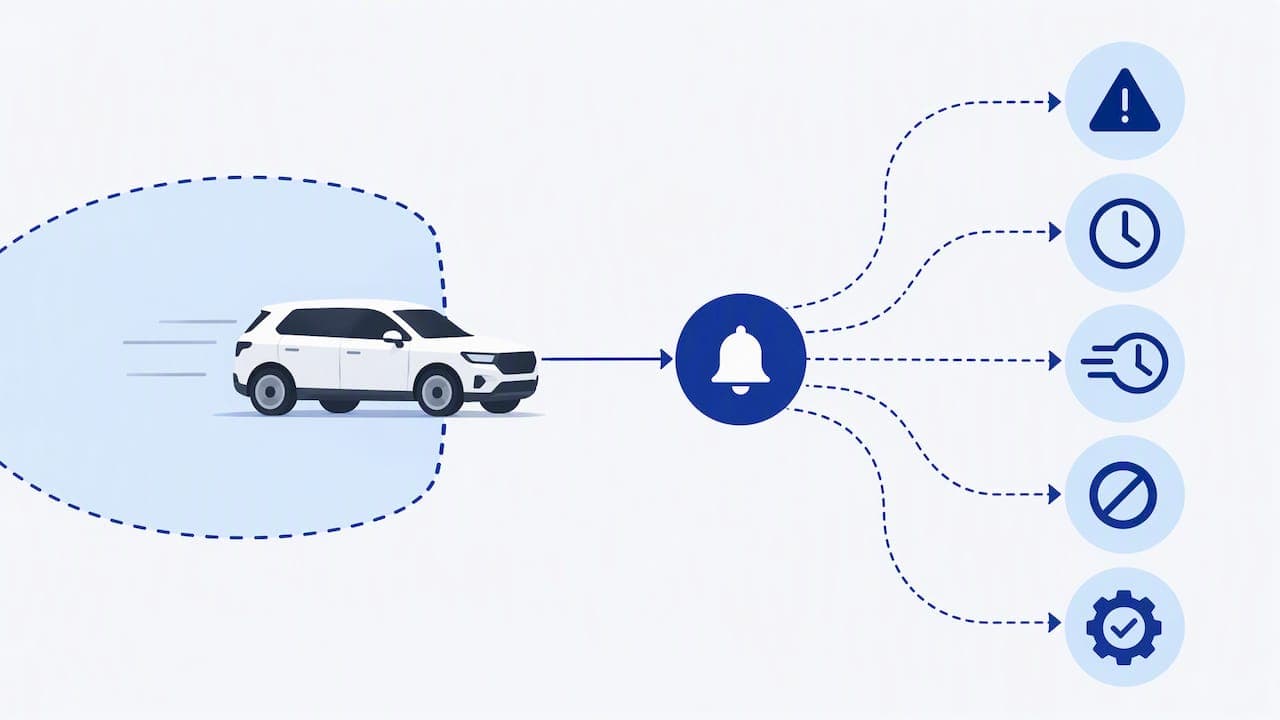
Triggers typically fire on entry, exit, extended dwell time, or speed within a zone. Once a vehicle crosses a line, the device sends a signal to a telematics platform, which passes the event to your rental management system through an API or webhook, where it becomes an automated workflow: an alert, a reconditioning ticket, or a billing adjustment.
Top benefits of geofencing specifically for rental operators
Geofencing earns its place in a rental operation by turning location data into four concrete outcomes:
- Asset protection. Boundary alerts flag unauthorized movement in real time, giving your team a head start on recovery before a vehicle disappears for good.
- Faster returns and reconditioning. A lot geofence detects the moment a vehicle re-enters your yard, automatically opening a reconditioning or inspection ticket instead of waiting on a staff member to notice.
- Contract compliance and usage billing. Boundary rules enforce the terms customers agreed to, from mileage caps to state-line restrictions, and can trigger out-of-zone fees without manual review.
- Placement and utilization data. Location history across your fleet reveals which lots or regions see the most demand, informing where to position vehicles next.
A documented case shows what this looks like at scale: geofence-triggered reconditioning and boundary alerts helped one fleet save over $400,000 annually while reducing theft exposure and unplanned downtime. The common thread across these benefits is automation: geofencing only pays off when the alert becomes a workflow rather than another notification sitting in an inbox.
High-value use cases and workflows for rental fleets
A handful of workflows account for most of the practical value rental operators get from geofencing:
- Return detection and reconditioning. A geofence around your lot flags the exact moment a vehicle returns, firing off an inspection or cleaning ticket automatically.
- Cross-border and state-line alerts. A boundary fence around an approved operating region catches a vehicle crossing into restricted territory before it becomes a contract dispute.
- Out-of-hours or no-go zone alerts. Fences around closed lots or excluded areas catch unauthorized use outside business hours, often the first sign of theft or policy violation.
- Pickup and return verification. Time-stamped entry and exit events give you a record to resolve disputes over when a vehicle was actually returned.
Pro Tip: Start with a single lot geofence for return detection before layering on boundary and no-go zone rules, since it delivers the fastest visible win and builds staff confidence in the alerts.
A fleet case documented how lot geofences paired with border alerts caught unauthorized state crossings before they escalated into bigger compliance problems.
Implementation checklist: pick hardware, set rules, onboard staff, and test
Rolling out geofencing well takes more than flipping a switch. Four stages cover most of the work:
- Choose your device. A dedicated telematics control unit (TCU) offers continuous reporting and strong tamper resistance, best for theft prevention and active recovery. An OBD-II device is cheaper and easier to install but can be unplugged. A smartphone app works for low-cost pilots but depends on the renter keeping the app running, as our guide to vehicle tracking technology explains in more detail.
- Confirm software requirements. You need a geo-editor for drawing fences, a rules engine for triggers, and webhook or API support to push events into your rental system.
- Plan the operational rollout. Pick a pilot group, write rule templates for common scenarios, and document standard procedures for who handles each alert type. Where local rules require it, disclose location monitoring to renters in your contract.
- Test and tune. Run the pilot long enough to catch false positives, then adjust thresholds. Define response-time expectations for each alert type and train staff on the escalation process before expanding coverage.
Device and reporting-frequency choices matter here: continuous-reporting hardware supports real-time recovery, while periodic-reporting devices suit lower-cost return automation and analytics. Our telematics guide for fleet managers covers these tradeoffs in more depth if you are still comparing device types.
Integrations and tech choices: telematics, APIs, and connecting geofence events to rental systems
Most rental operators connect geofencing through one of three patterns: a direct API integration between a telematics provider and the rental system, a webhook middleware layer that routes events to multiple destinations, or an all-in-one platform that bundles tracking and rental management together.
Before committing to any vendor, ask these questions:
- How fast does a geofence event reach your system after it happens?
- What fields does the event payload include, and do they map cleanly to your vehicle records?
- How are vehicle IDs matched between the telematics device and your reservation data?
- What authentication and security standards protect the data in transit?
Once the plumbing works, geofence events can trigger a range of automations: a reconditioning ticket when a vehicle re-enters the lot, an automatic fee when it crosses a mileage or boundary limit, or a remote lock command if a device supports it. Our guide to fleet asset tracking walks through several of these automation patterns in practice.
Measuring success: KPIs and results to track after you enable geofencing
Five metrics tell you whether geofencing is working: unauthorized-incident rate, average time-to-recovery, average vehicle turnaround time, alert false-positive rate, and the percentage of events that successfully trigger an automated workflow rather than requiring manual follow-up.
Start a pilot on a limited group of vehicles, often the highest-value units or those operating in higher-incident areas, and set a target false-positive rate below 10% before expanding coverage in stages.
A documented fleet case tied these metrics to a dollar figure: geofence-triggered automation and recovery workflows contributed to over $400,000 in annual savings, giving rental operators a reference point for what a well-tuned program can return.
Practical guidance from an operator perspective
Rental operators evaluating geofencing need a platform where location events connect directly to reservation and contract records, not a standalone tracking tool that leaves staff to bridge the gap manually. Nomora's documented approach combines integrated GPS tracking with API and webhook support, so a geofence event can trigger a reconditioning workflow or an automated fee without a separate system to manage.
In practice, this means:
- Mapping events to records. A return-lot geofence event ties directly to the matching reservation, closing the loop automatically.
- Automating the next step. Boundary breaches or late returns can trigger billing adjustments without manual entry.
- Getting running fast. Onboarding is designed to bring a rental operation fully operational in 24 to 48 hours.
For deeper proof points on these workflows, our advantages of GPS tracking overview and use cases by business type are useful starting points.
Author perspective: when geofencing is the right next step
Start with your highest-value vehicles and your highest-incident lots or regions. Pair every rule with a clear staff procedure and a renter-facing disclosure, since monitoring works best when customers understand what it covers and why.
— Dizzy
How Nomora helps you deploy geofencing without the integration headache
Setting up geofencing on its own still leaves you stitching together a telematics feed, a rules engine, and your reservation system by hand. Our platform brings integrated GPS tracking, automated return and billing workflows, and API and webhook support into one place, so a geofence event turns into a reconditioning ticket or a fee adjustment without a separate project to build it.

Most rental operations we onboard reach full operation quickly, allowing a geofencing pilot to start soon after sign-up. Compare our plans on the pricing page and see which tier fits the size of your fleet.
FAQ
Can I set up geofencing myself without a vendor?
Yes, if you already have GPS-capable devices and a telematics platform with a geo-editor, you can draw fences and set triggers yourself. The harder part is connecting those alerts to your reservation and billing system, which is where an integrated rental platform saves the most setup time.
How much does fleet GPS tracking typically cost?
Pricing varies widely by device type, reporting frequency, and whether tracking is bundled into a broader rental management platform. Nomora's plans start at $45 per month for the Starter tier, with per-vehicle pricing on the Business and Fleet plans for operators managing larger fleets.
What should I check before relying on geofencing for my fleet?
Geofencing depends on device reliability and reporting frequency, so confirm your hardware matches your use case, continuous reporting for theft recovery, periodic reporting for return automation. You should also review how location data is stored and disclosed, since vehicle geolocation data collection is an active area of privacy policy attention.
What kinds of companies provide geofencing for rental fleets?
Geofencing comes from standalone telematics providers, fleet hardware vendors, and integrated rental management platforms that bundle tracking with reservations and billing. The right fit depends on whether you want raw location data or a system that turns geofence events into automated workflows.
How does geofencing handle driver privacy and data retention?
Operators should maintain clear policies on how long location data is kept and who can access it, since geolocation data collection is drawing increased legislative scrutiny around consent and data access. Disclosing monitoring terms to renters in your contract is a practical way to stay ahead of emerging disclosure requirements.
Sources
Recommended
Ready to streamline your car rental business?
Book 30 minutes with the founder. We set up everything in this guide on your own vehicles, and migrate you out of Excel for free.