Yes: properly governed email automation reduces vacancy time and standardizes tenant communication, and the highest-value place to start is a short list of workflows, not a full rebuild. Before anything sends, we recommend locking in consent tracking and verified property data, then layering in inquiry responses, lease transactions, move-in instructions, maintenance updates, renewal outreach, and review requests in that order.
TL;DR:
- Automated workflows should start with inquiry responses, lease transactions, and move-in instructions, focusing on high-value resident lifecycle stages.
- Send volume estimates require aligning costs with contact list size, typically with per-contact tiers or per-send fees, and include a small pilot test before full deployment.
- Compliance depends on consistent opt-out management across all channels, with opt-outs honored within 10 business days, and strict control over consent and property data accuracy.
- Integrating email with SMS and platform messaging requires shared suppression lists, a unified inbox, and synchronized rules to prevent conflicting resident communications.
- Building automation from verified inquiries and approved property data helps ensure reliable, rule-based messaging that supports compliance and auditability.
Table of Contents
Top email automation workflows rental operators should run
Each workflow below solves a specific operational gap, and together they cover the full resident lifecycle from first contact to move-out.
- Inquiry auto-responder: confirms receipt instantly, states next steps, includes a tour booking link, and sets a realistic response timeline so leads do not go cold.
- Booking or lease transactional flows: send confirmations, contract links, and payment receipts the moment an action completes, reducing the back-and-forth that eats staff time.
- Move-in and check-in sequences: deliver access codes, parking instructions, and welcome information on a fixed schedule before the move-in date.
- Maintenance lifecycle messages: acknowledge the request immediately, post status updates as work progresses, and escalate to a human when a ticket stalls.
- Renewal and vacancy-fill campaigns: trigger outreach on a timed schedule ahead of lease-end dates or during vacancy windows to keep units filled.
- Post-tenancy review and referral requests: ask for feedback once move-out is confirmed, when the experience is still fresh.
Operators who move beyond one-off newsletters toward lifecycle-triggered messaging tend to see stronger engagement than those relying on generic batch sends. For a closer look at turning a basic newsletter into a true lifecycle system, our guide on building an automated newsletter walks through the transition step by step.
How to set up email automation for rentals (step-by-step checklist)
Setting up automation safely is mostly a sequencing problem: get the data right, then build the messages around it.
- Audit and tag every contact with consent status, contact source, and preferred channel before any send goes out.
- Define lifecycle states and triggers, moving contacts from lead to applicant to resident to past resident based on real events, not calendar guesses.
- Lock down an approved property-facts layer, meaning a single source of truth for rent, availability, and policies, with a named owner responsible for keeping it current.
- Build modular templates that separate transactional content (receipts, confirmations) from promotional content (renewal offers, referral asks), then pack reusable blocks like address formats and contact signatures.
- Implement suppression gates and draft-mode testing, running new workflows against a small pilot list before a full rollout.
- Document evidence timestamps and handoff rules, recording when consent was captured and exactly when a message should route to a human instead of firing automatically.
This sequence mirrors how automated booking triggers get structured in rental fleets, where our guide to automating rental bookings covers similar trigger logic adapted for a different asset type.
Pro Tip: Start every new workflow in draft mode against a pilot list of 20 to 30 contacts before switching it live for the full database.
Legal and consent checklist (CAN-SPAM, TCPA, opt-outs) for rental email automation
Compliance for rental email comes down to a handful of rules, applied consistently across every tool that touches a contact.
- A promotional message must include clear identification as an advertisement, a working opt-out link, and a valid postal address, per the CAN-SPAM Act.
- Transactional or relationship messages fall under a narrower definition, and the CAN-SPAM Rule explains how the primary-purpose test decides which category a mixed message falls into.
- For SMS and autodialed contact, collect appropriate consent and log the source and timestamp, since carriers increasingly require registered sender identities for business texting.
- Honor opt-out requests promptly and maintain one master suppression list shared across every tool in the stack, not a separate list per platform.
Opt-out requests must be honored within 10 business days under CAN-SPAM, a deadline that makes a single shared suppression list far safer than scattered unsubscribe lists across tools. When in doubt about a contact's status, default to "do not contact" until permission is documented.
Rather than chasing feature lists, judge any platform against what a rental workflow actually requires day to day.
Test a full lifecycle from inquiry to booking before committing: send a sample inquiry, confirm the auto-response fires correctly, and verify that property data stays accurate through the handoff to a human agent. An integrated property-management platform tends to keep data consistent across booking and communication, while a standalone email tool may offer deeper campaign design at the cost of manual syncing. Our use cases by business type page shows how that trade-off plays out differently depending on the size and structure of the rental operation.
| Criteria | What to check |
|---|
| Lifecycle triggers | Supports event-based sends tied to real status changes, not just calendar dates |
| CRM and booking integrations | Syncs contact and property data automatically without manual re-entry |
| Consent and suppression controls | Maintains one master opt-out list shared across all channels |
| Unified inbox | Centralizes email, SMS, and platform messages in a single audit trail |
| Deliverability reporting | Tracks opens, clicks, and bounce rates at the workflow level |
| Onboarding time | Measured in days, not weeks, with clear setup documentation |
Measuring success and estimating costs for rental email automation
The metrics that matter for rental email are the same ones that matter for any lifecycle program: delivery rate, open rate, click rate, conversion to application or booking, revenue per campaign, and unsubscribe rate. Set initial targets conservatively and adjust once a few cycles of real data come in, since rental audiences tend to be smaller and more segmented than typical retail lists.
Pricing for email tools generally follows one of three shapes: per-contact tiers, per-send fees, or a flat rate bundled into a broader platform subscription. A useful way to estimate cost is to calculate saved vacancy days multiplied by average rent against the combined subscription and sending fees for the month.
| Send volume | Common pricing shape | What to estimate |
|---|
| 1,000 sends | Per-contact tier or flat starter tier | Monthly subscription cost against contact list size |
| 10,000 sends | Per-send fee or mid-tier plan | Cost per thousand sends against expected conversions |
Integrating email with other channels: unified inbox and multi-channel hygiene
Email rarely works alone in a modern rental operation. SMS, platform messaging, and email need shared rules so residents never receive conflicting instructions from two channels at once.
- A unified inbox keeps every message in one audit trail, which means consistent answers and no duplicated staff effort.
- Reserve SMS for urgent, time-sensitive updates like access codes or maintenance arrivals, and use email for anything that benefits from more detail or a permanent record.
- Sync suppression lists across every channel so an opt-out on one tool applies everywhere, preventing the exact gap that causes most compliance complaints.
- Store event IDs, versioned property facts, and handoff logs so any dispute over what a resident was told can be resolved from the record, not from memory.
Lifecycle-driven automation paired with a unified messaging approach tends to prevent the inconsistent replies that damage trust during disputes. Our SMS setup guide covers the registration steps that apply just as directly to rental texting programs.
Pro Tip: Route every channel's opt-out through one suppression list, checked before every send, regardless of which tool originated the message.
Applied automation: a guarded workflow example using first-party automation principles
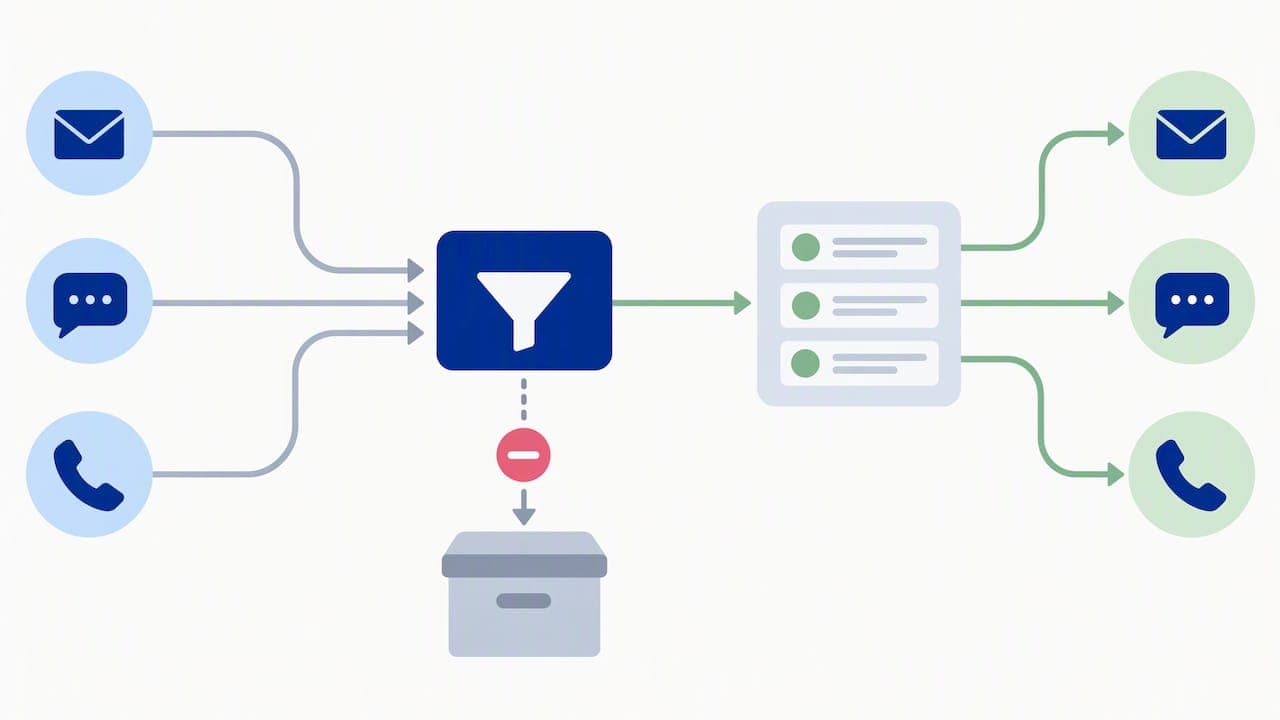
A guarded workflow starts narrow and stays narrow. Automation should trigger only from verified inquiries or approved lifecycle events, never from an unverified contact or a guessed status, and every outgoing message should pull from an approved property-facts layer rather than generated text.
- Trigger automation only from a verified inquiry or an approved lifecycle event, attaching minimal, pre-approved property metadata.
- Constrain outgoing content to facts already approved for that property, and route anything outside that scope to a human reviewer.
- Record the event ID, the data source version, and the disposition of every automated action for later audit.
Practitioners building AI-assisted leasing guardrails stress that automation should extend existing business rules rather than replace human judgment, with deterministic handoff paths for anything uncertain. Draft-mode testing and idempotent triggers prevent duplicate sends and accidental escalations, which keeps the system reliable even as volume grows.
Author perspective: which automations to prioritize and what to avoid
If we had to pick two workflows to launch first, they would be inquiry confirmation and transactional lease messages: both carry low risk and immediate payoff. Keep human handoff rules simple, run a consent audit every quarter, and resist the temptation to import a purchased contact list. Automation built on unverified contacts creates compliance exposure long before it creates revenue.
— Dizzy
FAQ
How much does it cost to send 10,000 emails?
Cost depends on the pricing shape a platform uses: per-contact tiers, per-send fees, or a flat rate bundled into a subscription. The most reliable way to budget is to request a quote based on actual list size and send frequency, since costs vary widely by platform and usage.
How do I send 1,000 emails at once for free?
Most free email tools cap daily or monthly sending volume well below what a growing rental operation needs, and free tiers rarely include consent tracking or suppression list management. For rental communication specifically, a paid tool with built-in compliance features is a safer starting point than stitching together free send limits.
Is email blasting illegal?
Sending unsolicited bulk commercial email is not illegal outright, but it must follow the CAN-SPAM Act, which requires clear advertisement labeling, a working opt-out mechanism, and a valid postal address. Opt-out requests must be honored within 10 business days, and failing to maintain a suppression list creates real legal risk.
Automated email tools are typically priced per contact, per send, or bundled into a broader subscription tier, so costs vary by platform and volume. Property managers running fleet or rental operations alongside email can find tiered SaaS pricing, such as Nomora's Starter plan at $45 per month, as one reference point for what an all-inclusive platform costs.
What property data do I need before automating rental emails?
At minimum, every contact needs a documented consent status, a verified contact field, and a clear lifecycle stage before any automated message goes out. Property facts like rent, availability, and policies should sit in a single approved source that every workflow pulls from, rather than being typed into each template separately.
Sources
Recommended
Ready to streamline your car rental business?
Book 30 minutes with the founder. We set up everything in this guide on your own vehicles, and migrate you out of Excel for free.