Why does a car rental newsletter matter for your business?
The direct channel is under pressure. Airbnb partnered with CarTrawler to distribute car rentals across five countries, and OEM programs like Tesla's app-based rental service are pulling short-term bookings away from independent operators. When aggregators own discovery, your email list becomes one of the few channels where you control the relationship and the margin.
Automated email addresses three concrete problems: idle fleet days that erode utilization, no-shows that leave vehicles unbooked, and corporate accounts that quietly lapse between contracts. A well-timed pre-trip upsell recovers add-on revenue through mobile fleet fueling services. A post-return feedback message reduces claim disputes. A monthly fleet availability digest keeps corporate clients renewing rather than shopping aggregators.
Automated fleet management consolidates reservations, pricing, and inspections into a single cloud interface, which makes reliable, data-driven email possible for independent operators at a cost that manual outreach cannot match. The investment case is straightforward: protect utilization, reduce overhead, and retain the accounts that generate recurring revenue.
Industry signal: Eurostat-cited travel volume data, referenced in recent industry reporting, confirms rising demand across key rental markets. Operators who keep their inventory visible and promoted through direct channels capture that demand before aggregators do.
What content types should your rental newsletter include?
The highest-impact messages map directly to reservation lifecycle events.
Transactional and operational messages:
- Booking confirmation: reservation ID, vehicle class, pickup location with a map link, and a contract link hosted securely in your PMS
- 48-hour pre-trip email: pickup instructions, fuel policy, add-on offers (GPS, child seat, insurance upgrade), and a single CTA to the booking page
- Return follow-up: invoice link via automated payment processing, damage inspection summary, and a feedback request
- Fleet availability digest: available vehicles by class and location, short-window promotions, and last-minute rate drops
Corporate and retention messages:
- Contract renewal reminders 30 and 7 days before expiration
- Invoice summaries for accounts payable contacts
- Loyalty tier updates and milestone rewards
Multimedia guidance: include a vehicle image in pre-trip and promotional emails, sized under 200 KB for mobile. Short video walkarounds (15–30 seconds, hosted externally) work well for EV or specialty vehicles where unique features like Supercharger access or contactless entry justify the explanation. Map links to pickup locations reduce support calls and improve the customer experience before the rental even starts.
How do you automate newsletters from your rental management software?
Your rental management system is the central nervous system of this operation. Every email should originate from a system event, not a manual send.

Pro Tip: Start with just three automated sequences: booking confirmation, 48-hour pre-trip upsell, and post-return feedback. These three cover the full reservation lifecycle and generate the fastest measurable ROI before you expand to promotional campaigns.
| Trigger Event | Email Type | Data to Pass |
|---|
| Reservation created | Booking confirmation | Reservation ID, vehicle class, pickup date/time, location |
| 48 hours before pickup | Pre-trip upsell | Add-on availability, GPS link, fuel policy, contract link |
| Vehicle returned | Invoice + feedback | Invoice total, return date, damage status, survey link |
| 30/90 days inactive | Winback offer | Last vehicle class, preferred location, discount code |
| Contract expiry (–30 days) | Corporate renewal | Account name, contract end date, renewal CTA |
Integration patterns fall into three tiers. Native automation built into your rental platform is the simplest: triggers fire automatically when reservation status changes, and templates pull live data from the booking record. A webhook-to-email-service setup (your PMS posts an event payload to an email platform's endpoint) gives more template flexibility. Full API-driven integration, where your system calls an email API with a populated payload, suits operators who need dynamic content like real-time fleet availability or GPS-linked pickup maps.
Treat each email as having a single data source of truth. Confirmation emails pull from the reservation record. Invoice emails pull from the payment record. Mixing sources creates conflicting messages and erodes customer trust faster than any subject line can recover.
For software integration patterns that cover webhooks and API connections, Nomora's integration guide covers the technical setup in detail.
How should you segment recipients and set send frequency?
Segmentation signals live in your PMS: booking frequency, average rental length, vehicle class preference, and recent revenue contribution. Use them.
Suggested segments and cadence:
- Corporate accounts: biweekly operational digest, immediate transactional emails, contract renewal sequence starting 30 days out
- Leisure/short-term travelers: monthly promotions, transactional emails tied to each reservation
- Loyalty-tiered customers: biweekly for top tier, monthly for mid-tier, with tier-specific offers
- Long-term renters: monthly invoice summaries, renewal reminders, and fleet upgrade offers
- Inactive customers: re-engagement at 30, 90, and 180 days with progressively stronger incentives
Frequency rules by message type:
- Transactional emails (confirmation, invoice): send immediately on trigger, no frequency cap
- Operational messages (pre-trip, return follow-up): one per reservation, timed to the event
- Promotional newsletters: monthly for leisure segments, biweekly for high-value corporate accounts
- Re-engagement flows: three-touch sequence at 30/90/180 days, then suppress to avoid spam complaints
For corporate vehicle rental segments specifically, biweekly cadence with account-level personalization (contract value, fleet usage summary) outperforms generic promotional sends.
What are the legal and deliverability requirements for U.S. rental emails?
CAN-SPAM applies to every commercial email you send in the United States. The requirements are specific: include your physical mailing address, use a subject line that accurately reflects the email's content, identify the message as an advertisement when it is one, and provide a working unsubscribe mechanism that processes opt-outs within 10 business days.
| Requirement | CAN-SPAM Rule | Action Required |
|---|
| Sender identity | Accurate "From" name and address | Use your business name and a monitored inbox |
| Subject line | No deceptive headers | Match subject to email content |
| Unsubscribe | Functional opt-out link | Process removals within 10 business days |
| Physical address | Required in every commercial email | Include your registered business address |
| Transactional emails | Exempt from most rules | Still avoid deceptive headers |
Pro Tip: Transactional emails (confirmations, invoices) are largely exempt from CAN-SPAM's opt-out requirements, but they must still carry accurate sender information and avoid deceptive subject lines. Keep promotional content minimal in transactional messages to preserve that exemption.
Deliverability depends on authentication. Configure SPF, DKIM, and DMARC records for your sending domain before your first send. Warm new IP addresses gradually over two to four weeks. Remove hard bounces immediately and suppress addresses with three or more soft bounces. Monitor spam complaint rates; a rate above 0.1% signals list quality or content problems that will damage inbox placement.
Data handling note: keep personally identifiable information out of email payloads. Link to system-hosted contracts and invoices via secure, authenticated URLs rather than attaching documents or embedding sensitive data in the email body.
Which KPIs should you track, and how do you calculate email ROI?
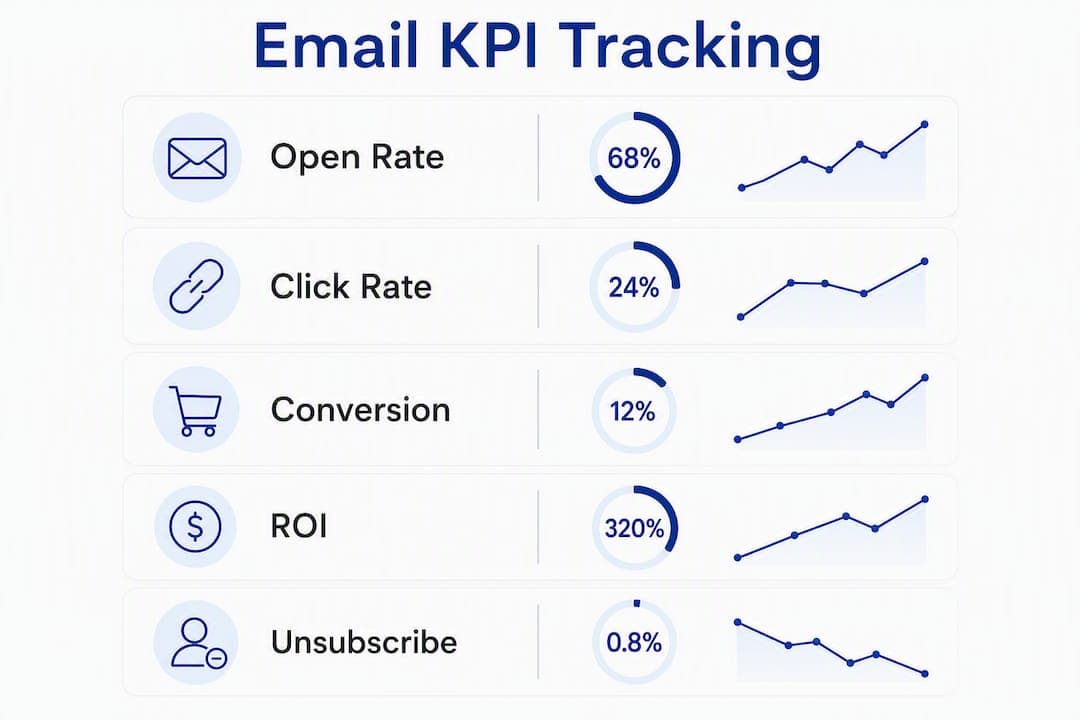
- Open rate: benchmark varies by segment; transactional emails typically outperform promotional sends
- Click-through rate (CTR): clicks on any link divided by delivered emails
- Click-to-book conversion: bookings completed after clicking from an email, tracked via UTM parameters
- Revenue per email: total attributed revenue divided by emails delivered in the period
- Retention/repeat rate: percentage of email recipients who book again within 90 days
ROI formula: (revenue attributed to email − cost of email program) ÷ cost of email program. Tag every booking-engine link with UTM parameters (utm_source=email, utm_medium=newsletter, utm_campaign=pretripupsell) and record the booking ID in your PMS against the email campaign. That linkage lets you calculate attributed revenue without guesswork.
| Reporting Cadence | Metrics to Review |
|---|
| Weekly | Open rate, CTR, unsubscribe rate, bounce rate |
| Monthly | Click-to-book conversion, revenue per email, bookings attributed |
| Quarterly | Cohort retention rate, lifetime value by segment, ROI by campaign type |
Rental data analytics built into your management platform can surface idle-day counts and utilization rates that give email ROI real operational context, not just marketing metrics.
Fleet utilization signal: rental managers should use software signals like idle days, upcoming maintenance windows, and local demand spikes to trigger targeted email offers that move vehicles back into revenue-generating use.
What do effective rental email templates look like?
Subject-line examples (with A/B pairs):
- Confirmation: "Your [Vehicle Class] is confirmed — pickup at [Location]" vs. "Booking confirmed: [Reservation ID] — details inside"
- Pre-trip upsell: "Your rental starts in 48 hours — add GPS for $X" vs. "Ready for pickup? One upgrade worth considering"
- Post-return: "Thanks for renting — your invoice is ready" vs. "[First Name], your trip summary and receipt"
- Winback: "It's been a while — here's 15% off your next rental" vs. "We saved your preferred [Vehicle Class] — book before it's gone"
- Fleet promo: "New vehicles available at [Location] — rates from $X/day" vs. "[Corporate Account]: updated fleet options for your team"
Template best practices:
- One primary CTA per email, linked with UTM parameters to the booking engine
- Vehicle images sized for mobile (under 200 KB, minimum 600px wide)
- Pickup instructions in plain text above the fold, not buried in a PDF attachment
- Personalization tokens:
{{first_name}}, {{vehicle_class}}, {{pickup_location}}, {{reservation_id}}
Subject lines under 50 characters consistently outperform longer ones on mobile, where the majority of rental confirmation emails are opened. Test send time as a second variable only after subject line performance stabilizes — changing two variables at once makes results uninterpretable.
Step-by-step checklist to launch your first automated rental newsletter
- Define goals and KPIs. Set baseline open rate, CTR, and click-to-book conversion targets before launch so you have a comparison point.
- Map triggers to emails. Document which system event fires which message, using the trigger table in the automation section above as your starting framework.
- Prepare templates and assets. Build the three core templates (confirmation, pre-trip, post-return) with mobile-optimized images and single CTAs.
- Configure integrations. Connect your PMS to your email automation layer via native connector, webhook, or API. Test with sandbox reservations before going live.
- Implement authentication. Set SPF, DKIM, and DMARC records. Verify with a tool like MXToolbox before sending to real customers.
- Run a pilot at one or two locations. Use a sample of 200–500 customers, split into control (no automated email) and test groups. Run for 30 days.
- Iterate from results. Review the pilot testing table below, identify the highest-lift variable, and scale what works before adding new sequences.
Pro Tip: For the pilot, test subject lines first — it is the single variable with the most leverage on open rate and the easiest to isolate. Hold send time, template design, and CTA copy constant until subject line performance is stable.
| Metric | Baseline | Expected Lift | Sample Size | Test Duration | Learning Required to Scale |
|---|
| Open rate | Measure in week 1 | Positive vs. control | 200–500 per group | 30 days | Subject line variant winner |
| CTR | Measure in week 1 | Positive vs. control | 200–500 per group | 30 days | CTA placement and copy |
| Click-to-book | Measure in week 1 | Positive vs. control | 200–500 per group | 30 days | Booking engine link attribution |
| Unsubscribe rate | Measure in week 1 | Below 0.1% | All sends | 30 days | Frequency and relevance check |
The pilot is not a proof of concept — it is a calibration exercise. The goal is not to confirm that email works; it is to find the specific subject lines, send times, and offers that work for your customer base and your fleet mix.
For multi-location rollout after the pilot, Nomora's guide covers how to scale automation across branches without duplicating configuration work.
Key Takeaways
An automated car rental newsletter connected to your PMS drives bookings, reduces idle days, and retains corporate accounts at a fraction of the cost of manual outreach.
| Point | Details |
|---|
| Start with three sequences | Confirmation, pre-trip upsell, and post-return feedback cover the full reservation lifecycle first. |
| Compliance is a prerequisite | Configure SPF, DKIM, DMARC, and CAN-SPAM requirements before any promotional send. |
| Segment by PMS signals | Use booking frequency, vehicle class preference, and revenue contribution to set cadence and offers. |
| Measure ROI with UTM attribution | Tag every booking-engine link and record booking IDs in your PMS to calculate real email revenue. |
| Nomora accelerates the pilot | Nomora's built-in automation, integrations, and 24–48 hour onboarding let you launch a working pilot without a lengthy setup. |
Where rental communications are headed
The operators who will hold their margin over the next few years are not the ones sending the most emails. They are the ones whose email channel is wired directly to their booking system, so every message reflects real fleet state, real availability, and real pricing at the moment of send.
Manual campaigns, even well-designed ones, are becoming structurally uncompetitive. When aggregator platforms can surface your competitor's available inventory in real time, a monthly newsletter built on static content and batch sends cannot keep pace. The investment priority is not better copywriting. It is tighter integration between your PMS, your booking engine, and your email layer, so that a vehicle coming off a return triggers an availability offer within minutes, not days.
Privacy-first data handling matters here too, especially for corporate clients. Keeping PII out of email payloads and relying on authenticated, system-hosted document links is not just a compliance posture. It is a trust signal that enterprise accounts notice and that protects your ability to send at scale without deliverability penalties.
Nomora puts your rental newsletter on autopilot
Rental operators who want to move from manual campaigns to a fully automated email channel have a concrete path with Nomora. The platform's built-in automation fires confirmation, pre-trip, and post-return sequences directly from reservation events, with no separate email tool required for the core lifecycle. Fleet management integrations connect GPS tracking, payment gateways, and contract generation to the same data layer your emails draw from, so every message reflects live fleet state.

Onboarding takes 24–48 hours. Security and GDPR compliance are built in, which matters when you are sending invoices and contract links to corporate accounts. UTM-friendly booking attribution means your KPI dashboard shows real revenue, not just open rates. To see how Nomora maps to your specific operation, visit the car rental software use cases page or explore the full platform overview to schedule a demo.
Useful resources for implementation and compliance
Start here based on your immediate need: integrations first if you are configuring your PMS connection, compliance first if you have not yet set up SPF/DKIM/DMARC, and the KPI and analytics guides if you are building your reporting dashboard.
Compliance and legal:
- CAN-SPAM Act guidance — Federal Trade Commission's official compliance guide for U.S. commercial email
- MXToolbox — free SPF, DKIM, and DMARC verification tool
Nomora product and integration resources:
- Car rental software overview — features, integrations, security, and onboarding
- Integration guide — API and webhook setup for connecting your PMS to email automation
- Rental data analytics — KPI definitions and ROI tracking for fleet operators
Industry context:
- Sigvi automation funding coverage — investor perspective on automated fleet lifecycle management
- Aggregator distribution trends — why direct communication channels matter as OTAs expand into car rental
| Point | Details |
|---|
| Compliance first | Set up SPF, DKIM, DMARC, and CAN-SPAM requirements before any promotional send. |
| Integration is the foundation | Connect your PMS to your email layer via API or native connector to enable real-time triggers. |
| KPI tracking requires UTM setup | Tag booking-engine links from day one so revenue attribution is accurate from the pilot onward. |
| Nomora covers the full stack | Nomora's platform handles automation, integrations, compliance, and analytics in one system. |
Recommended