A rental operations workflow is the repeatable path every booking follows, from the first quote to the final charge, plus the path every vehicle follows between rentals. The workflow runs well when each step has one owner, one source of truth and a defined exit. It breaks when bookings live in one spreadsheet, vehicle status in another and contracts in a third. A cloud rental management platform like Nomora puts reservations, fleet, contracts, payments and customer records in one system, so each handoff happens in the same place and no one retypes data.
This guide is for owners and managers of small and mid-sized rental companies, luxury and specialty operators, and corporate fleet managers. You will leave with a stage-by-stage workflow, a method to map your current process, a way to assign roles and exceptions, and a short list of metrics to track.
TL;DR
- A rental workflow has two loops: the customer loop (quote, booking, pickup, return, final charge) and the vehicle loop (inspection, cleaning, maintenance, ready status). Both must share one view.
- Map your real process first, end to end, including exceptions such as late returns, no-shows and payment failures. Most lost time sits in handoffs, not in the steps themselves.
- Give every task and every exception a named owner and a deadline. Automate the routine steps and keep people on the judgment calls.
- Roll out one process at a time and measure it. Large operators have cut out-of-service vehicles and raised utilization this way.
- Nomora covers reservations, fleet, contracts and payments in one platform, with onboarding of 24 to 48 hours.
Table of Contents
What a rental operations workflow actually includes
Think of the workflow as the central nervous system of the business. Every signal, such as a booking, a returned key, a flagged scratch or a declined card, has to reach the right person and trigger the right next action. If signals travel by text message and memory, things get dropped.
A complete workflow covers six areas:
- Demand and booking: inquiries, quotes, availability checks and reservations.
- Eligibility and paperwork: driver identity, license checks, rental agreements and deposits.
- Vehicle assignment and handover: choosing the unit, inspection at pickup, keys or digital access.
- Active rental support: extensions, questions, breakdowns and accidents.
- Return and settlement: check-in, fuel or charge level, damage review, final charge and disputes.
- Turnaround and fleet readiness: cleaning, maintenance, repairs and getting the vehicle back to "available".
Small operators often run all six through one or two people. That works until volume grows, a second location opens or a staff member is out sick. Written workflows are what let the business scale without the owner being on every handoff.
Map your current workflow before you change anything
Improving a process you have not drawn is guesswork. National operators do the same thing at larger scale: a case study on a national rental car provider describes analyzing existing processes end to end to find redundant steps before redesigning customer and vehicle flow. You can do a small version of this in an afternoon.
Step 1: Walk one booking and one vehicle from start to finish
Pick a recent rental. Follow it from the first inquiry to the final payment, and write down every touch: who did it, which tool they used, how long it waited before the next step. Do the same for the vehicle after its return. Use real records, not what you think happens.
Step 2: Mark the handoffs
A handoff is any moment work moves from one person or tool to another: sales to the counter, counter to the lot, the lot to the mechanic. Mark each one. Handoffs are where bookings double up, cars are listed as available while still in the shop, and damage goes undocumented.
Step 3: List the exceptions
The normal path is easy. Your workflow is judged on the exceptions. Write down the ones you meet in a typical month:
- Late return that collides with the next reservation
- No-show
- Customer wants a different class than the one booked
- Reserved vehicle unavailable because of damage or maintenance
- Expired or unreadable driver's license
- Declined card or failed deposit
- Accident, lost key or breakdown
- One-way return to a different location
For each, note who decides, what they need to see and how long it takes today.
Step 4: Find the friction
Circle the spots where staff retype data, wait for a call back, check two systems or fix a double booking. Those circles become your improvement list, ranked by how often they happen and what each one costs in time, revenue or customer goodwill.
The core workflow, stage by stage
Below is a working template. For each stage you will see what it takes, where it commonly goes wrong and what Nomora does there.
1. Quote and reservation
What it takes: a live view of which vehicles are free for the requested dates, rates by class and season, and a way to hold the booking.
Where it goes wrong: availability is checked against a spreadsheet or a shared calendar that someone forgot to update. Two customers get the same car on the same day. The fix is a single availability calendar that every booking writes to.
What Nomora does: it offers conflict-free booking tools and real-time reservation and fleet tracking, so a vehicle already committed does not show as open.
2. Eligibility, agreement and payment
What it takes: collecting driver details, confirming the driver is eligible, generating the rental agreement and taking the deposit or payment.
Where it goes wrong: paperwork is built by hand from a template, fields get missed and payment is taken separately from the contract, so the two do not reconcile. Software can enforce your rules, such as required fields, but a person still decides whether a particular customer is acceptable under your policy and your insurer's terms.
What Nomora does: it generates contracts automatically from the reservation and processes payments inside the same platform, so the agreement and the charge belong to the same record. See how automated rental payments fit into the flow.
3. Vehicle assignment and handover
What it takes: matching a specific unit to the booking, confirming it is clean, fueled or charged and inspected, and recording its condition at pickup.
Where it goes wrong: the assigned car is still on its way back from the previous rental, or its condition at pickup was never recorded, which makes damage disputes a matter of memory.
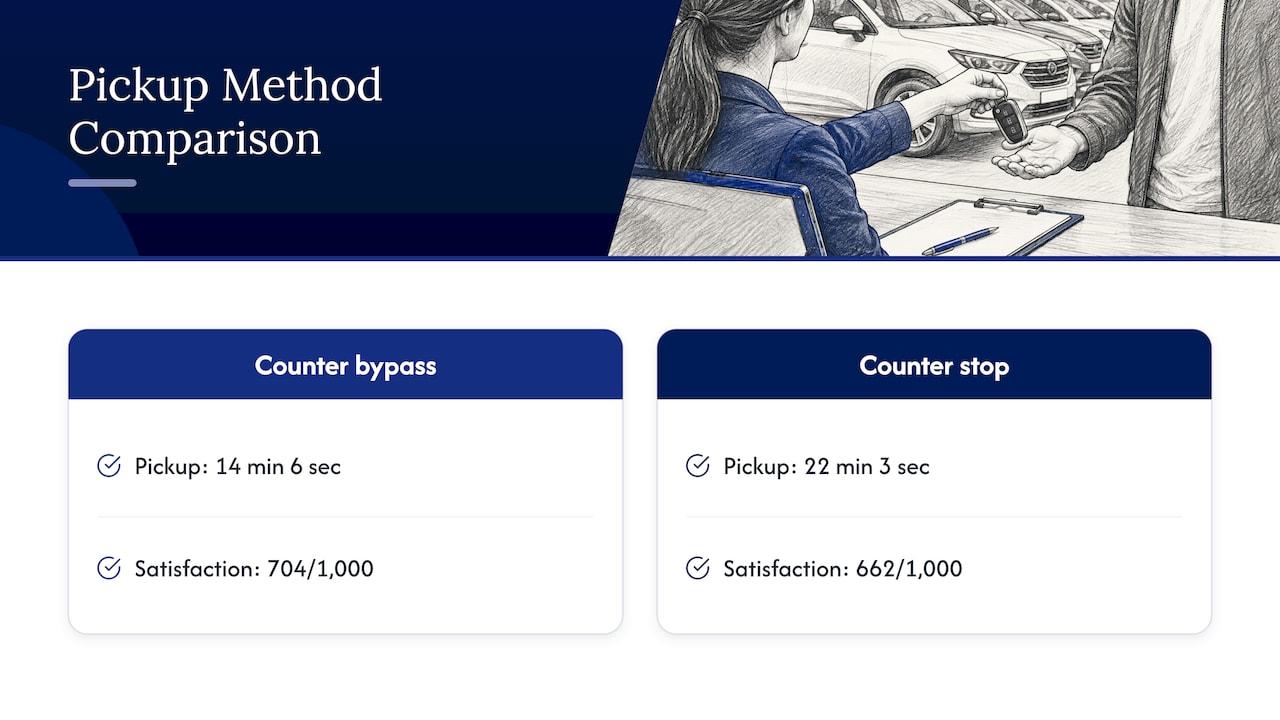
Handover speed also matters to customers. In the J.D. Power 2025 North America Rental Car Satisfaction Study, customers who bypassed the counter reported an average pickup time of 14 minutes and 6 seconds, against 22 minutes and 3 seconds for those who stopped at it. Their overall satisfaction score was 704 on a 1,000-point scale, against 662 for counter customers. Prepared paperwork and a vehicle ready before the customer arrives are what make a faster pickup possible.
4. Active rental and support
What it takes: a way to handle extensions, changes and incidents without disrupting the next booking.
Where it goes wrong: an extension is agreed by phone and never entered, so the car is promised to someone else. Every change should be made in the reservation record, not in a note.
What Nomora does: it keeps customer data and reservations together, and its fleet tracking includes GPS, so staff see where a vehicle is while it is out.
5. Return and settlement
What it takes: checking the vehicle in, comparing its condition with the pickup record, applying fuel or charge, mileage and any damage charges, and closing the contract with a final payment.
Where it goes wrong: returns happen after hours or on a busy lot and the check-in is rushed. Charges are calculated later from memory, and disputes follow. Close the loop the same day while the details are fresh.
6. Turnaround and readiness
What it takes: a task list for each returned vehicle (clean, refuel, inspect, service if due) and a clear status change to "available" only when it is complete.
Where it goes wrong: status is changed by whoever touches the car last, with no check that cleaning and inspection happened. A vehicle with an open maintenance item is rented anyway. Our guide to a fleet maintenance scheduling workflow goes deeper on this loop.
Assign roles so nothing falls between people
A workflow is only as reliable as its owners. Even in a five-person team, write down who does what. A simple version separates three jobs:
- Customer-facing staff handle bookings, paperwork, pickups and questions.
- Fleet staff keep vehicles clean, inspected, serviced and in the right place, and block damaged cars from rental.
- Finance or the owner approve exceptions that involve money, such as refunds, waived fees and damage charges.
In the national operator case study mentioned above, redefining the workforce into three clearly defined roles with streamlined responsibilities improved accountability and flow. A numbered stall system also let customers walk from check-in straight to an assigned vehicle. Your scale is different, but the principle carries over: fewer ambiguous responsibilities, fewer dropped tasks.
A simple decision grid for exceptions
For every exception on your list, answer four questions and put them in one table your team can see:
| Exception | Who decides | What they need to see | Deadline |
|---|
| Late return that blocks next booking | Duty manager | Next reservation, spare units in class | Before the next pickup time |
| Declined card at pickup | Counter staff, then owner | Contract and deposit status | Before keys are released |
| Damage found at return | Fleet lead | Pickup condition record and return photos | Same day |
| Vehicle unavailable for a booking | Duty manager | Free units in same or higher class | As soon as it is known |
| Accident during rental | Owner | Contract, driver details, vehicle location | Immediately |
The exact owners will differ by business. What matters is that each exception has a person, information and a time limit. If you run several locations, add a rule for which decisions are local and which go to headquarters, so routine work does not queue behind one person.
What to automate, and what to leave to people
Automation pays off where work is repetitive, rule-based and error-prone. For a rental business that usually means:
- Availability checks at the moment of booking
- Contract generation from reservation data
- Payment capture and receipts
- Confirmation and reminder messages to customers
- Vehicle status changes triggered by check-out, check-in and completed tasks
- Maintenance reminders based on mileage or dates
- Reporting on utilization and revenue per vehicle
Keep human judgment on decisions the software cannot make for you: whether a customer meets your eligibility policy, whether damage is chargeable and whether a vehicle is safe to rent. Software can enforce the rules you set and keep a record, but you set the rules.
The systems that need to connect are few: your booking calendar, your fleet records, your payment processor and, if you use it, GPS tracking. When these live in separate tools, someone becomes the human connector. When they live in one platform, the connection is built in. Our integrations guide explains what to connect when you do keep outside tools, such as accounting software.
Roll out one workflow at a time
The most common mistake is changing everything at once. Pick the stage that costs you the most, usually reservations or return and turnaround, redesign it, run it for a few weeks and then move on.

Large operators show what disciplined rollout looks like. In PwC's case study on Avis Budget Group's fleet operations, the program reached 125 US sites and 76% of the US fleet in under 18 months. It relied on a network of 1,300 change agents and an activation playbook with more than 70 deployment checklist items unique to each location. PwC reports that in pilot markets, the share of vehicles out of service fell by around 40%, and that vehicle utilization improved by about 1.2%.
You do not need 1,300 change agents. The lessons that scale down are these:
- Prepare a checklist per location. Each site has its own lot layout, staffing and peak hours.
- Name a champion. One person per shift or site who knows the new process and helps colleagues.
- Train in short sessions on the exact tasks people do, not on the whole system.
- Migrate clean data. Fix duplicate customers and incorrect vehicle records before you import them.
- Review after a few weeks and adjust the workflow to what staff actually run into.
How to measure whether it is working
Choose a handful of numbers and track them before and after the change:
- Utilization: the share of days each vehicle is on rent. Our fleet optimization guide shows how to calculate and raise it.
- Turnaround time: hours between return and "available".
- Pickup time: minutes from arrival to keys in hand.
- Booking conflicts and overrides: how often staff have to fix a double booking.
- Days to final charge: how quickly a closed rental becomes collected revenue.
- Out-of-service share: the proportion of the fleet unavailable for repairs or waiting on tasks.
A good baseline takes two weeks of honest logging. Without it, you cannot tell improvement from a busy month.
How the workflow differs by business type
Small and mid-sized rental companies usually have a short chain of handoffs and few people. The priority is a single reservation calendar and automatic contracts, so the owner is not the integration layer.
Luxury and specialty rental businesses have fewer vehicles but higher stakes per rental. Condition records at pickup and return, deposits and clear agreements matter more, and each vehicle's schedule is tighter, so a missed turnaround task costs more.
Corporate fleet managers are assigning vehicles to internal users rather than selling to the public, but the loops are the same: request, assignment, handover, return, maintenance. Our page on corporate fleet use cases shows how that adapts, and the use cases overview covers the other business types.
Perspective: why one system beats a patchwork
We built Nomora around a simple observation: most rental workflow problems are not caused by people working badly. They come from information that sits in the wrong place at the wrong moment.
When a booking lives in a calendar, the contract in a document, the payment in a processor's dashboard and the vehicle's status in someone's head, every handoff is a chance for the story to diverge. A single platform for reservations, fleet, contracts, payments and customer data removes the reconciling, which is the part of the job nobody enjoys and everybody ends up doing.
That is why every Nomora plan includes the full feature set, with no hidden fees, and why we aim to have a new customer fully operational in 24 to 48 hours. A workflow only improves if the team actually uses the system, and quick setup keeps the change small enough to adopt. Real-time automation reduces manual entry, cloud access lets staff work from any device, and integrated GPS and payments keep the vehicle loop and the money loop tied to the same record.
Our advice: draw your workflow, find the three handoffs that cost you most, and put those inside one system first.
Dizzy
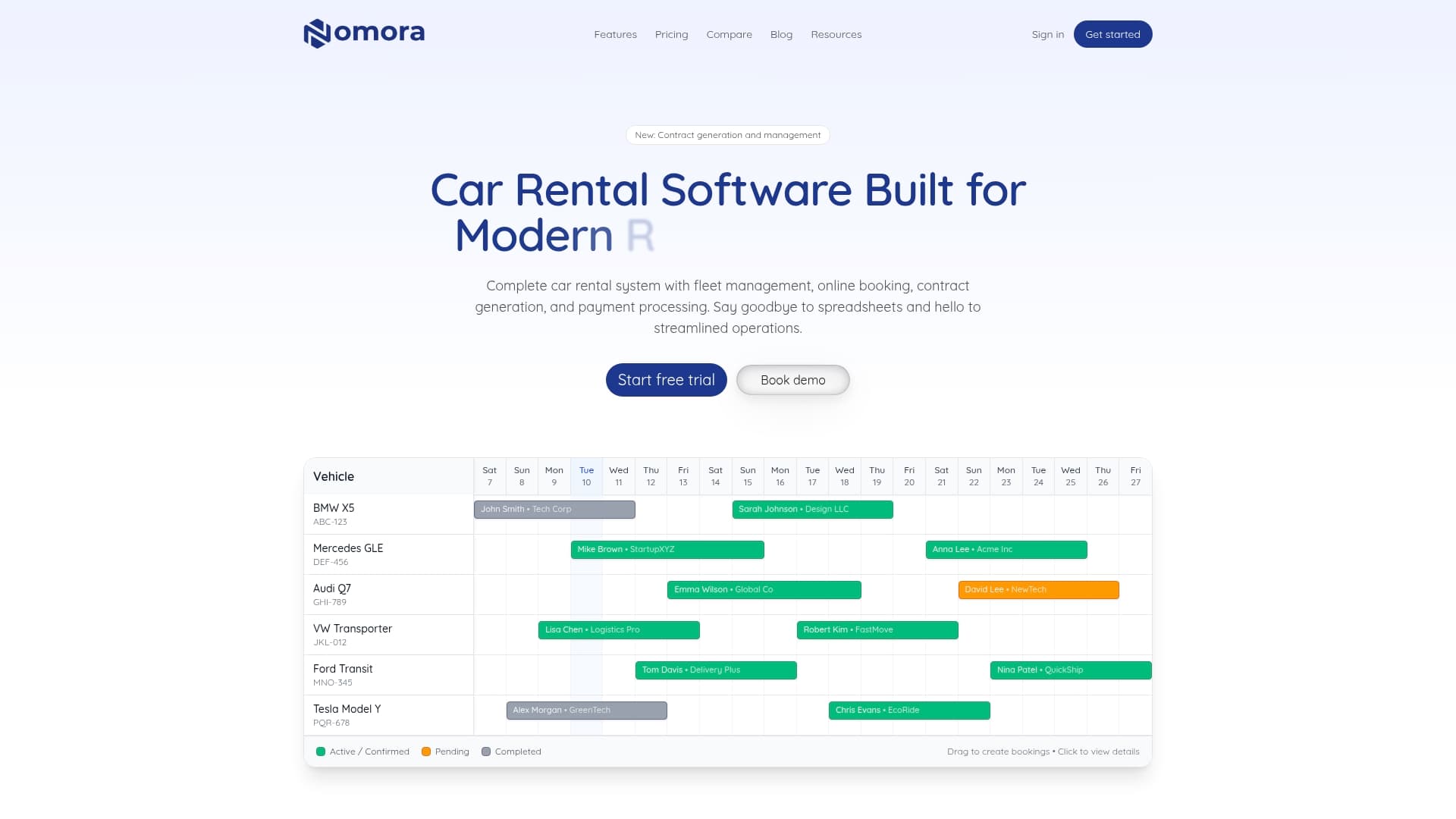
Nomora brings reservations, fleet management with GPS tracking, automated contracts, payment processing and customer records into one cloud platform, with every feature available in every plan. Published plans, as read on our pricing page in September 2026: Starter is €45 per month, Business is €2.80 per vehicle per month, Fleet is €2.20 per vehicle per month, and Enterprise is priced on request. Payment processing has its own fee, which is not published. See the current plans and pricing or learn more about our all-in-one car rental software.
If you manage a larger fleet, the fleet management software page covers what changes beyond 50 vehicles.
FAQ
What is the first step in improving a rental operations workflow?
Map what actually happens today. Follow one recent booking and one vehicle from first contact through final charge and readiness, and note who touched each step, which tool they used and where it waited. The handoffs and exceptions you find become your improvement list.
How long does it take to move a rental business onto workflow software?
That depends on how clean your data is and how many people you need to train. Nomora's onboarding is designed to have a business fully operational in 24 to 48 hours. Starting with one process, such as reservations, and cleaning your customer and vehicle records beforehand keeps the change manageable.
Which rental tasks are best to automate first?
Start with the repetitive, rule-based ones: availability checks, contract generation, payment capture, customer confirmations and maintenance reminders. These happen on every rental, so small errors add up. Leave eligibility decisions, damage charges and safety calls to your staff.
How do I prevent double bookings?
Use one availability calendar that every reservation writes to, and set vehicle status from real events such as check-out, check-in and completed maintenance. Conflict-free booking tools in a rental platform check availability at the moment of booking, so a committed vehicle does not appear free.
What should a small rental company track to know the workflow is improving?
Track utilization, turnaround time from return to available, pickup time, booking conflicts and days to final charge. Log them for two weeks before you change anything so you have a baseline, then compare after each change.
Sources
Recommended