Why cloud-based solutions give businesses a clear advantage
Cloud-based solutions deliver flexibility, cost control, security, and speed that on-premises infrastructure simply cannot match at the same price point. For business decision-makers weighing the shift, the core case comes down to six concrete advantages.
- Flexibility and scalability: Cloud elasticity lets you scale capacity up or down in minutes, not months, so you never pay for idle servers during slow periods.
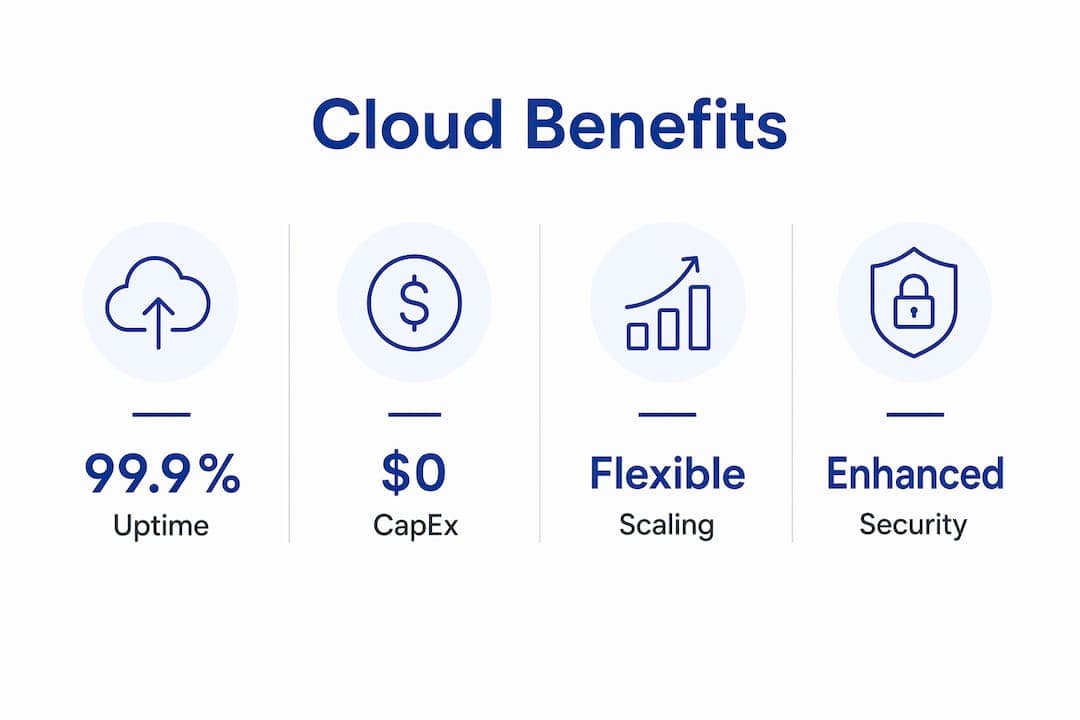
- Cost efficiency: You trade fixed capital expenditure on hardware for variable operational spending, paying only for what you actually consume.
- Security enhancements: Leading cloud providers deploy Zero Trust Architecture, AI-driven threat detection, and centralized management that most organizations could not afford to build independently.
- Faster deployment: New IT resources that once took weeks to provision are available in minutes with cloud, compressing development cycles and accelerating time to market.
- Collaboration and remote access: Teams across locations access the same data and applications from any internet-connected device, with no dependency on a single office network.
- Disaster recovery: Cloud providers offer automated backup and recovery features that protect against hardware failure, ransomware, and human error without requiring a secondary physical data center.
The business case for cloud adoption has moved well past debate. The question most organizations face now is not whether to migrate, but how fast and in what configuration.
What are the key benefits of cloud solutions for businesses?
Flexibility and on-demand scalability
Cloud infrastructure adjusts to demand in real time. A retail platform handling a flash sale, a logistics company managing seasonal peaks, or a car rental operation tracking a sudden surge in bookings all face the same challenge: capacity that matches the moment. Cloud providers dynamically allocate bandwidth and compute resources based on actual usage, scaling up when demand spikes and scaling back when it drops. You never overbuild for a peak that arrives three times a year.

Pro Tip: When evaluating cloud providers, ask specifically about auto-scaling policies and how quickly capacity adjusts. A provider that takes 10 minutes to scale during a traffic spike is meaningfully different from one that responds in seconds.
Cost efficiency through pay-as-you-go pricing
The financial model of cloud computing changes how IT budgets work. Instead of committing capital to servers and data centers before you know your actual load, cloud spending shifts to a consumption-based model where you pay for resources as you use them. This eliminates the twin problems of over-provisioning (paying for capacity you never use) and under-provisioning (degraded performance when demand exceeds what you bought). IT teams also recover time previously spent on hardware procurement, racking, and maintenance, freeing them to focus on work that directly supports business goals.
Cloud providers also benefit from aggregated usage across their entire customer base, which translates into lower per-unit costs than any single organization could achieve independently. That economy of scale flows directly to customers through competitive pricing.
Security enhancements and the shared responsibility model
Cloud computing can strengthen your security posture, though it requires understanding exactly where provider responsibility ends and your own begins. The shared responsibility model means cloud providers secure the underlying infrastructure, physical data centers, and core platform services, while your organization remains accountable for access controls, data governance, and configuration management. Misconfigurations at the customer level are among the most common sources of cloud security incidents.
That said, the security capabilities available through major cloud platforms exceed what most mid-sized organizations can deploy on their own. Features like virtual private cloud (VPC) isolation, API key management, security information and event management (SIEM), and continuous AI-driven threat monitoring are standard offerings, not premium add-ons. The Canadian Centre for Cyber Security recommends requesting third-party security certifications and attestations from any cloud service provider before committing, and using service level agreements (SLAs) to define performance guarantees and accountability.
Faster deployment and accelerated innovation
Speed is one of the most tangible advantages cloud computing delivers. Provisioning a new server environment that once required weeks of internal procurement, hardware setup, and configuration now takes minutes. That compression matters enormously for product development teams running iterative cycles, for businesses responding to market shifts, and for any organization that needs to test a new idea without a six-week lead time. Cloud platforms also provide instant access to specialized resources like GPUs for AI model training, which would be prohibitively expensive to maintain on-premises for most businesses.
Cloud platforms give organizations access to advanced AI, machine learning, and data analytics tools that function as catalysts for digital transformation. The practical effect is that capabilities once reserved for large enterprises with dedicated research budgets are now accessible to organizations of any size.
Collaboration and remote access
Cloud storage and applications make data available from any internet-connected device, anywhere in the world. For distributed teams, this is not a convenience feature. It is the operational foundation that makes remote and hybrid work viable at scale. Teams in different time zones collaborate on the same files, access the same customer records, and run the same applications without VPN complexity or location-based restrictions. For businesses like car rental operations managing multiple locations, real-time access to fleet data and booking systems from any device directly affects how quickly staff can respond to customers.
Disaster recovery and business continuity
Cloud-based backup and disaster recovery removes the need for a secondary physical data center. Data stored in the cloud replicates across geographically distributed servers, so a hardware failure, a ransomware attack, or a natural disaster at one location does not result in permanent data loss. Recovery times that once stretched into days now compress to hours or minutes, depending on the recovery point objective your SLA defines. For any business where downtime translates directly to lost revenue, that difference is measurable in dollars.
Industry insight: Cloud infrastructure's built-in redundancy and automated failover capabilities give organizations a level of business continuity that would require significant capital investment to replicate with on-premises hardware alone.
How do public, private, and hybrid clouds differ?
Understanding the three primary deployment models helps you match the right architecture to your actual requirements, rather than defaulting to the most visible option.
Public cloud
A public cloud environment hosts infrastructure shared across multiple customers, managed entirely by the cloud service provider. Resources like compute, storage, and networking are delivered over the internet on a pay-as-you-go basis. Public cloud is the right fit for organizations that prioritize cost efficiency, speed of deployment, and access to the broadest range of managed services. Startups, growing businesses, and teams running non-sensitive workloads typically find public cloud the most practical starting point.
Private cloud
A private cloud dedicates all hardware and software resources to a single organization. Financial institutions, healthcare providers, and government agencies often choose private cloud because they handle sensitive data subject to strict regulatory requirements, or because their security policies require direct control over the physical environment. The trade-off is higher cost and greater operational responsibility compared to public cloud.
Hybrid cloud
A hybrid cloud combines public cloud, private cloud, and on-premises infrastructure within a single IT environment. Organizations favor this model because it lets them run sensitive or regulated workloads in a controlled private environment while using public cloud capacity for less sensitive operations and demand spikes. Hybrid architecture also eases the transition for businesses with existing on-premises investments, allowing gradual migration rather than a full cutover.
| Deployment model | Control level | Cost structure | Best for | Compliance fit |
|---|
| Public cloud | Low (provider-managed) | Pay-as-you-go | Startups, general workloads | Standard requirements |
| Private cloud | High (organization-managed) | Higher fixed costs | Regulated industries, sensitive data | Strict regulatory needs |
| Hybrid cloud | Mixed | Flexible | Enterprises with mixed workloads | Variable, adaptable |
Integration with existing systems is a practical concern for any organization that cannot migrate everything at once. Hybrid models specifically address this by allowing on-premises systems to connect with cloud services through API integration, letting businesses preserve existing investments while extending capabilities. The key is evaluating which workloads genuinely benefit from cloud migration and which are better left on-premises, at least initially.
- Audit existing software investments and on-premises operating costs before committing to a deployment model.
- Identify the sensitivity level of your data to determine what can move to public cloud and what requires private or on-premises control.
- Use SLAs to define performance guarantees, uptime commitments, and data availability requirements with any cloud service provider.
Why are hybrid and multicloud strategies gaining ground?
The shift toward hybrid and multicloud models reflects a practical reality: no single cloud provider excels at every workload, and organizations that lock themselves into one vendor accept constraints on flexibility, pricing, and portability.
IBM research shows that organizations operating a full hybrid multicloud platform at scale derive 2.5 times the business value compared to those relying on a single-cloud vendor approach. That multiple reflects real differences in agility, the ability to allocate workloads to the most cost-effective or highest-performing environment, and the negotiating leverage that comes from not being captive to one provider's pricing.
Vendor lock-in: the risk and how to manage it
Vendor lock-in occurs when proprietary tools, data formats, or service dependencies make switching providers prohibitively expensive. It is one of the most cited concerns among IT professionals evaluating cloud adoption, and for good reason. A business that builds its entire infrastructure on one provider's proprietary services may find that migrating later costs more than the original migration to the cloud. Multicloud strategies address this directly by distributing workloads across providers and favoring open standards and portable architectures.
Practical mitigation steps include:
- Prioritizing open-source tools and containerization platforms like Kubernetes, which run consistently across providers.
- Avoiding deep dependencies on proprietary managed services where equivalent open alternatives exist.
- Reviewing SLAs for data portability guarantees and exit provisions before signing.
Implementation complexity and risk management
Hybrid and multicloud environments introduce operational complexity that single-cloud deployments do not. Managing multiple dashboards, reconciling billing across providers, and maintaining consistent security policies across environments requires deliberate governance. Cloud cost management tools offered by major providers help track spending and configurations across environments, but organizations still need clear internal ownership of cloud financial management, often formalized through a FinOps practice.
The payoff for managing that complexity is meaningful: greater resilience, the ability to negotiate on price, and the freedom to adopt best-in-class services from different providers without architectural constraints. For businesses at scale, those advantages compound over time.
How does cloud computing support sustainability and financial flexibility?
Environmental impact: a measurable reduction
Moving from on-premises data centers to cloud infrastructure can reduce energy consumption and carbon footprint by up to 90%. That figure reflects the efficiency gap between hyperscale cloud data centers, which use advanced cooling technologies, renewable energy sources, and optimized hardware utilization, and the typical on-premises server room running at a fraction of its capacity. For organizations with sustainability commitments or ESG reporting requirements, cloud migration is one of the highest-impact infrastructure decisions available.
Cloud providers operate energy-efficient data centers that help organizations reduce their overall emissions compared to traditional IT setups. Beyond the direct carbon reduction, consolidating workloads onto shared infrastructure eliminates the waste of underutilized servers that organizations routinely maintain on-premises.
- Cloud data centers achieve higher hardware utilization rates than most private server rooms.
- Renewable energy commitments from major providers contribute to scope 2 emissions reductions for customers.
- Reduced physical footprint means lower costs for cooling, electricity, and physical space.
From capital expenditure to operational spending
The financial shift from CapEx to OpEx is one of the most consequential advantages of cloud adoption for business decision-makers. Paying only for resources consumed eliminates the need to forecast capacity years in advance and commit capital to hardware that may be obsolete before it is fully depreciated. Capital that would have been tied up in servers and data center infrastructure becomes available for product development, hiring, or market expansion.
This model also changes how quickly teams can experiment. When spinning up a new environment costs a few dollars per hour rather than a six-figure hardware purchase, the threshold for testing a new idea drops dramatically. Organizations that migrate IT spending from upfront asset ownership to operational expenses consistently report faster development cycles and a lower cost of failed experiments, which is a prerequisite for genuine innovation.
The reputational dimension of sustainability commitments is also worth noting. Customers, investors, and regulators increasingly scrutinize environmental practices. A documented reduction in carbon footprint through cloud migration provides concrete evidence of progress, not just a policy statement.
Key Takeaways
Cloud-based solutions deliver measurable advantages in cost, speed, security, and sustainability that on-premises infrastructure cannot replicate at comparable cost.
| Point | Details |
|---|
| Scalability on demand | Cloud elasticity adjusts capacity in real time, eliminating idle hardware costs during low-demand periods. |
| CapEx to OpEx shift | Pay-as-you-go pricing replaces upfront hardware investment, freeing capital for growth and faster experimentation. |
| Hybrid multicloud value | Organizations using hybrid multicloud at scale achieve 2.5 times the business value of single-cloud approaches. |
| Carbon footprint reduction | Moving from on-premises to cloud infrastructure can reduce energy consumption and carbon footprint by up to 90%. |
| Shared security responsibility | Providers secure infrastructure; your organization must manage access controls, configurations, and data governance. |
See how Nomora puts cloud advantages to work

Nomora is a cloud-based car rental management platform built to translate every advantage described in this article into daily operational results. Reservations, fleet tracking, contract generation, payment processing, and customer data all run through a single integrated system accessible from any device, anywhere. Setup takes 24–48 hours, and the platform scales from independent operators to large franchise networks without requiring infrastructure investment on your end.
If you want to see how cloud technology applies directly to rental operations, the Nomora use cases page shows how different business types use the platform to replace manual processes and improve fleet utilization. For a closer look at the full feature set, the car rental software overview covers reservations, GPS integration, automated payments, and GDPR-compliant data management in detail.
Recommended