TL;DR:
- Cloud accessibility combines secure remote access and software design for people with disabilities to improve usability and compliance. Businesses must implement continuous security verification and regularly audit to maintain accessibility standards, which is vital for legal and operational reasons. Effective strategies include policy enforcement, vendor evaluation, and ongoing staff training to ensure full cloud-enabled inclusivity and security.
Cloud accessibility is defined as the capability for users and systems to securely access, use, and interact with cloud resources from any device or location, including by people with disabilities. The term covers two distinct but equally important concepts: operational remote access and digital inclusivity in software design. Business owners and IT professionals who conflate these two meanings risk gaps in both their remote work strategy and their legal compliance posture. This guide breaks down what is cloud accessibility in practical terms, covering its core pillars, security frameworks, compliance requirements, and the real benefits it delivers to distributed teams in 2026.
What are the main pillars of cloud accessibility in business?
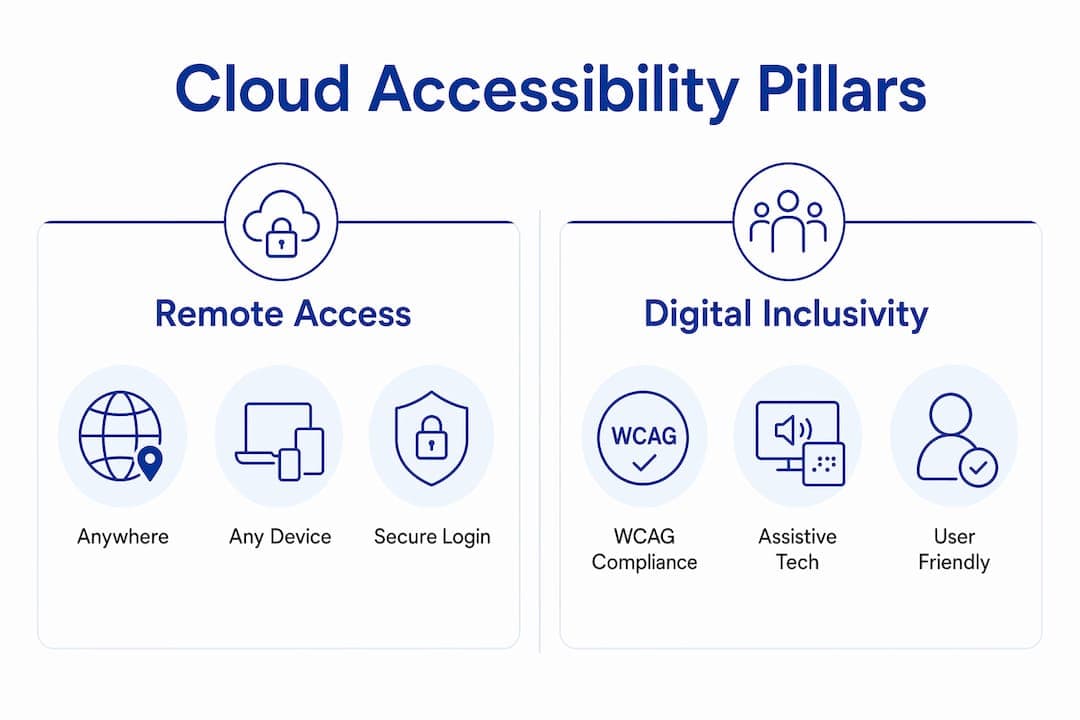
Cloud accessibility rests on two pillars: remote access and digital inclusivity. Understanding both is the foundation of any effective cloud strategy.

Remote access means employees can reach business data, applications, and systems from any location or device without relying on local hardware. A new hire in a branch office can log into a browser and start working on day one. Cloud accessibility enables faster onboarding because new employees access tools via browser instead of waiting days for physical IT setup. That speed directly reduces lost productivity during onboarding.
Digital inclusivity means designing cloud interfaces so people with disabilities can use them effectively. This includes support for screen readers, keyboard navigation, adjustable font sizes, and real-time captions. Standards like WCAG 2.2 (Web Content Accessibility Guidelines) define the technical requirements software must meet. Compliance with these standards is not optional for many businesses, particularly those serving government clients or operating in regulated industries.
The two pillars serve different goals but share one outcome: more people can use your cloud tools effectively, regardless of where they are or what challenges they face.
- Remote access supports geographic flexibility, hybrid work models, and business continuity.
- Digital inclusivity supports users with visual, auditory, motor, or cognitive disabilities.
- Both reduce friction in how employees interact with cloud software.
- Both require deliberate design and policy decisions, not just infrastructure choices.
Pro Tip: When evaluating cloud software for your business, ask vendors separately about remote access capabilities and WCAG compliance. These are different features with different documentation. Conflating them during procurement leads to gaps you will discover only after signing a contract.
How does cloud access security balance accessibility and data protection?
Open access without controls creates serious risk. The answer is not to restrict access broadly but to apply dynamic, policy-based verification at every access point.
Cloud Access Control uses Identity and Access Management (IAM) and Privileged Access Management (PAM) frameworks to verify who is requesting access, from what device, and under what conditions. Zero Trust models require continuous verification of user and device status rather than one-time authentication at login. This means access is an ongoing decision, not a gate you pass once. That approach aligns with the NIST Cybersecurity Framework 2.0, which treats access as a continuous risk assessment.
OWASP recommends that cloud governance account for both human and non-human identities. Non-human identities include automated scripts, APIs, and service accounts that access cloud resources without a person behind the keyboard. Governance of human and non-human identities prevents breaches that originate from compromised service accounts, a common attack vector in remote work environments.
Cloud Access Security Brokers (CASBs) sit between your on-premises infrastructure and cloud services, enforcing security policies before data moves. CASBs enforce authentication, encryption, and DLP policies while detecting shadow IT, the unauthorized cloud apps employees use outside IT oversight. That detection capability alone justifies CASB adoption for most mid-size and enterprise organizations.
Key security features in a well-governed cloud access environment include:
- Multi-factor authentication (MFA): Requires a second verification step beyond a password.
- Conditional access policies: Grant or deny access based on device posture, location, and user role.
- Data Loss Prevention (DLP): Blocks unauthorized transfer of sensitive data to external destinations.
- Threat protection: Monitors for anomalous behavior patterns that signal a compromised account.
- Encryption in transit and at rest: Protects data whether it is moving or stored.
Pro Tip: Pair your CASB with a device posture check. If an employee's personal laptop lacks current security patches, conditional access policies can block or limit that session automatically, without requiring manual IT intervention.
Why is accessibility compliance critical for cloud software in 2026?
Cloud software that cannot be used by people with disabilities creates legal exposure and lost business. The regulatory environment tightened significantly in recent years, and 2026 brings additional enforcement pressure.
The Americans with Disabilities Act (ADA), Section 508 of the Rehabilitation Act, and the European Accessibility Act (EAA) all impose requirements on digital products and services. Over 7.2 million Americans face digital accessibility barriers, and failing to address those barriers can result in litigation, regulatory penalties, and lost procurement contracts. Government agencies and many large corporations now require vendors to submit a Voluntary Product Accessibility Template (VPAT) 2.5 before awarding contracts.
A VPAT 2.5 documents how a software product conforms to WCAG 2.2 and Section 508 standards. It is not a certification. It is a self-reported disclosure that procurement teams use to evaluate whether a product meets their accessibility requirements. Failing to provide a VPAT removes your product from consideration before evaluation even begins.
The most common misconception among SaaS providers is that moving to cloud infrastructure automatically satisfies accessibility requirements. It does not. Cloud-native infrastructure does not guarantee WCAG compliance. Accessibility is a software-layer responsibility. The interface, the content, and the interaction patterns must all be purposefully designed to meet WCAG 2.2 criteria.
Accessibility compliance is not a feature you add at launch. It requires ongoing audits, user testing with people who have disabilities, and documented remediation cycles. A product that passes an audit today may fail six months later after a UI update.
Key compliance requirements for cloud SaaS in 2026:
- WCAG 2.2: The current international standard for web and software accessibility.
- Section 508: Applies to federal agencies and vendors selling to the U.S. government.
- ADA Title III: Covers digital products offered to the public in the United States.
- EAA: Applies to digital products and services sold in European Union markets.
- VPAT 2.5: The documentation format used to communicate compliance status to buyers.
Pro Tip: Schedule accessibility audits at every major release cycle, not just annually. A quarterly audit cadence catches regressions before they reach procurement reviewers or trigger complaints.
What practical benefits does cloud accessibility bring to businesses?
Cloud accessibility delivers measurable advantages across productivity, consistency, and operational efficiency. These benefits compound over time as your workforce grows and diversifies.
-
Device independence. Employees access the same tools and data from a laptop, tablet, or phone without losing their settings or assistive configurations. A field manager using a tablet gets the same experience as a desk-based analyst on a workstation.
-
Consistent assistive technology settings. Cloud platforms synchronize assistive settings like screen readers and font sizes across devices. An employee with low vision does not need to reconfigure their preferences every time they switch devices. That consistency directly improves daily productivity.
-
Scalable accessibility features. Cloud computing supports resource-intensive features like AI-based real-time captions, voice recognition, and high-contrast rendering without requiring local hardware upgrades. These features run on cloud infrastructure and scale with demand.
-
Faster updates and fixes. Centralized cloud maintenance means accessibility fixes deploy to all users simultaneously. There is no waiting for individual devices to update. A bug affecting keyboard navigation gets patched once and resolves everywhere.
-
Faster onboarding for remote teams. New employees in distributed teams access tools on day one through a browser. Physical IT setup that previously took days compresses to hours. For businesses with high staff turnover or seasonal hiring, that speed creates a direct operational advantage.
For rental businesses specifically, remote access in car rental operations illustrates how cloud accessibility translates to real-world efficiency gains across distributed locations.
How can businesses implement effective cloud accessibility strategies?
Effective cloud accessibility requires deliberate policy, the right tools, and ongoing education across IT and operations teams.
- Implement conditional access policies. Require device posture checks and multi-factor authentication before granting access to cloud resources. Define access rules by user role, location, and device compliance status.
- Deploy a CASB. A Cloud Access Security Broker enforces your security policies at the point of cloud access and surfaces shadow IT usage. CASBs sit between infrastructure and cloud, ensuring policies apply before data moves.
- Conduct regular WCAG audits. Audit your cloud software interfaces against WCAG 2.2 criteria at every major release. Use both automated scanning tools and manual testing with assistive technologies.
- Train IT teams on both definitions. IT staff must understand that remote access governance and disability accessibility compliance are separate disciplines with separate tools, standards, and documentation requirements.
- Maintain a current VPAT. Update your VPAT 2.5 after each significant product release. An outdated VPAT signals to procurement teams that your accessibility program lacks rigor.
- Centralize identity management. Use a single Identity Provider (IdP) to manage all human and non-human identities. Centralization reduces the risk of orphaned accounts and simplifies access revocation when employees leave.
For businesses managing GDPR compliance alongside cloud access, integrating data protection requirements into your access governance framework from the start avoids costly retrofits later.
Pro Tip: Build a cross-functional accessibility working group that includes IT, legal, HR, and a representative with lived experience of disability. That group catches compliance gaps that purely technical audits miss.
Key Takeaways
Cloud accessibility requires both secure remote access governance and purposeful software design for disability inclusivity to deliver full business value.
| Point | Details |
|---|
| Two distinct pillars | Cloud accessibility covers remote access and WCAG-compliant software design. Treat them separately in procurement and audits. |
| Security requires continuous verification | Zero Trust and IAM frameworks verify access continuously, not just at login. |
| Compliance is a software-layer responsibility | Moving to cloud infrastructure does not satisfy WCAG 2.2 or Section 508 requirements. |
| Practical benefits compound over time | Device independence, consistent assistive settings, and faster onboarding all improve as cloud adoption matures. |
| Ongoing audits are non-negotiable | Accessibility compliance degrades after product updates without a regular audit and remediation cycle. |
The part of cloud accessibility most businesses get wrong
Most businesses treat cloud accessibility as a checkbox. They migrate to a cloud platform, assume the infrastructure handles compliance, and move on. That assumption is wrong, and it costs real money.
The gap between "we are on the cloud" and "our cloud software is accessible" is where contracts get lost and lawsuits originate. I have seen organizations invest heavily in Zero Trust security frameworks while their customer-facing portals fail basic keyboard navigation tests. The security team and the product team were operating in separate worlds.
The businesses that get this right treat accessibility as a continuous program, not a project. They audit after every release, maintain a current VPAT, and include accessibility criteria in vendor evaluations. They also recognize that remote access governance and disability accessibility are different problems requiring different expertise. Mixing them up wastes resources and leaves both areas underserved.
Cloud accessibility done well is a competitive advantage. Government contracts, enterprise procurement, and an increasingly diverse workforce all reward organizations that can demonstrate both secure access controls and genuine software inclusivity. The investment pays back faster than most IT leaders expect.
— Dizzy
How Nomora supports cloud accessibility for rental businesses
Rental businesses face a specific version of the cloud accessibility challenge: staff across multiple locations need real-time access to fleet data, contracts, and payment records, all without compromising security or compliance.

Nomora is built as a cloud-based SaaS platform that addresses both sides of this equation. Its car rental management software gives operators browser-based access to reservations, fleet status, and customer data from any device, with role-based access controls that limit what each user can see and do. GDPR compliance and secure data handling are built into the platform architecture. Setup takes 24–48 hours, which means distributed teams are operational quickly without lengthy IT provisioning. Businesses looking to understand how cloud tools apply across different operation types can review Nomora's use cases by business type to find the configuration that fits their scale and structure.
FAQ
What is cloud accessibility in simple terms?
Cloud accessibility is the ability for any authorized user to securely access cloud-based tools and data from any device or location, including users with disabilities who rely on assistive technologies.
Is cloud accessibility the same as WCAG compliance?
No. WCAG compliance is one component of cloud accessibility focused on software usability for people with disabilities. Cloud accessibility also includes remote access governance, identity management, and security controls.
Does moving to the cloud automatically make software accessible?
No. Cloud-native infrastructure does not guarantee WCAG compliance. Accessibility must be built into the software interface and content by developers, independent of the underlying cloud platform.
What is a VPAT and why does it matter?
A VPAT (Voluntary Product Accessibility Template) 2.5 documents how a software product conforms to WCAG 2.2 and Section 508 standards. Many government and enterprise procurement processes require a current VPAT before a vendor can be considered.
How does Zero Trust improve cloud accessibility security?
Zero Trust frameworks require continuous verification of user identity and device status throughout a session, not just at login. This approach reduces the risk of unauthorized access while keeping cloud resources available to legitimate users from any location.
Recommended
Ready to streamline your car rental business?
Book 30 minutes with the founder. We set up everything in this guide on your own vehicles, and migrate you out of Excel for free.