What Does a Solid Quick-Start Checklist Look Like for User Training on Car Rental Software?
Getting a rental team from zero to live bookings does not require a semester of coursework. It requires a tight sequence executed in order, with someone accountable for each step. Vendor quick-start guides in the rental technology space show that a first live booking within 15 minutes is achievable when setup follows a script rather than improvisation. That speed matters less as a novelty and more as proof that a compact checklist, done right, beats a sprawling onboarding deck nobody reads.
The first 24 to 72 hours should follow this order:
- Create the admin account and assign roles. One person owns system configuration; everyone else gets scoped permissions matched to their job.
- Populate the fleet. Load vehicle records, VINs, categories, and current status (available, in maintenance, reserved) before touching rate tables.
- Set baseline rates. Enter starting daily and weekly rates for each vehicle class. Refine pricing logic later.
- Connect the minimum viable integrations. A payment gateway and, if applicable, GPS tracking need to be live before real bookings start.
- Run one full mock booking. Reserve a vehicle, generate a contract, collect a test payment, and close it out. This single dry run exposes more configuration gaps than an hour of reading documentation.
- Publish job aids at every workstation. One-page reference sheets for check-in, check-out, and payment processing prevent staff from guessing under pressure.
A few things separate a checklist that works from one that gets ignored by day three:
- Assign a single owner for the mock booking test, not a committee.
- Keep job aids to one page per task. Anything longer gets skipped.
- Confirm every staff member can log in and see their own dashboard before day one ends.
- Flag any integration that fails during the mock booking and fix it before opening to real customers.
Pro Tip: Run the mock booking on the exact device and browser your front-desk staff will use daily. A workflow that looks perfect on a manager's laptop can break on a shared tablet with a different screen resolution.
The mock booking deserves more weight than most managers give it. It is not a formality. It is the moment you find out whether your payment gateway actually talks to your reservation system, whether your contract template pulls the right fields, and whether a front-desk agent can complete a transaction without calling you for help. Skip it, and you find those problems during a real rental with a real customer waiting at the counter.
How Do You Build a Repeatable Training Program for Rental Staff?
A quick-start gets people moving. A structured program keeps them competent as your team grows, turns over, or adds locations. The two are not interchangeable, and treating the 72-hour checklist as the entire training plan is one of the fastest ways to end up with a team that can process a simple booking but panics at a modification or a dispute.
Vendor-run programs offer a useful model here. A multi-week live training course structured around weekly 60 to 90 minute sessions, organized by the parts of the system users actually touch, produces stronger role-specific outcomes than a single marathon onboarding day. The logic holds regardless of which platform you run: spaced repetition beats information dumping, and sessions tied to real job tasks stick better than generic feature tours.
Core modules worth building into any curriculum:
- System foundations: navigation, dashboard basics, notifications, and where to find help.
- Bookings and reservations: creating, modifying, and canceling reservations, handling overlaps, and managing waitlists.
- Fleet operations: vehicle status updates, maintenance scheduling, and inspection logging.
- Payments and contracts: processing deposits, refunds, generating and voiding contracts.
- Reporting: pulling utilization reports, revenue summaries, and exception logs.
A realistic cadence looks like this:
- Day one: system-wide orientation covering navigation and account structure for all staff.
- Week one to two: role-specific foundation training, delivered in short live sessions rather than one long block.
- Week two to four: proficiency building through sandbox tasks, scenario practice, and supervised live transactions.
- Ongoing: monthly refreshers tied to new features or seasonal demand shifts (like the holiday booking surge).
Delivery format matters as much as content. Live workshops work well for anything involving judgment calls, like handling a double-booking or explaining a late fee to an upset customer. Micro-lessons, five to ten minutes each, suit narrow tasks like generating a contract or updating a vehicle's mileage log. Recorded sessions give new hires a reference library instead of forcing them to interrupt a colleague every time they forget a step. Sandbox tasks, where staff complete transactions in a test environment with no real money or real customers on the line, remain the closest thing to hands-on practice without operational risk.
Assessment does not need to be formal to be effective. Track how long it takes a trainee to complete five common tasks in the sandbox, and compare that against a benchmark set by your fastest experienced staff. That gap tells you exactly who needs more coaching before they touch a live booking.
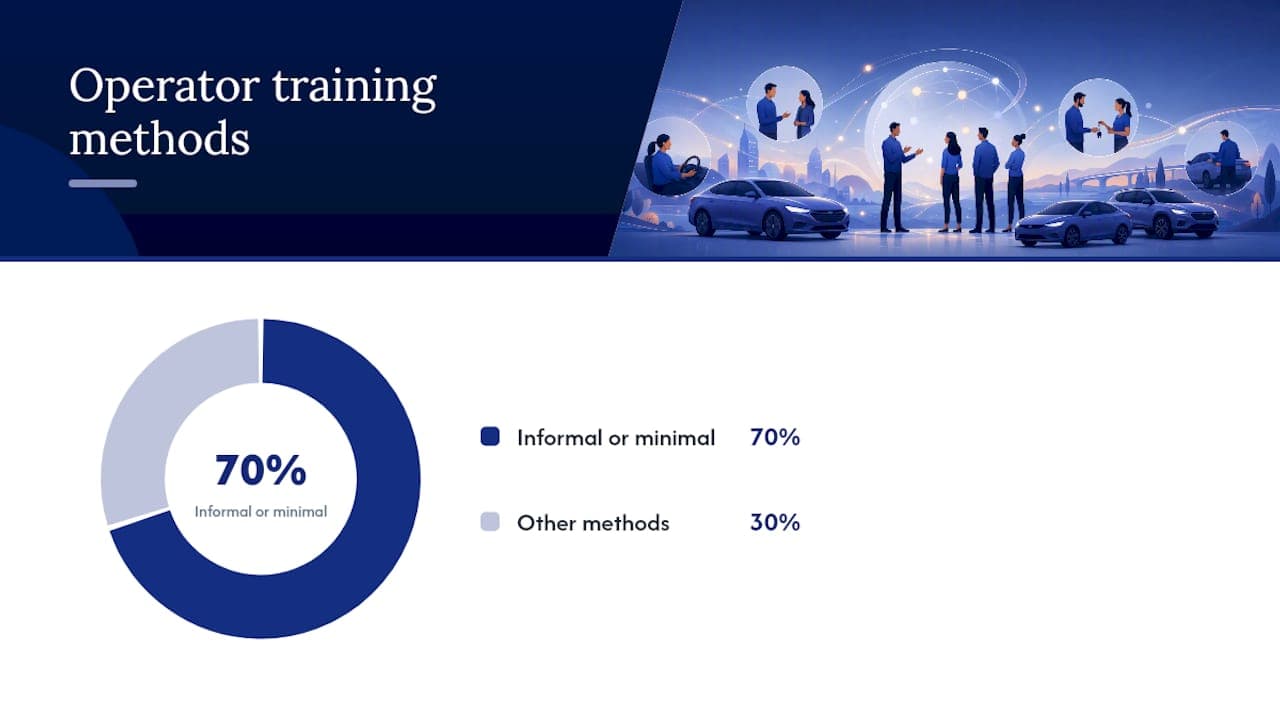
Seven in ten car rental operators still rely on informal or minimal training methods, which helps explain why so many rental businesses struggle to translate a software purchase into measurable efficiency gains. The software is rarely the bottleneck. The training around it usually is.
Which Training Track Fits Each Role on Your Team?
Different jobs use different parts of the system, so a one-size curriculum wastes time for everyone. An admin needs to understand permission structures and integration settings; a front-desk agent needs speed and confidence handling a line of customers. Building four or five short, role-specific tracks beats one long generic course that tries to cover everything for everyone.
Admin and manager essentials cover user provisioning, permission templates, rate configuration, and system-wide reporting. Sandbox tasks for this track should include creating a new user role from scratch, adjusting a rate plan mid-cycle, and generating a fleet utilization report. Admins also need enough familiarity with every other role's workflow to troubleshoot when something breaks at the counter.
Front-desk workflows center on speed under pressure. Practice scenarios should include a double-booking conflict, a customer showing up early for pickup, and a walk-in with no reservation during a fully booked weekend. Conflict resolution deserves dedicated practice time, since a front-desk agent who freezes during a dispute costs you both the sale and the customer's trust.
Fleet and maintenance tracks focus on vehicle status accuracy. Exercises should walk staff through logging a post-rental inspection, flagging a vehicle for service, and updating mileage and fuel status before the next reservation pulls that vehicle back into rotation. As fleets increasingly add electric vehicles, staff also need training on EV-specific customer questions around charging time, range anxiety, and how an EV drives differently from a gas vehicle. Skipping this leaves your front-desk team fumbling when a customer asks how far they can drive before needing a charge.
Revenue and pricing tracks teach staff to run rate checks against competitor pricing, build seasonal rate plans, and reconcile daily transactions against the system's revenue report. This track pairs well with a deeper look at dynamic pricing strategy for managers who want to move beyond flat seasonal rates.
Customer service templates should cover refund processing, dispute documentation, and how to handle a damaged-vehicle claim without escalating a frustrated customer further. Give staff a script and a decision tree, not just a policy document to reference mid-conversation.
- Admin: role provisioning, rate configuration, system-wide reports.
- Front-desk: booking modifications, conflict resolution, walk-in handling.
- Fleet/maintenance: inspection logging, status updates, service flagging.
- Revenue/pricing: rate plan creation, competitor checks, reconciliation.
- Customer service: refunds, disputes, damage claims.
Pro Tip: Pair a new front-desk hire with your most experienced agent for their first five live transactions instead of five sandbox transactions. Nothing replicates the pressure of a real customer waiting at the counter.
What Technical Setup Steps Prevent Onboarding Problems?
Most training failures trace back to a configuration mistake made in week one, not a gap in staff skill. Getting the technical foundation right before you start heavy training saves you from re-teaching workflows after a permissions error or a broken integration forces a mid-course correction.
Start with user roles built on least-privilege principles: give each person access to exactly what their job requires, nothing more. A front-desk agent does not need access to system-wide financial reports, and a fleet coordinator does not need permission to modify pricing. Overly broad access is not just a security risk; it also means untrained staff can accidentally break configurations meant for admins only.
Data import should follow a strict order:
- Vehicle and fleet records first (VINs, categories, status, location).
- Customer records second, if migrating from a spreadsheet or legacy system.
- Historical booking data third, if you want continuity for reporting.
- Rate tables and pricing rules last, once fleet and customer data confirm clean.
Validate each import stage before moving to the next. Pull ten random vehicle records and manually check them against your source data. A five-minute spot check catches a batch import error before it corrupts a week of bookings.
Minimum integrations to test before going live:
| Integration | What to test | Why it matters |
|---|
| Payment gateway | Process a test charge and a test refund | Confirms deposits and payouts settle correctly |
| GPS tracking | Confirm real-time location updates on one test vehicle | Verifies fleet visibility before scaling to the full fleet |
| Accounting sync | Push one transaction and confirm it lands correctly | Prevents reconciliation headaches at month-end |
For GPS specifically, testing before full deployment matters more than most managers expect, since hardware type affects both installation time and data reliability. A technical guide to fleet GPS systems covers the tradeoffs between hardwired and plug-in units, useful reading before you commit to outfitting an entire fleet.
Sandbox testing for high-risk workflows deserves extra time before launch. Run a simulated no-show, a same-day cancellation with a refund, and a vehicle swap due to mechanical issue. These are the scenarios that break untested configurations, and they are far cheaper to discover in a sandbox than during a live weekend rush. For a broader walkthrough of connecting payment processors, GPS providers, and accounting tools, a detailed integrations guide covers the sequencing in more depth.
How Do You Know If Training Is Actually Working?
Training effectiveness shows up in numbers, not in how confident people say they feel. Four KPIs give you a reliable read on whether your program is producing competent, independent users: daily active users by role, bookings processed per user, error rate per transaction type, and average time to complete key workflows like booking creation or contract generation.
Capture a baseline in week one, even if it is rough. You need a starting point to measure improvement against, and waiting for a "clean" baseline usually just means you never establish one at all.
- Track daily active users by role to spot who has stopped engaging with the system.
- Monitor bookings per user weekly to catch anyone still relying on a colleague to process transactions.
- Watch error rates on contract generation and payment processing, since these carry the highest cost when mishandled.
- Measure time-to-complete for a standard booking; a wide spread between staff signals uneven training, not just uneven skill.
Review cadence should follow a simple rhythm: weekly check-ins for the first month, then a formal 30-day review, then a 90-day review tied to broader business metrics like fleet utilization and revenue per available vehicle. A breakdown of how software adoption affects profitability is worth reviewing alongside your 90-day numbers, since training quality and revenue outcomes tend to move together.
Large-scale rollouts back this up. Enterprise pricing platform deployments that paired technology with deliberate change management achieved faster adoption and measurably better workflow outcomes than deployments that treated training as an afterthought. The pattern holds at any scale: pairing the software rollout with structured measurement, not just a launch date, is what separates teams that adopt quickly from teams that limp along for months.
Set thresholds that trigger remedial training automatically. If a staff member's error rate on contract generation exceeds double the team average after two weeks, that is not a performance problem to ignore. It is a signal to schedule a 15-minute refresher before a bad habit calcifies into a pattern.
What Mistakes Derail Car Rental Software Adoption?
Most adoption failures are predictable, and most have a fix that costs a manager an afternoon, not a budget line item.
Digitizing a broken process instead of fixing it first. Moving a messy manual workflow into new software just makes the mess faster. Map your actual booking, check-in, and maintenance workflows before configuring the system, and fix the obvious inefficiencies on paper first.
Manager disengagement. If leadership treats the rollout as an IT project rather than a business priority, staff notice and deprioritize it too. Assign a visible executive sponsor and at least one local champion per location who fields questions and models good habits.
Feature overload. Rolling out every advanced module in week one overwhelms new users and slows adoption of the basics. Phase advanced features (dynamic pricing rules, automated marketing triggers, detailed analytics) in after core workflows are second nature, and lock them from general access until then.
Staff turnover erasing institutional knowledge. A new hire six months in should not start from scratch. Keep onboarding materials current, and pair every new employee with a trained buddy for their first week of live transactions.
- Map workflows before configuring software, not after.
- Name an executive sponsor and a local champion at every location.
- Lock advanced features until core tasks are routine.
- Keep onboarding documents updated and assign a buddy to every new hire.
Pro Tip: Revisit your job aids every quarter. A one-page reference sheet written for version one of your rate structure becomes actively misleading after your first pricing update.
Organizational readiness, meaning clear decision rights over who owns pricing, who owns fleet status, and who resolves booking conflicts, tends to matter more than any single feature gap. Training that skips role clarity and jumps straight to button-clicking produces staff who can navigate a screen but freeze the moment a decision falls outside their assumed authority.
How Does Nomora's Onboarding Model Map to This Playbook?
An effective setup process often follows the principle of getting people into the system quickly, then layering role-specific depth on top. A typical setup may run 24 to 48 hours, covering account provisioning, fleet data import, and initial integration setup, matching the technical checklist's recommended steps.
Role templates in many car rental platforms mirror training tracks: administrators get configuration access, front-desk staff a streamlined booking interface, and fleet coordinators a focused dashboard. Such structures help managers avoid inventing role boundaries from scratch. Sandbox environments let new users complete mock bookings before handling real data.
A realistic first-month rollout using this approach looks like this:
- Days one to two: system setup, fleet import, admin and role provisioning.
- Days three to seven: front-desk and fleet staff complete sandbox mock bookings and inspection logging.
- Week two: live bookings begin under supervision, with error rates tracked daily.
- Weeks three to four: revenue and reporting training rolls out for managers, alongside a first 30-day KPI review.
For managers planning a full implementation, a step-by-step rollout guide walks through the sequencing in more detail, and the integrations resource covers connecting payment and GPS systems specifically.
What Managerial Habits Actually Drive Long-Term Adoption?
The research points somewhere most managers do not expect: adoption rarely fails because staff cannot learn the software. It fails because nobody keeps watching after week one. The teams that stick with new systems share a few behaviors that have nothing to do with the software itself.
Ownership matters more than talent. A manager who checks the dashboard daily for the first month sends a signal that this system is not optional. Visible KPI tracking, posted somewhere staff can see it, turns an abstract "use the new software" directive into a concrete target people can hit or miss.
Three tactical moves for week one: post error rates where staff can see them, hold a five-minute daily huddle to flag friction points, and fix the first broken workflow within 48 hours rather than adding it to a backlog. Rollouts that succeed tend to follow this pattern: fast fixes early, visible measurement throughout, and a manager who treats the first month as active coaching rather than a passive waiting period.
— Dizzy
Nomora: A Practical Option for Fast Onboarding and Scalable Training
If your team needs to move from spreadsheets to a working reservation system without spending weeks on setup, Some platforms get fleet data, role permissions, and payment integrations live quickly, enabling the training plan above to start soon after setup.

The role templates built into the platform—admin, front-desk, fleet, and revenue—match the training tracks described throughout this guide, which means you are not building permission structures and curricula from scratch at the same time. Explore how Nomora fits different rental business models on the use cases page, or get the full picture of platform capabilities on the product overview. If payment processing is your biggest current bottleneck, the automated payments page covers how deposits, refunds, and reconciliation work inside the system. Request a demo to see how a sandbox environment and role-based setup could shorten your own quick-start window.
Sources
FAQ
How long does user training for car rental software typically take?
Expect one day for system-wide orientation, one to two weeks for role-specific foundation training, and two to four weeks total before most staff reach full proficiency.
What is the fastest way to get new staff processing live bookings?
Run a mock booking end-to-end in a sandbox environment first; this single exercise, backed by evidence that focused quick-starts enable a first booking within 15 minutes, surfaces configuration problems before real customers do.
Which KPIs best measure whether training worked?
Track daily active users by role, bookings processed per user, error rate on contract and payment tasks, and average time to complete a standard booking.
Do different rental staff roles need different training tracks?
Yes. Admins need permission and configuration training, front-desk staff need speed and conflict-resolution practice, and fleet staff need inspection and status-update workflows, each requiring a distinct curriculum.
How does Nomora support fast onboarding for new rental teams?
Nomora typically completes setup, including fleet import and role provisioning, within 24 to 48 hours, letting managers start role-based training almost immediately after signing up.
Recommended