Most rental operations should migrate data in phases rather than one weekend switch. A phased approach lets active bookings finish safely in the old system while your team validates the new one, module by module. Start now with a full data audit and an export manifest. A platform with fast onboarding means the technical setup no longer has to be the bottleneck.
TL;DR:
- A thorough data audit should categorize fleet, reservation, customer, financial records, and documents to create a detailed export manifest before migration.
- Phased migration is safest for high-volume or seasonal operators, allowing validation of each module while active bookings continue on the old system.
- Test imports with actual reservation data in a sandbox, involving operations and finance staff to identify workflow gaps before going live.
- Keep the old system in read-only mode for at least 90 days after launch, completing reconciliations and exporting records before full decommissioning.
- Prioritizing clean source data through early auditing reduces downstream mapping, testing, and training complexity, making the whole migration faster and safer.
Table of Contents
What to Audit Before Any Rental Software Data Migration
A rental software data migration lives or dies on what you find during the audit, and this is the step most operators rush past. NexusRMS calls the audit the most skipped but most critical step in the entire process, and the reason is simple: dirty data goes in, and dirty data comes out, just faster.
Before you touch an import tool, inventory five categories:
- Fleet and vehicle records — VIN or chassis numbers, current status, maintenance history, and any linked GPS or telematics identifiers.
- Reservations and contracts — separate active bookings from historical ones, flag overlapping reservations, and note outstanding deposits.
- Customer records — hunt for duplicates, verify contact fields, and confirm which records hold required ID documents or stored payment tokens.
- Financial records — decide what stays in your accounting software versus what needs to live inside the rental management system (RMS).
- Documents — signed contracts, insurance certificates, and inspection photos, along with a plan for archiving anything you won't import directly.
The deliverable here isn't a feeling of readiness. It's a written export manifest with a field count for each category, so you know exactly what "done" looks like before you export a single file.
Big Bang, Parallel, or Phased: Which Migration Strategy Fits?
NexusRMS frames the decision around three approaches, and picking the wrong one is how a two week project turns into a two month headache. Each carries a different trade-off between speed and risk:
- Big bang — you cut over everything on one date. It's fast, but there's no fallback if something breaks mid switch, and it usually demands a full operational pause.
- Parallel run — old and new systems operate side by side for a set window. You get a safety net, but staff have to do double entry, which gets exhausting past a couple of weeks.
- Phased migration — you move one module at a time (fleet first, then reservations, then finance), validating each before moving to the next.
The right choice depends on your booking volume, how seasonal your business is, and how many integrations you need to test. A specialty vehicle operator with a quiet winter can often afford a big bang cutover. A multi-location car rental company running near peak season should lean phased or parallel, since phased migrations let active bookings complete in the old system while each new module gets validated on its own schedule. For most rental operators, phased wins simply because it fails safely.
Mapping Fleet, Reservation, and Finance Data for Import
Once you know what you're moving, the next job is translating it into a format your new platform understands. Expect to work with CSV exports, JSON files, or direct API pulls, depending on what your current system supports and what import templates the new vendor provides.
Field mapping is where most of the real work happens:
- Build a canonical field list (one name per data point) and map every old field to it, even ones you're not sure you'll use.
- Create a status translation table. As one migration analysis puts it, map "On hire" to "Out" and "In repair" to "Maintenance" explicitly, because a missed status mapping causes double bookings on day one.
- Document custom fields separately. They're the fields vendors forget to ask about, and they're the ones your staff built a workflow around.
- Rebuild your rate structure carefully: daily and weekly rates, seasonal pricing rules, and any discount codes tied to specific customer segments.
Reservations that straddle your cutover date need their own policy. The recommended approach is a carry-forward rule: lock the in-flight reservation in the legacy system, then create a linked record in the new system with a pointer back to the original and a reconciliation note. Payment reconciliation should follow the same logic. Nail down which system holds the "official" transaction record so your finance team isn't hunting for a missing deposit three weeks after go-live. Your deliverables at this stage: a completed mapping table, a handful of sample import files, and written notes on any transformation logic you had to invent.
How Do You Test a Rental Data Import Before Going Live?
Test imports catch the problems a spec sheet never will. Load a representative sample, not your whole database, into a sandbox environment and check that record counts match what your export manifest predicted.
From there, run structured user acceptance tests with the people who'll actually use the system daily. NexusRMS points out that role-based testing by operations and finance staff surfaces workflow gaps that a purely technical check will miss entirely, since a dispatcher notices a broken booking flow long before an IT audit would.
| Test area | Who signs off | What "pass" looks like |
|---|
| Fleet and vehicle status | Fleet manager | Every vehicle shows correct status and maintenance history |
| Reservation accuracy | Dispatch/ops lead | No double bookings, deposits match originals |
| Payment gateway sync | Finance lead | Transactions post correctly, no duplicate charges |
| GPS/telematics integration | Fleet manager | Live location data matches vehicle records |
| Customer notifications | Ops lead | Confirmation and reminder emails trigger correctly |
Set your rollback trigger before testing starts, not after something breaks. A common threshold: if more than a small percentage of sampled records fail verification, you pause and re-map before touching production data.
Pro Tip: Run your sandbox test with last month's actual reservation data, not sample data the vendor provides. Real bookings expose edge cases (multi-day rentals spanning weekends, one-way rentals, corporate accounts) that clean demo data never will.
Training Staff and Planning a Safe Go-Live Date
Technical readiness means nothing if your front desk doesn't know where the "check vehicle in" button moved. Schedule role-based training sessions rather than one generic walkthrough. Dispatchers need different screens than finance staff, and a single one-size-fits-all session leaves gaps in both.
- Build quick-reference guides for the five or six tasks each role performs daily.
- Pair new-system training with shadowing shifts, where experienced staff work alongside someone still learning the interface.
- Pick a quiet weekday morning for go-live, never a Friday afternoon or a date inside your peak season.
- Stage the cutover by location or fleet segment if you operate more than one site, rather than flipping every branch simultaneously.
Name one person as the help desk owner for the first two weeks, with a clear escalation path for anything they can't solve. Keep read-only access to the legacy system available during this window. Nomora's own onboarding resources walk through exactly this kind of staged rollout for teams moving off spreadsheets or legacy tools.
Decommissioning the Old System Without Losing History
Don't shut down your legacy platform the moment the new one goes live. NexusRMS recommends keeping the old system in read-only mode for a minimum of 90 days, exporting full archives in CSV or PDF format before you ever cancel a subscription.
- Run a reconciliation check at the 30 day mark, comparing payment records and active contracts between both systems.
- Run a second reconciliation at 90 days, closing out any remaining discrepancies before archiving.
- Export every document, contract, and financial record you're required to retain, in a format you can actually open five years from now.
- Cancel legacy subscriptions and licenses only after both reconciliation checks pass clean.
Rental data retention rules vary by state and by what a contract or insurer requires, so check your own obligations before you delete anything permanently.
What I'd Prioritize if I Were Running This Migration
The pitfall I see most often isn't technical. It's operators trying to replicate their old spreadsheet workflow inside new software instead of using the tools the new platform actually offers, which NexusRMS lists among the most common migration mistakes alongside migrating years of unnecessary historical data nobody will ever query again.
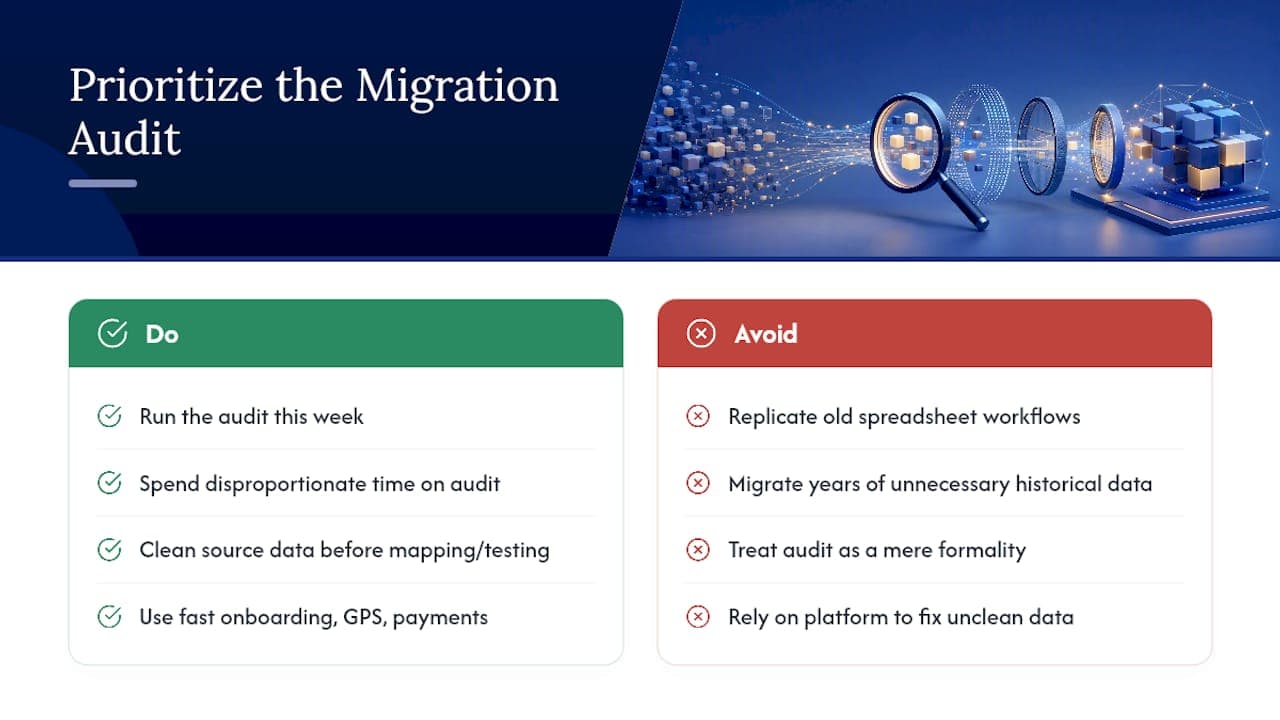
If you're staring at a migration project right now, the audit is where I'd spend the disproportionate share of your time. Everything downstream, mapping, testing, training, gets easier when the source data is clean. A platform with fast onboarding and built-in GPS and payment integrations removes real friction, but it can't fix data you never cleaned up.
Run the audit this week. Treat it as the whole project's foundation, not a formality to clear before the "real" work starts.
— Dizzy
How Nomora Shortens the Migration Timeline
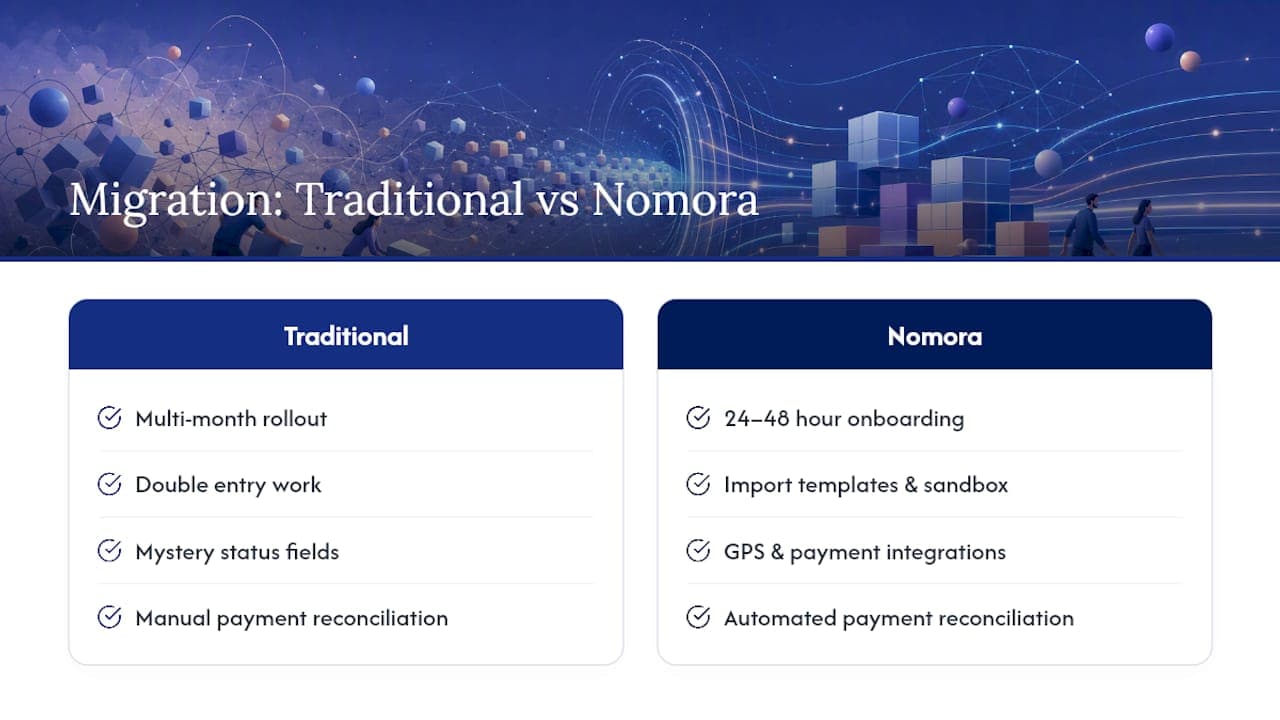
Nomora is the alternative to a drawn-out, multi-month rollout for rental operators tired of double entry and mystery status fields. Because onboarding runs 24 to 48 hours rather than weeks, and the platform ships with import templates, sandbox testing, and integrations for GPS tracking and payment gateways already built in, most of the mapping work described above gets a head start instead of a blank spreadsheet.

Nomora also connects the pieces most migrations stumble on: reservation data, fleet status, and payment reconciliation all live in one system built around conflict-free bookings rather than a patchwork of add-ons. If your finance team spends hours matching deposits by hand, the automated payment processing built into Nomora handles that reconciliation as part of the daily workflow instead of a monthly scramble. GDPR compliance and cloud based access mean your team can review migrated records from anywhere during the transition, not just from one office terminal.
Ready to see what your migration timeline could actually look like? Request an import checklist or book a demo to find out how fast your specific fleet and reservation data could move.
Sources
For a deeper phased checklist, see the NexusRMS migration guide. For vendor-specific setup steps, review Nomora's implementation rollout guide and integration guide.
- Switching Rental Software: A Data Migration Guide — NexusRMS
Recommended
Ready to streamline your car rental business?
Book 30 minutes with the founder. We set up everything in this guide on your own vehicles, and migrate you out of Excel for free.