The one action that closes most liability gaps is capturing the renter's or vehicle's declarations page at intake, tying it directly to a VIN, and setting an automated expiry alert. The declarations page, not a generic insurance ID card, is where policy limits, exclusions, and named vehicles actually live. Generic fleet cards don't hold up under audit. Start there, standardize intake, and let automation flag expirations before they become liability exposure.
TL;DR:
- Verifying and capturing the declarations page at intake links policy details directly to the vehicle and prevents liabilities from expired or invalid coverage.
- Staff must record comprehensive information, including policy number, vehicle coverage, limits, and exclusions, with timestamped verification to ensure audit readiness.
- Automating OCR extraction, VIN linking, expiry alerts, and exception routing reduces manual errors but still requires human review for ambiguous cases.
- Retaining insurance records for one to four years past policy expiry is crucial for regulatory compliance and audit defense, linking policies to registration data.
- A streamlined process includes prearrival uploads, on-site verification, system logging, and exception handling, all designed to minimize liability gaps during high-volume operations.
Table of Contents
Quick Operational Checklist: What Attendants Must Capture and Verify at Pickup
Every rental counter needs a repeatable capture routine, not a judgment call made under pressure while a customer waits. The declarations page carries the details that matter for a claim: policy number, effective dates, covered vehicles, lienholders, and limits, according to guidance from the Insurance Information Institute. An insurance card alone rarely shows exclusions.
At handover, attendants should capture:
- A clear photo or scan of the declarations page, not just the wallet-sized ID card
- Policy number, named insured, and insurer name
- Effective and expiry dates
- VIN or fleet schedule showing the vehicle is actually covered
- Coverage limits and any commercial-use endorsement or exclusion
- Lienholder information, if applicable
Three triggers should stop a release cold: an expired policy, a commercial-use exclusion with no supplemental endorsement, or a missing declarations page. Each one calls for a hold, a sale of supplemental coverage, or an outright refusal, documented on the spot.
Timestamp every capture and log which staff member verified it. That single habit turns a routine handover into evidence you can produce months later if a claim or audit ever asks who checked what, and when.
Step-by-Step Intake and Verification Workflow
A checklist only works if it's embedded in a process that survives a busy Saturday. Here's the sequence that holds up under volume:
- Prearrival collection. Ask renters to upload their declarations page through a reservation portal or email before they arrive. Validating coverage before the customer is standing at the counter saves time and avoids awkward on-the-spot refusals.
- On-site verification. Confirm the declarations page matches the vehicle being released: correct VIN, active coverage dates, adequate limits, and no commercial-use exclusion that would apply to the rental. Run a motor vehicle record check if your policy requires one.
- System entry. Attach the document image to both the reservation and the specific VIN, tag the key fields (policy number, expiry, limits), and set an automated alert ahead of the expiry date.
- Exception handling. When something doesn't match, route it to a review queue rather than letting an attendant decide alone. Options include a temporary hold, requiring supplemental coverage at the counter, or refusing release with a documented reason.
This structure matters because a renter's personal policy is often excess to your own coverage and may carry exclusions the renter didn't know about, according to New York's Department of Financial Services. Confirming coverage order before handing over keys is what protects your business when a claim gets contested later.
What to Store: Declarations Page vs. Insurance Card
The declarations page is the authoritative document. An insurance card confirms a policy exists; it doesn't show limits, exclusions, or which vehicles are actually scheduled. NAIC guidance confirms the declarations page lists policy numbers, effective dates, covered vehicles, and lienholder contact information, which is exactly what an adjuster or auditor will ask for.
Build your extraction template around these fields:
- Policy number and insurer name (plus NAIC company code, if listed)
- Named insured
- Effective and expiry dates
- VIN or a "fleet" mapping showing which vehicles the policy actually covers
- Coverage types and dollar limits
- Commercial-use endorsements or exclusions
- Lienholder name and contact details
Blanket or fleet policies deserve extra scrutiny. A master policy number alone rarely satisfies a VIN-level audit. Insurers sometimes issue a single blanket "fleet" ID that has to be paired with a separate vehicle schedule, and your records need to link that master policy to individual VINs and their registration periods, not just to the fleet as a whole.
Manual data entry is where insurance certificate tracking breaks down. Four steps are worth automating first: OCR extraction of declaration-page fields, automatic linking of policy numbers to VINs, expiry alerts with batch renewal reminders, and an exception queue that routes anything ambiguous to a human instead of letting it slip through.
Several tool categories cover these needs:
- Fleet and reservation platforms with built-in document capture
- Mobile intake apps for counter or curbside verification
- OCR services tuned for insurance and legal documents
- Motor vehicle record integrators for driver history checks
- Telematics and GPS integrations, such as Moto Watchdog, for ongoing vehicle tracking once a rental is underway
An integrated platform folds document capture, VIN linking, and expiry alerts into the same system that already handles reservations and contracts, with onboarding typically running 24 to 48 hours instead of weeks of manual setup. Centralizing records this way cuts the number of places a policy detail can get lost between counter, spreadsheet, and filing cabinet.
Pro Tip: Set your expiry alerts to fire 30 and 7 days before a policy lapses, not just on the expiry date itself. A single alert gives your team no room to chase a renter or reroute a vehicle before the paperwork goes stale.
Compliance, Retention, and Audit Readiness
Retention policy is where a lot of operators get sloppy, usually by deleting records the moment a policy expires. That's a mistake. Regulatory exposure often outlasts the policy itself, since audits and disputes can surface long after a rental period closes. A safer baseline is to keep records for the longest applicable period across every jurisdiction your fleet operates in, which commonly means holding files for one to four years rather than purging on expiry.
Tie every policy record to the vehicle's registration and rental period, not just to a customer file. Some state registration systems, including International Registration Plan filings, expect insurer names and policy numbers to be reconcilable against apportioned fee reporting, which means your insurance records and your registration records need to point to the same VIN.
For audit evidence, preserve:
- The original declarations-page scan, not a cropped screenshot
- Timestamped metadata showing when and how the document was captured
- The identity of the staff member who verified it
- Transaction logs tied to the specific reservation
- Any written communication about exceptions, holds, or refusals
A recent Colorado Supreme Court opinion on rental company insurance arrangements is a reminder of how tangled liability disputes between rental companies and third-party insurers can get. Clean documentation is often the difference between a fast resolution and a drawn-out legal fight.
Implementation Checklist and Timeline
Moving off spreadsheets doesn't require a quarter-long project. A realistic rollout looks like this:
- Days 1 to 7: Standardize the intake checklist, require declarations-page uploads at reservation or kiosk check-in, and train pickup staff on the hold-and-refuse triggers.
- Weeks 1 to 4: Turn on document storage and expiry alerting inside your fleet system, pilot it on a subset of vehicles, and map every master policy to its individual VINs.
- Ongoing: Run monthly spot audits on a sample of records, adjust validation rules based on what those audits catch, and enforce your retention policy consistently.
Most operators see the biggest jump in reliability in that first week, simply from forcing every attendant to look for the same document in the same place.
Responding to Discrepancies or Invalid Certificates During Verification
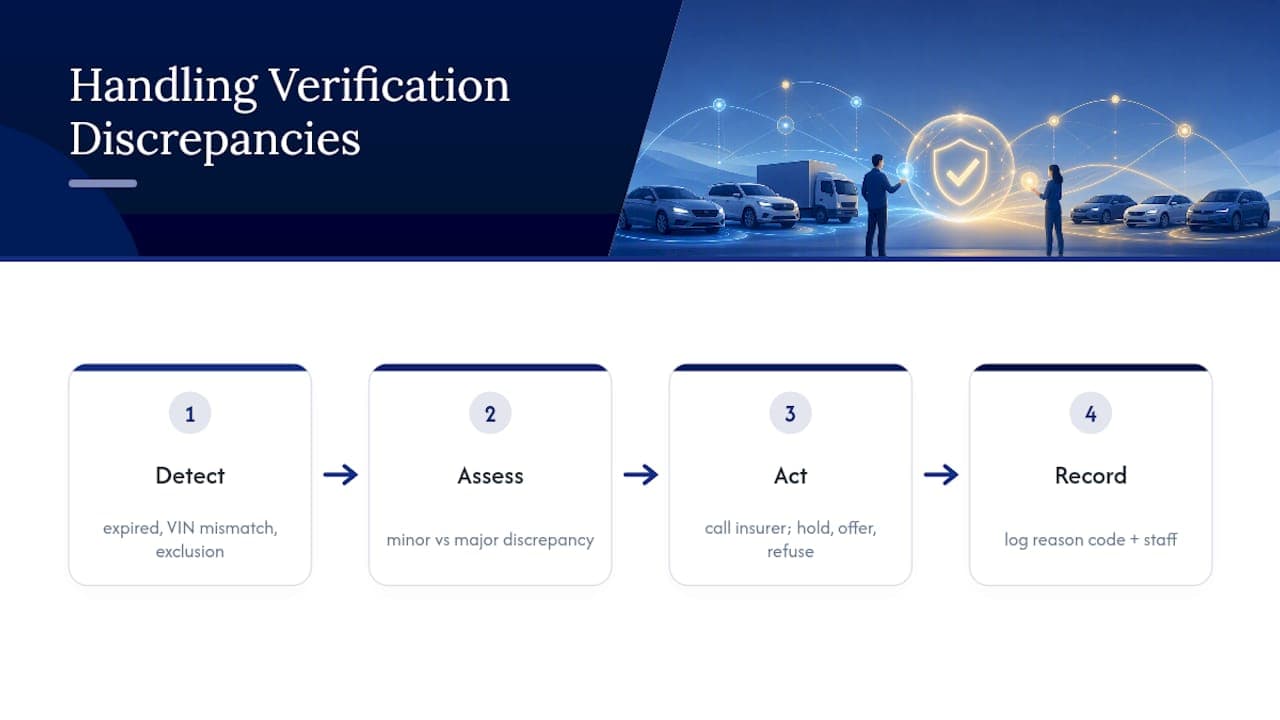
A mismatch at the counter is not a reason to panic, but it is a reason to stop and document. The most common discrepancies are a policy that expired days earlier without the renter noticing, a VIN on the declarations page that doesn't match the vehicle being handed over, or a personal auto policy that explicitly excludes commercial or livery use.
Ride-sharing and commercial-use coverage guidance from the Insurance Information Institute notes that personal auto policies frequently exclude for-hire or livery use altogether, which is exactly the kind of exclusion a rental transaction can trigger if the renter plans to use the vehicle for delivery or ride-share work.
When something doesn't check out, the response should be proportional and documented, not improvised. A minor date discrepancy might warrant a phone call to the insurer to confirm active status. A clear exclusion or an expired policy should trigger an immediate hold and an offer of supplemental coverage at the counter. Outright refusal to release the vehicle is appropriate when the renter can't produce a valid declarations page at all or when the named insured doesn't match the person picking up the keys.
Log every one of these exceptions with a reason code and the staff member's name attached. That log becomes your defense if a customer later disputes a refusal, and it's often the first thing an auditor asks to see when reviewing how consistently your team applies its own rules.
Integrations With DMV or Regulatory Bodies for Compliance Checks
Insurance certificate tracking doesn't operate in isolation from your registration and licensing obligations. Many state vehicle registration processes, including International Registration Plan applications, require insurer names and policy numbers as part of the filing, which means your insurance records and your DMV-facing paperwork need to agree with each other.
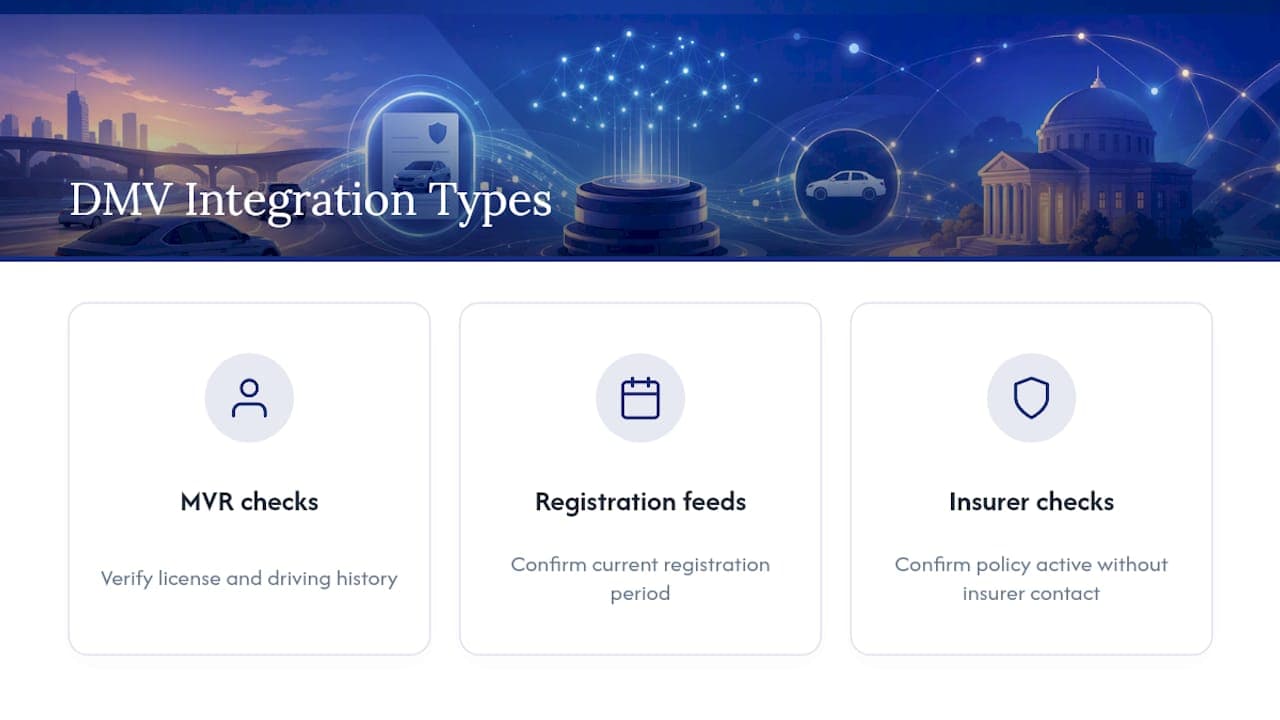
Where integrations exist, they typically fall into a few categories: motor vehicle record checks that verify a renter's driving history and license status, registration data feeds that confirm a vehicle's current registration period, and, in some states, insurer verification systems that let regulators or law enforcement confirm a policy is active without contacting the insurer directly.
Practically, this means your fleet software should be able to export or match records in a format that lines up with what a DMV or apportioned-fee auditor expects: policy number, effective and expiry dates, and a clear VIN linkage. If your system stores insurance data in a format that only makes sense internally, reconciling it against a state audit request turns into a manual scramble. Building that linkage in from the start, rather than retrofitting it during an audit, is what separates operators who pass reviews quickly from ones who spend weeks pulling records by hand.
State regulators vary in how much direct system integration they offer, so it's worth checking your own state insurance department's guidance on what documentation format they expect before an audit ever happens, not during one.
Why Nomora Prioritizes Declarations-Page Capture and VIN Linkage
Most liability gaps trace back to convenience winning over diligence: a card scanned instead of a declarations page, a fleet number typed instead of a VIN match. Automation doesn't remove diligence. It just makes the diligent path the fast path, so staff stop choosing the shortcut. That's the gap worth closing first.
— Dizzy
Get Your Fleet's Insurance Records Off Spreadsheets
Nomora is the alternative to spreadsheets and loose file folders for tracking rental fleet insurance. Instead of hunting through email attachments for a declarations page, your team gets document capture, field extraction, VIN linking, and automated expiry alerts built into the same system that already runs your reservations and contracts.

GPS integrations round out the picture once a vehicle leaves the lot, and onboarding typically takes 24 to 48 hours rather than weeks of manual data migration. Every plan includes the same core feature set, so smaller operators aren't locked out of automation while they scale.
If you're running a handful of vehicles, the Starter plan runs $45 per month. Larger fleets tend to fit better under the Business plan at $2.80 per month per vehicle or the Fleet plan at $2.20 per month per vehicle. Visit the pricing page to match a plan to your fleet size, or explore the car rental software overview to see how document tracking fits alongside reservations and contracts.
Sources
FAQ
What Is the Most Important Insurance Document to Track?
The declarations page, not the insurance ID card, because it lists policy limits, covered vehicles, and exclusions that a card doesn't show. NAIC guidance confirms this is the document insurers and adjusters rely on for coverage disputes.
How Long Should Rental Companies Keep Insurance Records?
Keep records for the longest applicable retention period across every jurisdiction your fleet operates in, commonly one to four years past expiry. Purging files immediately when a policy lapses can create audit exposure if a claim or registration review surfaces later.
Can Automation Fully Replace Manual Insurance Verification?
No. Automation handles OCR extraction, VIN linking, and expiry alerts reliably, but ambiguous cases like a commercial-use exclusion or a mismatched VIN still need a human in an exception queue. Platforms like Nomora are built around that split: automate the routine, flag the exceptions.
What Happens if a Renter's Personal Policy Excludes Commercial Use?
The rental should be held or the vehicle should be refused until the renter secures supplemental coverage. Personal auto policies frequently exclude for-hire or commercial use, according to Insurance Information Institute guidance on ride-sharing coverage.
Does Nomora Integrate With GPS or Telematics Systems?
Yes, Nomora supports GPS integrations for ongoing fleet visibility alongside its document capture and alerting tools. Pricing details for each plan are available on the pricing page.
Recommended