Most rental-software rollouts stumble not because the technology fails, but because teams rush scope, inherit dirty data, skip end-to-end integration testing, undertrain staff by role, and treat go-live as the finish line. The fix is a single discipline: balance technical configuration with structured change management, grounded in ADKAR-based planning, and prove the approach with a short pilot before scaling across your fleet.
TL;DR:
- Set measurable targets before configuration, document current workflows, and involve accounting, IT, fleet, and reservation staff early to catch permission and reconciliation gaps.
- Clean records under a named data owner, then reconcile a test migration line by line, checking deposits, refunds, account history, and general ledger postings.
- Test the full reservation lifecycle and payment exceptions, including refunds, chargebacks, webhook retries, and failed payments; document rollback steps and assign a support owner.
- Train reservation, fleet, finance, and management staff by role, then pilot with one team or location and revise materials before expanding.
- For the first six to twelve weeks, track adoption by role, booking errors, reconciliation exceptions, reservation time, payment failures, and support volume.
Table of Contents
1. Eight common mistakes to check before you roll out
Before diving into root causes, run through this list and flag which ones apply to your plan.
- Unclear outcomes: no measurable goal means no way to judge success; the project lead should own this before kickoff.
- Missing stakeholders: leaving out accounting or fleet staff creates reconciliation gaps later; the implementation manager should confirm sign-off from every department.
- Rushed timeline: compressing testing invites bugs at the worst time; operations leadership should set the pace.
- Over-customization: heavy custom workflows delay launch and complicate upgrades; the system administrator should default to standard configuration first.
- Dirty data: migrating duplicate or outdated records breaks reporting from day one; a designated data owner should clean records before transfer.
- Incomplete integration testing: a connected payment gateway is not a tested one; IT or the integration lead should verify full transaction cycles.
- Insufficient role-based training: a generic feature tour leaves staff unsure how to handle exceptions; department managers should own task-specific training.
- Measuring only go-live: declaring victory at launch ignores adoption and error trends; leadership should track metrics for weeks afterward.
2. Planning and scope mistakes: setting measurable outcomes and involving the right teams
Vague goals are the root of most failed rollouts. Instead of aiming to "modernize operations," define a specific, measurable target, such as cutting booking errors by a set percentage or shortening reservation creation time. Document your current workflows before you touch any configuration screen, since you cannot streamline a process you have not written down.
Early cross-functional involvement matters more than most teams expect. Prosci's ERP implementation research found that people and change management made up the largest category of recommended actions in surveyed projects, and that involving only operations while skipping accounting, IT, and front-desk staff tends to surface permission errors and reconciliation problems after launch rather than before it.
Avoid over-customizing early. Start with standard workflows and layer in custom rules once your team has lived with the base system.
A workable sequence looks like this:
- Define measurable outcomes.
- Document current workflows.
- Map required integrations.
- Build a sandbox configuration.
- Run a limited pilot.
Pro Tip: Write your success metric down before you request a demo. A measurable success metric keeps the whole rollout honest.
3. Data migration mistakes and a short data checklist
Legacy spreadsheets and outdated customer records do not improve by moving to a new platform. They just become faster to find and harder to trust. Assign a data owner who sets standards for formatting, duplicate handling, and required fields before migration begins, and clean records against those standards rather than copying them as-is.
Migrate a test copy first and reconcile it line by line against your legacy system, paying particular attention to deposits, refunds, and accounting mappings, since these are the records most likely to carry hidden errors. Prosci's ADKAR-based guidance treats this reconciliation step as part of the same sequence that includes defining outcomes and mapping integrations, not a separate afterthought.
Before cutover, confirm:
- Sample reservations migrated with correct dates, rates, and vehicle assignments.
- Deposits and refunds match legacy totals.
- Customer account merges did not duplicate or drop history.
- General ledger postings align with your chart of accounts.
Poor data migration carries a real cost beyond inconvenience: incomplete or inaccurate records erode staff trust in the new system and leave reports unusable right when managers need them most, a pattern Prosci's ERP research ties directly to stalled adoption.
4. Integration and testing mistakes: what to verify beyond "it connects"
A green status light on your payment gateway or GPS feed tells you almost nothing about whether the integration will hold up under real use. Test the complete reservation lifecycle, including creation, modification, cancellation, extension, and vehicle substitution, and confirm each action posts correctly to accounting and updates fleet or GPS status, a verification approach IBM's integration troubleshooting documentation recommends ahead of any cutover.
Payment flows deserve the same scrutiny:
- Authorization and capture complete correctly under normal conditions.
- Refunds and chargebacks route back to the right account.
- Webhook retries do not create duplicate charges or bookings.
- Failed payments trigger visible alerts rather than silent errors.
Simulate messy, realistic scenarios too: overlapping reservations, late returns, offline mode, and duplicate webhook events. Document a rollback plan for each integration and name a support owner responsible for it. Our integrations guide walks through connecting common payment gateways and GPS trackers in more detail.
Pro Tip: A successful connection test and a successful transaction test are not the same thing. Run both before you trust the integration with live bookings.
A single feature walkthrough rarely prepares staff for real work. Reservation agents, fleet staff, finance teams, and managers each use the system differently, so training should follow that split rather than a one-size-fits-all demo. Prosci's adoption research frames this role-based, task-based approach as essential precisely because staff can understand the interface and still stumble on exceptions like refunds or vehicle substitutions if ownership of those processes was never clarified.
Budget time and attention for the less visible parts of change management:
- Sponsor communications that explain why the change is happening.
- Stakeholder engagement sessions where staff can raise concerns before launch.
- Reinforcement activities in the weeks after go-live, not just during training week.
- A clear support channel for questions that surface once real bookings start flowing.
Pilot with one team or location first, gather feedback, adjust training materials based on what actually confused people, then scale to the rest of your operation.
6. Go-live and post-go-live mistakes: what to measure after cutover
Go-live is a milestone, not a finish line. Prosci's adoption guidance identifies user adoption rate as a critical indicator precisely because the benefits of new software depend on staff actually using it in daily work rather than falling back on old habits or spreadsheets.
Track these in the first six to twelve weeks:
- Adoption rate by role and department.
- Booking and data-entry error rates.
- Reconciliation exceptions between payments and accounting.
- Time to create or modify a reservation.
- Payment failures and support ticket volume.
Review these numbers during stabilization, then again after your first round of fixes. Keep a named support contact and a documented rollback plan ready, informed by whatever issues your pilot surfaced earlier.
7. Backup and disaster recovery planning during implementation
Implementation is the riskiest window for data loss, not because the new system is unreliable, but because two systems and multiple data transfers are in motion at once. Before migration begins, confirm that your legacy system's data is backed up independently of the migration process itself, so a failed transfer never leaves you without a clean source to retry from.
During the transition, schedule automated backups of your new system's database at intervals tight enough to limit how much work you could lose if something fails mid-rollout, including during the pilot and cutover. Confirm that backup files are tested by actually restoring a sample, not just generated and stored.
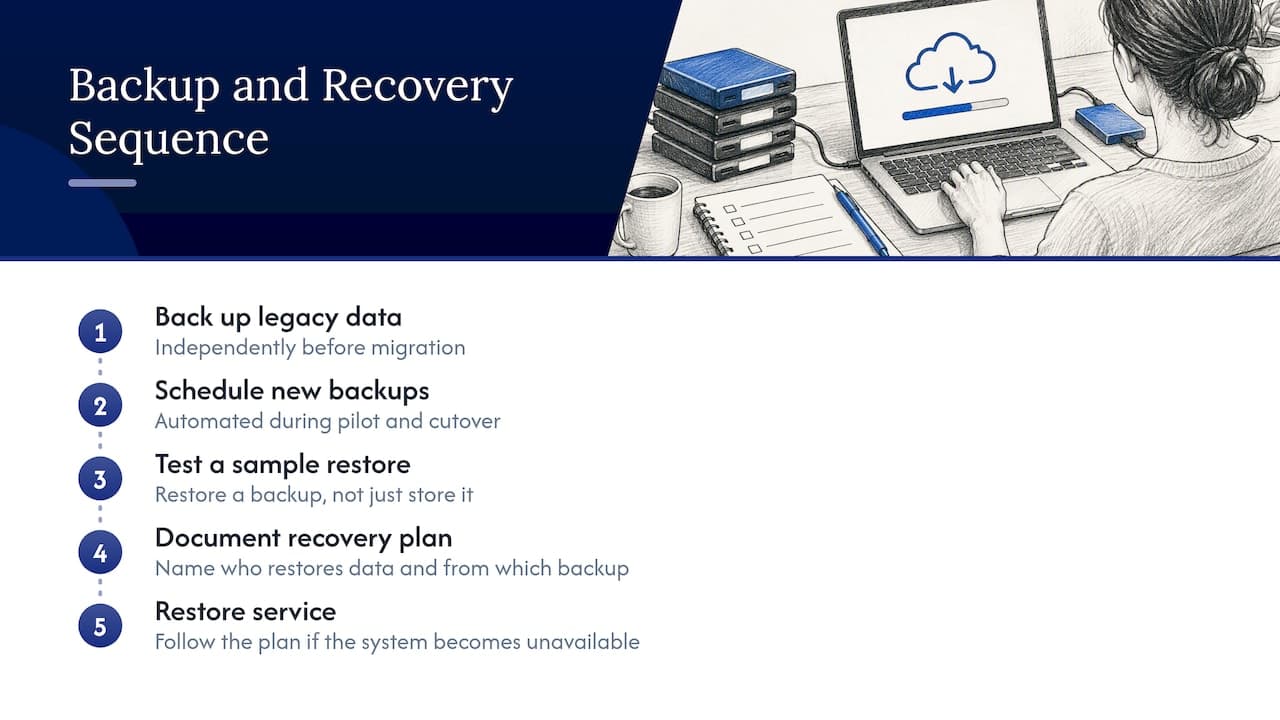
Document a disaster recovery plan that names who restores data, from which backup, and within what timeframe if the new system becomes unavailable during a shift. This matters most in the first weeks, when staff are still building muscle memory with the new workflow and a prolonged outage would push them straight back to spreadsheets.
Confirm your provider's uptime and data protection commitments in writing, including how customer data is protected during the transition period, since compliance obligations around customer information do not pause during implementation. A documented recovery plan, tested before go-live, helps keep a technical hiccup from becoming a trust problem with your staff and customers.
8. Our recommendation: run the pilot before you scale
Balancing technical setup with change management is not optional work you get to if time allows. It is the difference between a rollout that sticks and one that quietly reverts to spreadsheets within a month. Our strongest recommendation is a focused pilot: migrate a small, representative dataset, run transaction scenarios end-to-end, and train that pilot group by role rather than by feature tour. Fast onboarding claims only mean something if you use the time well, and a tight pilot is exactly how to use it.
— Dizzy
How Nomora helps rental teams avoid these mistakes
We built Nomora to centralize reservations, fleet tracking, contract generation, and payments in one system, which removes the spreadsheet handoffs where most reconciliation errors creep in. GPS tracking and payment processing are integrated rather than bolted on, so the end-to-end testing this guide recommends happens against a system designed to support it, not around it.

We're built for fast onboarding, with rental businesses able to get operational quickly, which gives you room to run a real pilot instead of rushing straight to full-fleet cutover. Every plan includes full feature access with no hidden fees, so testing integrations during your pilot does not mean paying extra to explore them. If you manage a small independent fleet or a larger franchise network, our use cases by business type show how teams structure their rollout, and our automated payments page covers how payment processing fits into daily operations. Compare plans, including Starter at 45 EUR per month and Business at 2.80 EUR per month per vehicle, on our pricing page, or reach out for a demo to see how a pilot would look for your fleet.
FAQ
What is the biggest mistake rental businesses make during software implementation?
The most common failure is prioritizing technical configuration while skipping change management entirely. Prosci's ERP research found people and change management activities made up the largest category of recommended actions in surveyed projects, ahead of technical fixes.
How long should a rental software pilot run before full rollout?
A pilot should last long enough to migrate a test dataset, run end-to-end transaction scenarios, and train a limited group by role. This window lets you catch integration and data issues before they affect your full fleet.
Which teams should be involved in a rental software rollout besides operations?
Accounting, fleet or maintenance staff, front desk or reservation agents, and IT should all review workflows early. Prosci's research notes that leaving out any of these groups tends to surface permission and reconciliation problems later rather than during planning.
What should operators measure after go-live?
Track adoption by role, booking and data-entry error rates, reconciliation exceptions, time to create or modify a reservation, and payment failures. Prosci's adoption guidance treats user adoption rate as a critical indicator since software benefits depend on staff actually using it daily.
How much does Nomora cost for a small rental business?
Our Starter plan is priced at 45 EUR per month, while Business and Fleet plans scale per vehicle at 2.80 EUR and 2.20 EUR per month respectively. Current Enterprise pricing is on our pricing page.
Sources
Recommended