The reliable model for automating deposits is pairing pre-authorization holds with card tokenization inside your rental management platform. This combination lets you skip manual refund processing on clean returns, recover funds after an authorization expires on longer rentals, and keep your accounting reconciled without a spreadsheet in sight. Operators who set it up correctly cut administrative work per rental close to zero.
TL;DR:
- Accurate deposit automation relies on pairing pre-authorization holds with tokenization and requires proper setup of hold amounts based on vehicle risk profiles.
- Tokenization enables post-rental charges after holds expire, but merchant-initiated transactions must be well-documented to prevent disputes.
- Rolling out a deposit automation system should be phased through testing on limited fleet segments to optimize hold amounts and inspection procedures.
- Maintaining a detailed ledger for holds, capturing timestamped photos, signed documents, and consistent reconciliation is crucial to prevent chargebacks and procedural errors.
- Vendors must support specific capabilities, such as flexible hold management and real-time webhook notifications, to ensure the automation functions smoothly.
Table of Contents
How Pre-Authorizations, Captures, and Releases Work
A pre-authorization hold reserves funds on a customer's card without moving a cent. That distinction from an immediate charge is what makes pre-auth holds the backbone of deposit automation: you never process a refund on a clean return because you never took the money in the first place. Compare that to charging a flat deposit upfront, which forces you to run a refund transaction on every single rental, even the ones with zero damage.
Once the hold is in place, you have three paths:
- Capture in full when damage or extra charges justify taking the entire held amount.
- Capture partially when a smaller fee (a cleaning charge, a missing fuel top-up) applies and the rest should release back to the customer automatically.
- Release the hold when the vehicle comes back clean, freeing the customer's funds usually within a few business days depending on their bank.
Card networks don't hold funds indefinitely. Visa and Mastercard set standard authorization windows that are shorter than many rental durations, though extended windows of up to 30 or 31 days exist for qualifying rental transactions. That gap between a short standard hold and a longer rental period is exactly why you need a fallback for multi-week bookings, which brings us to tokenization.
Tokenization and What to Do When a Hold Expires
Tokenization solves the problem pre-authorizations can't: what happens when the hold expires before the car comes back. Instead of storing raw card numbers, your payment processor generates a secure token tied to the customer's card, held in a PCI-certified vault. That token lets you run a merchant-initiated transaction after the rental ends, whether the original hold is still active or not.
The distinction between merchant-initiated and customer-initiated transactions matters for your paperwork, not just your payment stack:
- Customer-initiated transactions happen when the renter is present and actively approving the charge, like a point-of-sale payment at pickup.
- Merchant-initiated transactions happen after the customer has left, using the stored token, and require documented consent captured at signing.
Every merchant-initiated charge carries dispute risk if the customer doesn't recognize it later. Clear bank descriptors and a rental agreement that spells out exactly when and why a post-rental charge might occur go a long way toward preventing that.
Pro Tip: Store the token at check-in, not check-out. If you wait until return to capture card details, you lose the recovery option entirely on any authorization that has already expired.
How to Set Up Deposit Automation Step by Step
Rolling out deposit automation works best as a phased build, not a single flip of a switch. Here's the sequence that keeps you from breaking bookings mid-rollout.
- Set deposit amounts by vehicle category and duration. A compact sedan on a two-day rental doesn't carry the same risk profile as a luxury SUV on a two-week booking; your hold amounts should reflect that.
- Define partial-capture thresholds. Decide in advance what dollar amount triggers a full review versus an automatic partial capture, so front-line staff aren't guessing case by case.
- Configure pre-auth rules in your rental platform. Set the hold window, the automatic release trigger for clean returns, and where tokens get stored for post-rental recovery.
- Build mandatory inspection evidence into intake and return. Timestamped photos and a signed digital inspection form at both ends of the rental are non-negotiable, since documented evidence is what wins a dispute later.
- Design the exception approval flow. Route any capture above a set dollar threshold through a second approver, and put a clock on how long staff have to respond to a disputed charge.
- Draft your customer communication templates. Renters should know the hold amount and timing before they sign, not discover it as a surprise line item on their statement.
- Pilot on a limited slice of your fleet. Run automation on one vehicle category or one location first, track your exception rate and average time-to-resolution, then adjust deposit amounts and inspection steps before rolling out fleet-wide.
Operators who skip the pilot step tend to discover their deposit amounts were wrong only after a wave of customer complaints. A pilot on a limited slice of your fleet over several weeks gives you enough volume to spot problems without exposing your whole operation to a bad configuration.
Reconciling Holds, Refunds, and Disputes
Every automated hold needs a paper trail, even when nothing goes wrong. Build a holds ledger that records the authorization ID, booking ID, vehicle ID, hold amount, timestamp, and expiry date for every single transaction. Without that ledger, matching a bank statement line back to a specific booking becomes guesswork the moment your volume climbs past a handful of rentals a week.
Daily reconciliation should be routine, not reactive:
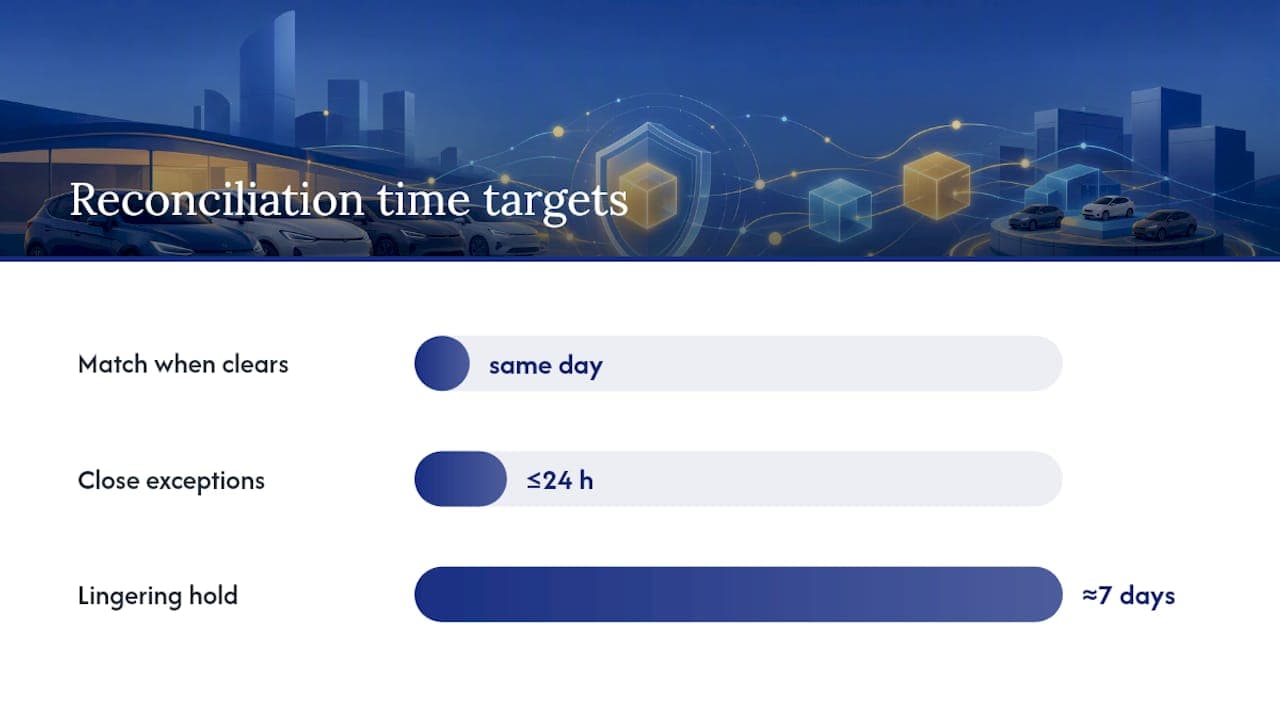
- Match every captured or released hold against its booking record the same day it clears.
- Generate an exception report for anything that didn't auto-match, and assign someone to close it out within 24 hours.
- Automate what you can of this matching inside your rental management platform rather than exporting to a spreadsheet.
When a customer disputes a capture, your documentation determines the outcome more than your argument does. Keep timestamped photos, the signed rental agreement, and a clear incident note tied to that specific booking ID, and make sure your bank descriptor identifies your business by name, not a generic processor code that confuses the cardholder.
The pitfalls that trip up most fleets are procedural, not technical: voids processed late so a hold lingers on a customer's statement for a week longer than it should, captures attempted after the authorization already expired, or an audit trail with a gap because someone handled an exception manually and forgot to log it. Each one is preventable with the ledger discipline described above, and each one is a common reason chargebacks climb even when the underlying rental went fine.
What to Require From Your Payment and Rental Software
Not every rental platform can actually run the workflow described above. Before you commit to a vendor, check for a specific list of capabilities rather than taking a sales deck's word for it.
- Pre-authorization management with support for full capture, partial capture, and automatic release.
- Tokenization and vaulting certified to PCI Level 1, so post-rental charges don't require you to touch raw card data.
- Automated void handling that corrects itself if a release doesn't process cleanly the first time.
- Webhook events that fire on hold creation, capture, and release, so your booking system and payment processor stay in sync in real time.
- API access for booking-to-payment mapping, plus reporting and export tools your accounting team can actually use.
Ask any vendor for a sandbox environment before signing anything. A platform with strong payment integrations should let you test the full authorize, capture, release cycle without touching a live customer card.
Pro Tip: Ask about hold-release timing SLAs specifically. A vendor that can't commit to a release window in writing is telling you, indirectly, that their automation isn't as automated as the pitch implies.
What Operators Get Wrong About Automating Deposits
The efficiency gain from pre-auth automation is real, but it's not evenly distributed. Fleets that switch from flat deposits to holds see the administrative cost of a clean rental drop close to zero, because there's no refund to process and no phone call to field about "when do I get my money back." That's the win everyone expects.

What surprises most operators is that the software isn't the hard part. Inspection discipline is. If your staff skip the timestamped photo at return because the lot is busy, you lose your best defense the moment a customer disputes a capture. The platform can automate the hold; it can't automate someone actually taking the picture.
Migrate in stages. Pilot one vehicle category, watch your exception rate for a month, and only then expand. Fleets that flip the switch fleet-wide on day one tend to discover their deposit amounts were wrong the hard way.
— Dizzy
How Nomora Puts This Workflow to Work for Your Fleet
Building this entire stack from separate vendors, a payment gateway here, a document tool there, a spreadsheet holding it all together, is exactly the kind of overhead deposit automation is supposed to eliminate. Nomora runs pre-authorization rules, token storage, timestamped inspection photos, and reconciliation reporting inside a single rental management platform, so your team configures the workflow once instead of stitching four systems together every time a rental closes.

Setup typically takes 24 to 48 hours, including your payment gateway connection, so a pilot on a portion of your fleet doesn't mean a month of onboarding before you see results. Fleet managers running larger operations can see how the same holds-and-tokenization model scales in the fleet management software built for 50 or more vehicles. If you're ready to see the pre-auth and capture workflow running against your own booking data, request a demo and bring your current deposit policy with you.
Sources
Recommended
Ready to streamline your car rental business?
Book 30 minutes with the founder. We set up everything in this guide on your own vehicles, and migrate you out of Excel for free.