Custom fields are extra data slots you add to reservations, vehicles, customers and corporate accounts when the standard fields in your rental software do not cover something your business needs to know. A luxury operator might record a chauffeur-delivery window. A corporate fleet manager might record a cost center. A small local agency might record which tire set is on which car. The fields themselves are easy. The hard part is choosing the few that earn their place, naming them consistently and keeping the data clean. This guide covers that, and why the data belongs in one connected platform rather than in side spreadsheets.
TL;DR
- A custom field is worth adding only if someone will filter, report on, bill from or act on it. If nobody will, skip it.
- Choose the field type deliberately: dropdowns and yes/no fields keep data consistent, free text invites typos that break reports.
- Start with 10 to 15 fields across reservations, vehicles, customers and corporate accounts, then review them quarterly.
- Collect only the personal data you need, and keep sensitive fields visible to the staff who need them.
- Fields scattered across spreadsheets drift apart. Fields inside the system that runs bookings, contracts and payments stay connected to the work.
Table of Contents
What custom fields are, in plain terms
Every rental platform ships with standard fields: renter name, pickup date, vehicle plate, daily rate. A custom field is one you define yourself. You give it a label (for example "Delivery address"), a type (text, number, date, dropdown, yes/no) and decide where it appears.
Think of the software as the central nervous system of your operation: every signal from the counter, the lot and the customer passes through it. Custom fields are the extra nerve endings that let it register what is specific to your business. Without them, that information ends up in a notes box, a sticky note or a personal spreadsheet, where it cannot be searched or reported on.
You need them when you catch yourself doing any of these:
- Typing the same detail into a free-text notes box on every booking.
- Keeping a second spreadsheet just to track something about cars or clients.
- Being unable to answer a simple question, such as "which bookings this month were airport deliveries?", without reading contracts one by one.
Which fields are worth adding
The test is simple: who will use this value, and when? A field earns its place if it drives a decision, an invoice, a report or a handoff between staff. Below are practical starting points by record type. Treat them as a menu, not a checklist.
Reservation fields
Reservations are where most operators first feel the gap.
- Booking source (dropdown: website, phone, walk-in, partner, repeat client). It shows which channels bring revenue.
- Delivery or collection required (yes/no) plus delivery address (text) and delivery window (date/time). Essential for luxury and specialty rentals where the car goes to the client.
- Flight number (text). Useful when pickup times follow arrivals.
- Purpose of rental (dropdown: leisure, business, wedding, film shoot, insurance replacement). It helps with pricing and insurance conversations.
- Authorized additional drivers (number) so the counter can check against the contract.
- Special instructions (long text), kept for true exceptions only.
Vehicle fields
Vehicle data is where operational problems hide. Standard fields usually cover make, model, plate and VIN. Consider adding:
- Tire type or set (dropdown: all-season, winter, summer). Handy in states where winter tires or chains matter.
- Toll transponder installed (yes/no) and transponder ID (text).
- Child seat or ski rack compatible (yes/no).
- Acquisition cost and acquisition date (number, date) for per-vehicle profitability.
- Next inspection due (date), so a view can show cars approaching a deadline.
- Vehicle class for marketing (dropdown), for example "Exotic", "Executive", "Van", used to group cars in reports.
- Driver age restriction (number) for performance cars that require an older minimum age.
If your cars carry equipment such as child seats, GPS units or cargo accessories, pair these fields with a handover routine. Our docs on equipment checklists show how check-in and check-out records tie to each rental.
Customer fields
Customer fields are the most sensitive, so be selective.
- Customer type (dropdown: individual, corporate, insurance, tourist).
- Preferred contact method (dropdown: phone, email, text).
- Marketing consent (yes/no) with a date field recording when it was given.
- Loyalty or VIP tier (dropdown), useful for luxury clients who expect recognition.
- Referral source (dropdown).
Resist the urge to store anything you do not use. The Future of Privacy Forum's white paper on data minimization describes the principle that organizations should limit personal data to what is reasonably necessary for the purpose they disclosed. For a rental company, that means every personal field should have a reason you could explain to the renter.
Corporate account fields
For fleet managers and businesses renting to companies, these fields turn a customer record into an account:
- Cost center and purchase order number (text). They stop invoices from bouncing back.
- Authorized bookers (contact or text), so only approved employees reserve.
- Billing terms (dropdown: pay at return, net 15, net 30).
- Account manager (user), so every company has a named internal owner.
- Contract rate tier (dropdown), so staff apply negotiated rates consistently.
- Vehicle replacement policy (text), for accounts with service-level promises.
Fleet operations fields
For depots and fleet managers:
- Home location or branch (dropdown).
- Assigned department or driver (dropdown or user), for internal corporate fleets.
- Fuel or charging type (dropdown: gas, diesel, hybrid, EV) and connector type for EVs.
- Cleaning status (dropdown: clean, needs wash, detailing).
- Damage on file (yes/no) linked to your inspection records.
How to design fields that stay useful
Most custom field problems are design problems made in the first week. Five habits prevent nearly all of them.
1. Pick the right field type
The type decides how reliable your data will be.
| Type | Best for | Risk if misused |
|---|
| Dropdown | Categories with a known list (source, tire type, tier) | Too many options make staff pick "Other" |
| Yes/no | Simple conditions (child seat compatible, delivery needed) | Hides nuance, so use a dropdown when there are three states |
| Number | Costs, counts, mileage thresholds | Storing units in text breaks totals |
| Date | Inspections, consent, expiry | Using text means no sorting or reminders |
| Short text | Identifiers (PO number, transponder ID) | Typos make records impossible to match |
| Long text | Real exceptions | Becomes a dumping ground |
A good rule: if you can list the possible answers on one hand, it is a dropdown. Dropdowns also protect you from spelling variations. "Winter", "winters" and "snow tires" would otherwise count as three separate groups in a report.
2. Name fields for the person reading them
Use labels a new counter agent understands without training: "Delivery address", not "Del addr 2". Keep one convention (sentence case, no abbreviations) and never create two fields that mean nearly the same thing. If "Tire type" and "Tyre set" both exist, half your cars will have data in each.
3. Decide what is required
Make a field mandatory only when a blank value causes real harm, such as a missing PO number on a corporate booking. Too many required fields slow the counter and push staff toward filler entries like "n/a" or "123", which are worse than blanks. For optional fields, a blank should mean "not applicable", and that should be the team's shared understanding.
4. Plan before you build
Changing a field later is often more painful than creating it carefully. Changing a type can mean re-entering data, and deleting a field can remove every value stored in it. Before creating anything, write down for each field: who fills it, when, who reads it, and which report or invoice depends on it. If you cannot fill in all four, the field is not ready.
5. Review quarterly
Once a quarter, look at each field and ask whether it is filled in on most records and whether anyone used it in the last 90 days. Retire what nobody uses. A short list of well-maintained fields beats a long list of half-empty ones.
Fields and payments: the data processors expect
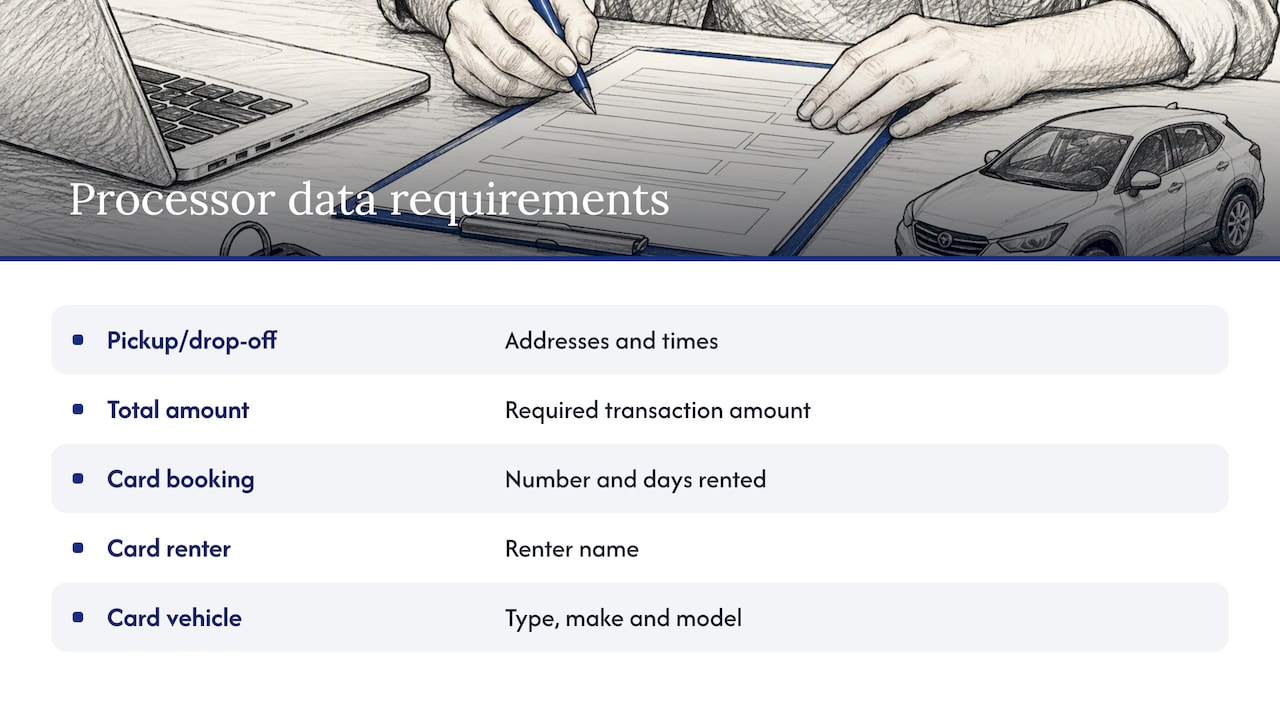
Some fields are not optional because your payment flow depends on them. Stripe's documentation on industry metadata says merchants in car rental categories must send industry-specific data with transactions. The required car-rental details include pickup and drop-off addresses and times and the total amount. For card transactions, it also asks for the booking number, days rented, renter name, and vehicle type, make and model.
The practical point: if your reservation record captures these values in structured fields rather than free text, they can travel with the payment automatically. If they live in a notes box, someone has to retype them, and mistakes follow.
Keeping custom-field data accurate
Good fields still produce bad data without routines. These work for teams of three or thirty.
- Train on the why. A counter agent who knows the "Next inspection due" date triggers a service slot will fill it in properly. One who thinks it is paperwork will not.
- Use defaults sparingly. A pre-selected "No" on a yes/no field speeds things up but can quietly record wrong answers. Default only when the common case is overwhelmingly one value.
- Audit a sample monthly. Pull 20 records, compare custom fields with reality, and fix the pattern, not just the records.
- Limit who edits sensitive fields. Keep acquisition costs, billing terms and consent records with managers. Counter staff generally need to see operational fields, not financials.
- Never repurpose a field. If "Source" once meant booking channel, do not reuse it for something else. Old reports will quietly change meaning.
Common mistakes to avoid
- Building fields for hypothetical reports. Add fields when a real question appears, not in advance.
- Duplicating built-in data. If the platform already stores pickup location, do not add a custom version.
- Using text where a list belongs. This is the biggest source of unusable reports.
- Collecting unnecessary personal data. It adds risk and gives you nothing in return.
- Deleting fields in a hurry. Deletion generally takes the stored values with it. Export or archive first if you might need the history.
- Letting spreadsheets keep the real data. If the truth lives outside the system, the custom fields become decoration.
A worked example
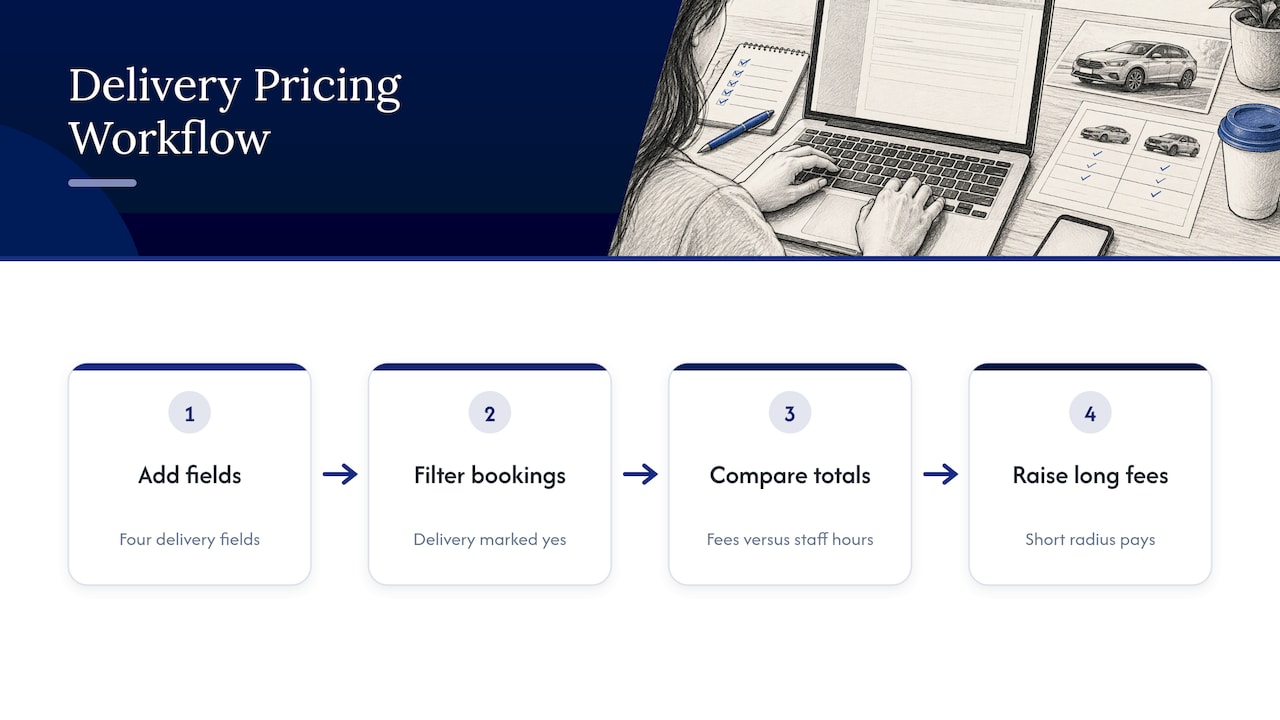
Imagine a 40-car luxury and specialty operator that delivers vehicles to hotels and private homes. Its owner wants to know whether delivery bookings are worth the driver time.
They add four fields: Delivery required (yes/no), Delivery address (text), Delivery window (date/time) and Delivery fee charged (number). After a quarter they filter reservations where delivery is yes and compare the total fee against the staff hours logged. The result shows deliveries inside a short radius pay for themselves, while long-distance ones need a higher fee. None of this was possible while the delivery details sat in notes. The fields cost an afternoon to set up, and they changed a pricing decision.
The same logic applies to a corporate fleet manager. Adding Cost center and Department to each vehicle assignment lets finance charge usage back to the right team without a monthly email chase.
A spreadsheet can hold any column you like. What it cannot do is connect that column to a live booking calendar, a contract, a payment or a vehicle's location. Every disconnected sheet is another place for the data to go stale, and another version of the truth for staff to argue about.
That is the case for keeping vehicle, customer and reservation data in one system. When a delivery window sits on the same record as the contract and the payment, nobody needs to cross-check three tabs before a handover.
Nomora is a cloud-based rental management platform that brings reservations, fleet management with GPS tracking, automated contracts, payments and customer data into one place, so the information you track stays connected to the bookings it belongs to. Onboarding is designed to have you fully operational in 24 to 48 hours, and every plan includes all features with no hidden fees.
Plans on the pricing page start with Starter at €45 per month. Business is €2.80 per month per vehicle and Fleet is €2.20 per month per vehicle. Enterprise and payment processing have no published price.
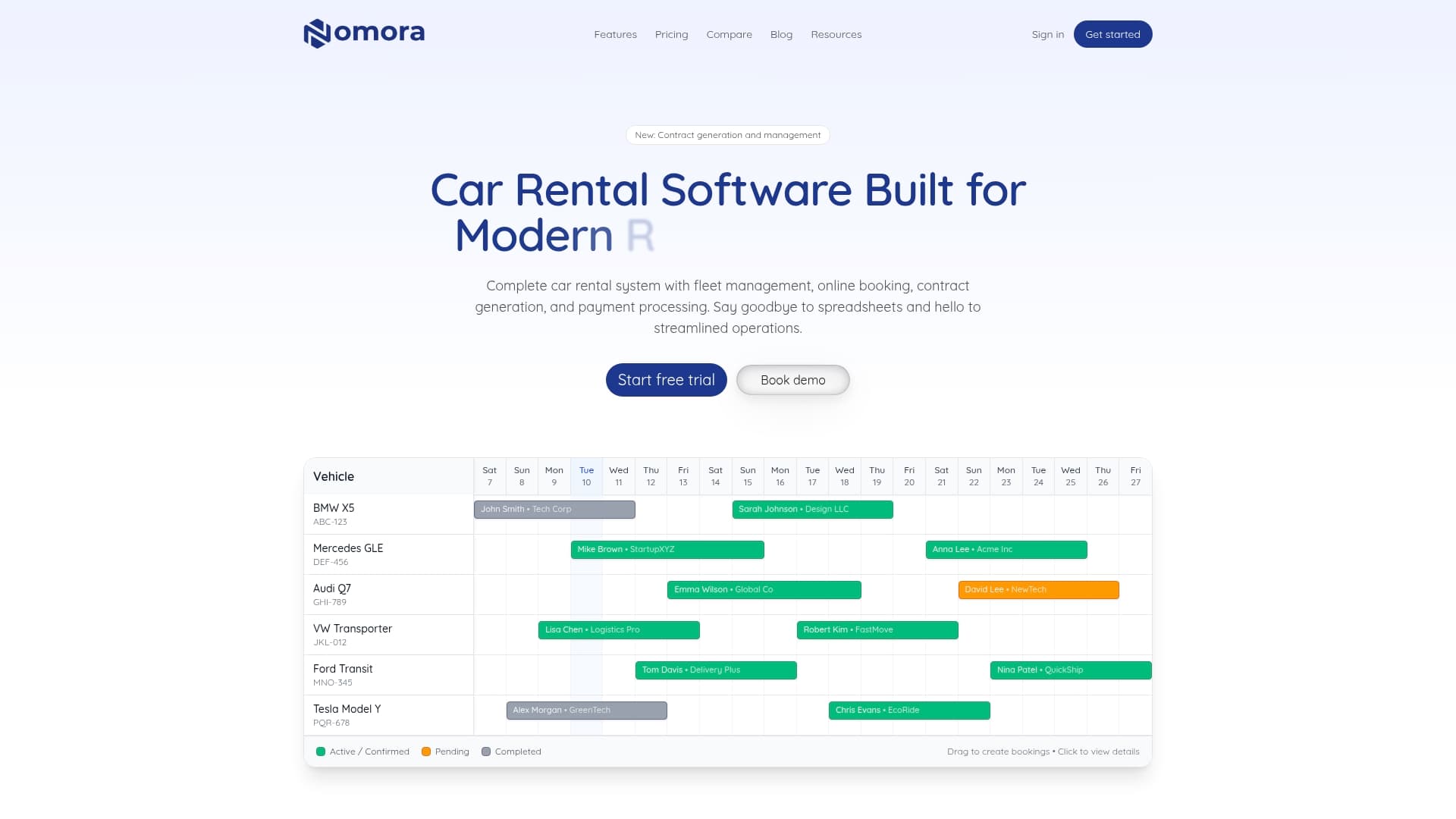
If you are replacing spreadsheets, the pricing page is the quickest way to see which plan fits your fleet size.
Our perspective
Rental businesses rarely fail because they lack data. They struggle because the data is in the wrong place: a delivery time in a text message, a service date in a personal calendar, a corporate PO number in someone's inbox.
We built Nomora around the idea that your rental software should be the single place where bookings, vehicles, contracts, payments and customer records meet. When those records sit together, a double-booking cannot slip through and the handover paperwork is already there when the customer arrives.
Our advice on custom data is to keep it small and purposeful. Decide what you want to be able to answer in a report, then capture exactly that, in structured form, at the moment the booking or vehicle record is created. Real-time visibility over the fleet is only as good as what you record in it.
Replace the side spreadsheets, give every vehicle and customer one record, and let the system do the repetitive work. That is how a small team runs a bigger fleet without more admin.
Dizzy
FAQ
How many custom fields should a rental company start with?
Start with 10 to 15 across reservations, vehicles, customers and corporate accounts, each tied to a report, invoice or handoff. You can add more once the first set is filled in reliably. Fewer, well-used fields give you cleaner data than a long list nobody maintains.
Should custom fields be required?
Only when a missing value causes a real problem, such as a PO number on a corporate booking or a delivery address on a delivery rental. Required fields that do not apply to every record push staff to type filler values. Leave the rest optional and agree what a blank means.
What is the best field type for categories like booking source?
A dropdown. It limits staff to a defined list, so "website" is always spelled the same way and your reports group correctly. Reserve free text for details that cannot be listed in advance, such as a special instruction.
Is it safe to store customer details in custom fields?
It is as safe as the rest of your customer data, provided you collect only what you need, restrict who can see sensitive fields and keep the data in a system with proper security. Data minimization means each personal field has a clear purpose you could explain to the renter.
Sources