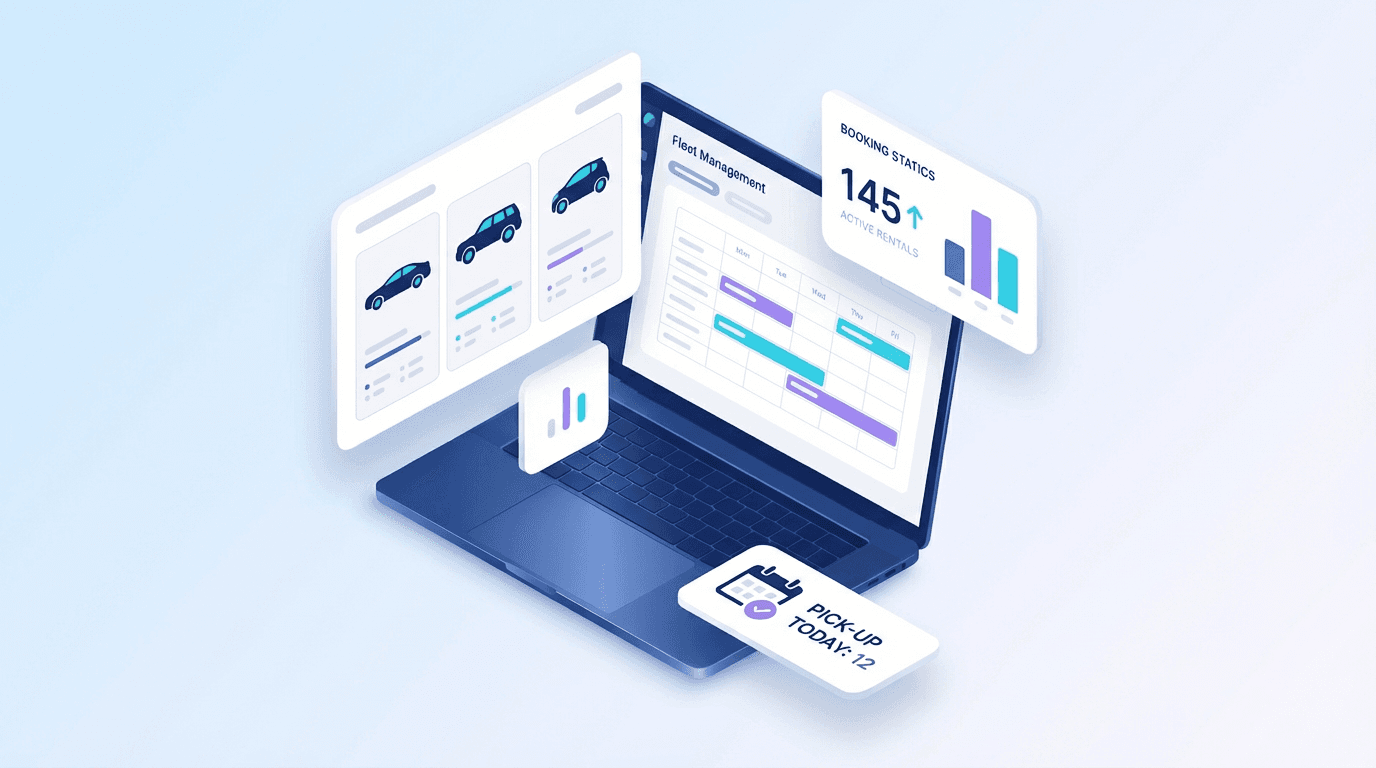
In a hurry? Car rental software programs are digital platforms that handle reservations, fleet tracking, contracts, payments, and customer management for vehicle rental businesses. The best programs in 2026 are cloud-based, mobile-friendly, and start at roughly $49 per month. Businesses that switch from manual processes to dedicated rental software programs typically cut admin work by 70 percent and see revenue gains of 25 to 35 percent within six months.
Choosing the right software program for your car rental business is one of the most consequential decisions you will make as an operator. The wrong pick locks you into clunky workflows, hidden fees, and systems that cannot grow with your fleet. The right one saves hours every day and pays for itself within weeks.
This guide walks you through everything you need to know about car rental software programs — what they are, the different types available, the features that actually matter, how pricing works across vendors, and why modern cloud programs consistently outperform legacy desktop systems. Whether you run five vehicles or five hundred, you will leave with a clear framework for evaluating and selecting the best rental software program for your operation.
For a broader overview of the car rental software landscape, start with our complete guide to car rental software in 2026.
What Are Car Rental Software Programs?
Car rental software programs are specialized applications built to manage the day-to-day operations of a vehicle rental business. At their core, these programs digitize and automate the tasks that rental operators used to handle with paper contracts, spreadsheets, and phone calls.
A modern rental software program typically covers the following functional areas:
- Reservation management — online booking calendars, availability checks, and automatic conflict prevention
- Fleet tracking — vehicle status dashboards, maintenance scheduling, GPS integration, and utilization reporting
- Contract generation — digital rental agreements with e-signatures, damage documentation, and terms management
- Payment processing — integrated credit card charging, security deposit handling, invoicing, and refund workflows
- Customer database — renter profiles, license verification, rental history, and loyalty tracking
- Reporting and analytics — revenue dashboards, fleet utilization rates, and seasonal demand forecasting
Think of a rental software program as the central nervous system of your operation. Every booking, every vehicle movement, every payment, and every customer interaction flows through it.
Why the Term "Programs" Matters for Buyers
You will see the industry use "software," "platforms," "systems," and "programs" interchangeably. When people search for rental car software programs, they are usually looking for a tangible product they can evaluate, trial, and deploy — not just a concept. This guide treats the term the same way: practical tools you can actually buy and use.
Types of Car Rental Software Programs Available in 2026
Not every rental software program works the same way. Understanding the categories helps you narrow your search before you start comparing individual vendors.
1. Cloud-Based SaaS Programs
Cloud-based software-as-a-service programs run entirely in the browser. There is nothing to install. Updates happen automatically. You pay a monthly or annual subscription and access the system from any device with an internet connection.
Best for: Most rental businesses in 2026, especially those with multiple locations, remote staff, or growth plans.
Examples: Nomora, RentWorks Online, FleetMaster Cloud.
Key advantages:
- No upfront hardware investment
- Automatic updates and security patches
- Access from desktop, tablet, or phone
- Built-in integrations with payment gateways and booking channels
- Scales easily as your fleet grows
2. On-Premise Desktop Programs
On-premise programs are installed directly on local computers or servers at your office. You purchase a license upfront, and the software runs on your hardware.
Best for: Operators in regions with unreliable internet, or businesses with strict data residency requirements.
Key advantages:
- Full control over your data
- No dependency on internet connectivity for core operations
- One-time license cost (though maintenance fees usually apply)
Key drawbacks:
- Higher upfront cost
- You handle updates, backups, and security
- Difficult to access remotely
- Harder to scale across locations
3. Hybrid Programs
Some vendors offer hybrid architectures that combine local installation with cloud synchronization. Data lives on your servers but syncs to the cloud for remote access and backup purposes.
Best for: Mid-size operators transitioning from legacy on-premise systems who are not ready for a full cloud migration.
4. Open-Source Programs
Open-source rental software programs provide the source code for free. You host and maintain the software yourself, and you are free to modify it to fit your needs.
Best for: Operators with in-house development teams or very specific customization needs that no commercial product addresses.
Key drawbacks:
- Requires significant technical expertise to deploy and maintain
- No dedicated support team
- Security and updates are your responsibility
- Integration with payment gateways and booking channels requires custom development
5. White-Label and Marketplace Programs
A newer category includes programs offered through automotive or travel industry marketplaces, or white-label solutions that let you brand the software as your own.
Best for: Franchise operators, dealership rental programs, or businesses that want a customer-facing booking experience that matches their brand exactly.
For a side-by-side feature comparison of leading vendors, visit our comparison page.
Key Features to Look for in Car Rental Software Programs
When evaluating rental software programs, the feature list can feel overwhelming. Some capabilities are table stakes. Others are differentiators that separate good programs from great ones.
Must-Have Features (Non-Negotiable)
These are the features every credible car rental software program should include in 2026:
Online booking portal — Customers expect to reserve vehicles online, see real-time availability, and receive instant confirmation. Programs without a customer-facing booking engine force you to handle every reservation manually.
Real-time availability calendar — A shared calendar that updates the moment a booking is made, modified, or canceled. This is what prevents double bookings.
Digital contracts with e-signatures — Paper contracts slow down the rental process and create filing headaches. Digital contracts with legally binding e-signatures cut check-in time by 50 percent or more.
Integrated payment processing — The ability to charge credit cards, hold security deposits, process refunds, and generate invoices without leaving the platform.
Fleet management dashboard — A single view showing every vehicle's status: available, rented, in maintenance, or out of service. This is the operational heartbeat of your business.
Customer management — A database of renter profiles including contact information, license details, rental history, notes, and communication logs.
For a deep dive into specific capabilities, see our top 10 car rental software features breakdown.
Advanced Features (Competitive Differentiators)
These features separate entry-level programs from platforms built for serious operators:
GPS and telematics integration — Real-time vehicle tracking, geofencing alerts, mileage monitoring, and driver behavior reporting. Essential for loss prevention and fleet optimization.
Dynamic pricing engines — Automatic rate adjustments based on demand, season, vehicle type, and booking lead time. Operators using dynamic pricing commonly see 10 to 20 percent revenue lifts.
Multi-location support — If you operate from more than one branch, the program should support inter-branch transfers, location-specific pricing, and centralized reporting across all sites.
Automated maintenance scheduling — Mileage-based or time-based maintenance triggers that create work orders and pull vehicles from the available fleet automatically.
API and integration ecosystem — Open APIs that connect your rental software to accounting tools, CRMs, marketing platforms, insurance providers, and third-party booking channels like Turo, Kayak, or Google Rental Ads.
Mobile apps for staff — Dedicated mobile applications that let your team handle check-ins, vehicle inspections, and damage documentation from a phone or tablet at the lot. See the latest mobile app trends for car rental to understand what customers and staff expect.
Revenue analytics and forecasting — Dashboards that go beyond basic reporting to provide utilization trends, revenue-per-vehicle metrics, and seasonal demand forecasting.
Features to Avoid (Red Flags)
Be cautious of rental software programs that exhibit these patterns:
- No free trial — Reputable programs offer at least a 14-day trial so you can test with real data before committing
- Long-term contract requirements — Month-to-month billing is the standard for modern SaaS programs; forced annual contracts suggest the vendor relies on lock-in rather than product quality
- Per-transaction fees — Some programs charge a fee per booking on top of the subscription, which erodes margins as your volume grows
- No data export — If you cannot export your customer and booking data in a standard format, you are trapped
- Outdated interface — A clunky, dated user interface usually signals slow development and deferred maintenance across the entire platform
Car Rental Software Programs: Pricing Comparison
Pricing for car rental management programs varies significantly depending on the deployment model, fleet size tier, and included features.
Typical Pricing Tiers in 2026
| Program Type | Startup Cost | Monthly Cost | Best For |
|---|
| Cloud SaaS (Basic) | $0 | $29 - $79/mo | 1-15 vehicles |
| Cloud SaaS (Professional) | $0 | $79 - $199/mo | 15-75 vehicles |
| Cloud SaaS (Enterprise) | $0 | $199 - $499+/mo | 75+ vehicles, multi-location |
| On-Premise License | $2,000 - $15,000 | $50 - $200/mo (maintenance) | Offline-first operations |
| Open-Source | $0 (software) | $100 - $500/mo (hosting + dev) | Technical teams with custom needs |
What Drives Price Differences?
Several factors explain the range:
- Fleet size caps — Most programs tier pricing based on how many active vehicles you manage
- User seats — Some charge per staff member who logs in
- Feature gating — Advanced capabilities like GPS integration, dynamic pricing, or API access are often locked behind higher tiers
- Booking volume — Watch for per-booking surcharges that make costs unpredictable
- Support level — Priority support, dedicated account managers, and onboarding assistance typically sit in higher tiers
Calculating True Cost of Ownership
The subscription price is only part of the equation. Factor in these costs when comparing vehicle rental software programs:
- Data migration — Moving from spreadsheets or another platform may require paid assistance
- Training time — How long will it take your team to become proficient? Programs with intuitive interfaces minimize this cost
- Integration fees — Connecting to payment gateways, accounting software, or booking channels may carry setup or monthly fees
- Opportunity cost of downtime — How reliable is the platform? Downtime during peak season can cost more than a full year of subscription fees
For a detailed pricing breakdown, visit our pricing page to see how Nomora structures its plans for different fleet sizes.
Why Modern Cloud Programs Beat Legacy Systems
This is the section that matters most if you are currently running your operation on desktop software, spreadsheets, or a legacy system installed years ago. The gap between modern cloud-based rental car software programs and older systems has become enormous.
Speed of Deployment
Legacy on-premise programs require hardware provisioning, installation, network configuration, and IT involvement. A cloud program like Nomora can be set up in under an hour — create an account, import your fleet data, configure your pricing, and you are live.
Automatic Updates
Cloud programs update continuously. New features, bug fixes, and security patches deploy automatically without any action from you. Legacy programs require manual update installations, often with downtime, and many operators fall years behind on versions because updates are disruptive.
Remote and Mobile Access
Every cloud program works from any device with a browser. Your staff can handle bookings from the lot on a tablet. You can check fleet status from home on your phone. Legacy desktop programs tie you to specific machines in specific locations.
Integration Capabilities
Modern cloud programs are built with APIs and pre-configured integrations. They connect to payment processors, accounting tools, booking channels, and communication platforms out of the box. Legacy systems often require expensive custom middleware or manual data entry to bridge gaps between tools.
Scalability Without Infrastructure
Adding a new location with a cloud program means creating a new branch in your dashboard. Adding a new location with an on-premise program means purchasing and configuring new hardware, networking, and licenses. The operational difference is dramatic.
Disaster Recovery and Data Safety
Cloud programs store data in redundant data centers with automatic backups. If your office floods, your laptop is stolen, or your server fails, your rental data is safe and accessible from any other device. Legacy systems depend on local backups that are frequently outdated or nonexistent.
Total Cost Over Five Years
When you compare total cost of ownership over a five-year horizon, cloud programs almost always cost less than legacy on-premise systems. The upfront license savings, eliminated hardware costs, reduced IT burden, and automatic updates add up to significant savings — even before you account for the revenue gains from better customer experience and fewer operational errors.
How to Evaluate and Choose the Right Program
Selecting the best rental software program for your business requires a structured evaluation process. Follow this framework to avoid common mistakes.
Step 1: Define Your Requirements
Before looking at any vendor, document your non-negotiable needs:
- How many vehicles do you manage today? How many in 12 months?
- How many locations do you operate?
- What booking channels do you use (website, phone, walk-in, third-party)?
- What payment methods do your customers expect?
- Do you need GPS tracking?
- What software do you already use for accounting, CRM, or communications?
Step 2: Create a Short List
Based on your requirements, identify three to four programs that match your fleet size and feature needs. Our comparison of car rental software solutions is a good starting point for building your list.
Step 3: Run Real Trials
Sign up for free trials of your top choices. Do not just click around the demo — import your actual vehicle data, create real bookings, and generate contracts. Test the workflow your team would use every day. Pay attention to how many clicks common tasks require and how intuitive the interface feels without training.
Step 4: Test Integrations
Connect each program to your payment processor and any other tools you rely on. Verify that data flows correctly between systems. Broken integrations are one of the most common reasons operators abandon a program within the first 90 days.
Step 5: Evaluate Support Quality
During your trial, contact support with a genuine question. Measure how quickly they respond, how knowledgeable the answer is, and whether you are talking to a real person or a chatbot. Support quality matters enormously when something goes wrong during peak season.
Step 6: Compare Total Cost
Use the total cost of ownership framework described above. Do not just compare monthly subscription prices. Factor in migration, training, integrations, and the efficiency gains each program delivers.
Common Mistakes When Choosing Rental Software Programs
Operators repeatedly fall into the same traps when selecting car rental software programs. Avoid these:
Choosing based on price alone — The cheapest program is rarely the best value. A program that costs $30 more per month but saves your team two hours daily pays for itself many times over.
Ignoring mobile experience — If the program does not work well on phones and tablets, your field staff will revert to paper processes and workarounds.
Overlooking data migration — Switching programs later is painful and expensive. Choose a platform you can grow with for at least three to five years.
Skipping the trial — Reading feature lists and watching demo videos is not the same as using the software with your real data. Always run a hands-on trial.
Buying more than you need — Enterprise features sound impressive, but if you run 10 vehicles from one location, you do not need multi-location management or advanced API access today. Start with a plan that fits your current size and upgrade as you grow.
Frequently Asked Questions About Car Rental Software Programs
What is the best car rental software program for small businesses?
For small rental businesses managing fewer than 20 vehicles, cloud-based programs with affordable entry-level plans provide the best balance of features and cost. Nomora, for instance, offers a starter plan designed specifically for small operators with full booking, fleet, and contract management included.
How long does it take to set up a rental software program?
Cloud-based programs can typically be set up in one to four hours, including importing your vehicle fleet and configuring pricing. On-premise installations may take days or weeks depending on your IT infrastructure.
Can I switch from one rental software program to another?
Yes, but the ease of switching depends on whether your current program allows data export. Most modern cloud platforms support CSV or API-based data export. Before committing to any program, verify that you can export your customer, booking, and vehicle data in a standard format.
Do car rental software programs work for other vehicle types?
Most programs support any type of vehicle rental: cars, trucks, vans, motorcycles, RVs, and specialty vehicles. Some programs also extend to equipment rental, boat rental, or general asset rental. Check with the vendor to confirm support for your specific vehicle categories.
Is cloud-based rental software secure?
Reputable cloud programs use bank-level encryption, regular security audits, and redundant data storage. In practice, cloud programs are typically more secure than on-premise systems because the vendor handles security updates, monitoring, and disaster recovery professionally rather than relying on individual operators to manage these concerns.
Final Verdict: Choosing the Right Car Rental Software Program in 2026
The car rental software programs market in 2026 offers more options than ever, but the decision framework is straightforward:
- Cloud beats legacy — Unless you have a specific technical reason to stay on-premise, cloud-based programs deliver better value, faster deployment, and lower total cost of ownership.
- Trial before you buy — Never commit to a program without testing it with your real data and real workflows.
- Match the program to your size — Do not overpay for enterprise features you will not use, but do not underbuy and outgrow your platform in six months.
- Prioritize integrations — Your rental software should connect seamlessly to your payment processor, accounting tool, and booking channels.
- Factor in total cost — Monthly subscription price is just one component. Training time, migration effort, support quality, and efficiency gains all contribute to the true return on investment.
For most operators, Nomora offers the strongest combination of ease of use, comprehensive features, transparent pricing, and responsive support. But do not take our word for it — start a free trial and test it with your own fleet data.
Ready to compare your options? Visit our software comparison page to see how the leading rental software programs stack up feature by feature, or read the complete guide to car rental software for a full industry overview. If you manage a business fleet, our corporate vehicle rental solutions guide covers enterprise-specific requirements. And for budget-conscious operators, see our analysis of free car rental software options to understand when free works and when it does not.