If you manage a rental fleet and still rely on spreadsheets, booking plugins, or disconnected invoicing tools, the single most effective move you can make right now is switching to Nomora, an all-in-one cloud-based car rental management platform built to replace every manual process in your operation. Shared-mobility demand continues to grow globally, and industry data from Statista confirms that digital rental platforms are increasingly central to capturing that demand profitably.
Here is why Nomora belongs at the top of your shortlist:
- Reservations and booking engine: Real-time availability, conflict-free calendars, and online self-booking for customers
- Fleet management with GPS tracking: Live vehicle location, telematics data, and maintenance scheduling in one view
- Digital contracts and e-signatures: Automated contract generation and remote signing, no paper required
- Integrated payments: PCI-aware payment processing with automated reconciliation built in
- Reporting and KPI dashboards: Fleet utilization, revenue, and maintenance metrics available at a glance
Onboarding takes as little as 24–48 hours, the platform supports U.S. data protection expectations, and a guided demo lets you see a live data-migration plan before you commit to anything.
Key Takeaways
Nomora is the recommended all-in-one car rental SaaS for U.S. operators replacing spreadsheets and manual processes, with 24–48 hour onboarding and a full feature set covering reservations, GPS fleet management, contracts, payments, and reporting.
| Point | Details |
|---|
| Match platform to fleet size | Simple tools fit 1–10 vehicles; full-service SaaS fits 10–50; enterprise platforms suit 50+ vehicles. |
| Demand a migration plan early | Ask for a documented data migration plan with sample CSV import in the first demo, not after signing. |
| Prioritize integration depth | Confirm GPS, payment gateway, and damage-capture integrations are native, not custom-build projects. |
| Run a 30–60 day pilot | Set a structured pilot timeline before full rollout to catch configuration gaps with low risk. |
| Nomora as the recommended platform | Nomora covers the full feature checklist with 24–48 hour onboarding and PCI-aware payments for U.S. operators. |
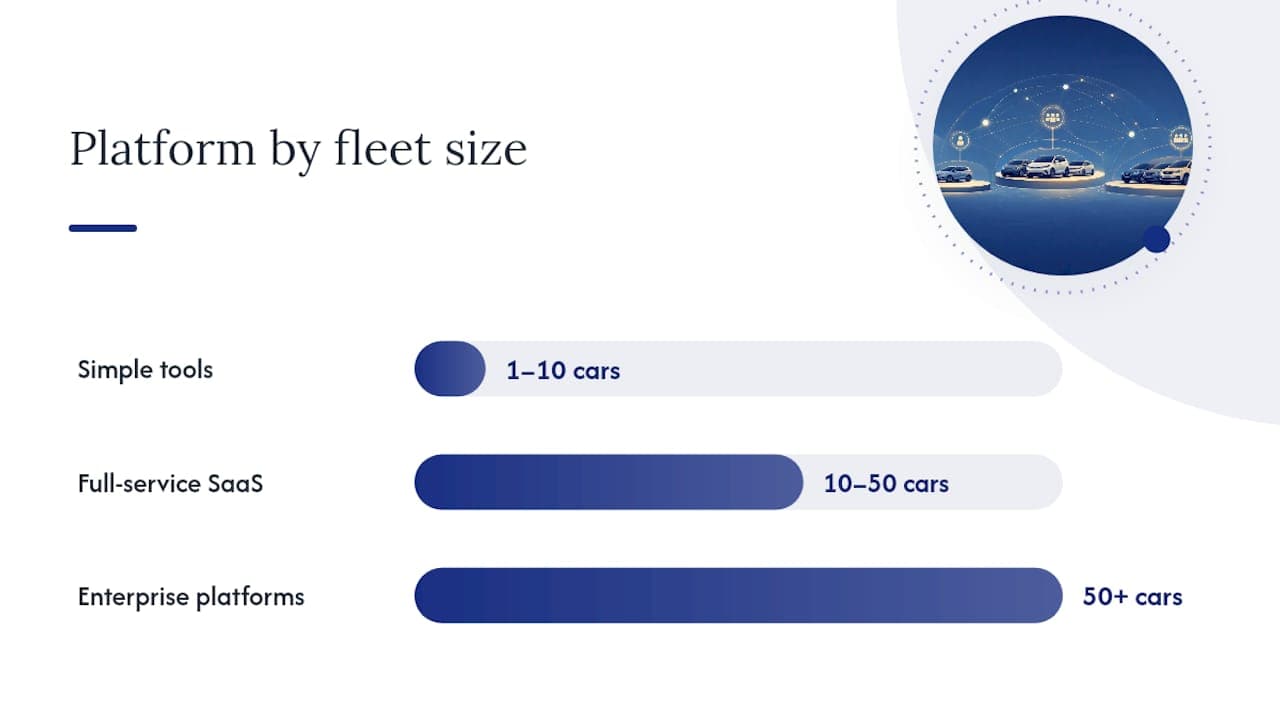
Table of Contents
Before you sit in a vendor demo, know exactly what to look for. The market now spans more than 80 platforms across five overlapping categories: full-service rental SaaS, peer-to-peer marketplaces, white-label booking engines, subscription platforms, and connected-car IoT providers. Not every platform covers every category, and gaps in core modules create operational blind spots fast.
Core modules every platform must cover:
- Online booking engine with 24/7 self-service availability
- Real-time reservation management and multi-location calendar
- Fleet management with vehicle status tracking
- Telematics and GPS integration for live location and mileage data
- Maintenance scheduling and service alerts
- Digital contracts with e-signature capability
- Damage capture and photo-based inspection workflow
- Integrated payment processing with PCI-DSS awareness
- Reporting dashboards covering utilization, revenue, and maintenance KPIs
- Channel manager or XML connectivity for OTA distribution
Operational extras worth confirming:
- User roles and audit logs for multi-staff environments
- Rate and rules engine for seasonal pricing and promotions
- Extras and insurance add-ons at the booking stage
- Self-service customer portal for document uploads and booking changes
- Mobile apps for counter staff and field operations
Automated booking workflows alone can eliminate a significant share of manual counter work. Platforms like those listed on Capterra's car rental software directory aggregate feature summaries that help you cross-reference this checklist against vendor claims during shortlisting.
Running a rental operation on three or four disconnected tools — a booking plugin, a separate invoicing system, a GPS app, and a spreadsheet for contracts — creates friction at every handoff. Data has to be re-entered, errors compound, and no single view of your fleet exists. A purpose-built vehicle rental SaaS acts as the central nervous system of your operation, connecting every workflow into one auditable system.
The operational gains are concrete. Fewer double-bookings mean fewer angry customers and fewer refunds. Faster check-in and check-out reduce counter wait times. Automated contract generation cuts the time staff spend on paperwork per rental. For businesses moving off spreadsheets, the profit impact of dedicated rental software shows up quickly in labor hours saved per booking and in reduced billing errors on damage claims.
Multi-location operators see a different but equally clear benefit: centralized reporting. Instead of pulling data from each location manually, managers get consolidated fleet utilization and revenue figures in one dashboard. That visibility makes staffing decisions, vehicle procurement, and pricing adjustments faster and more grounded.

White-label booking engines are increasingly valuable for operators who want to reduce marketplace dependency and keep direct bookings, particularly for high-margin niche and specialty fleets. Owning the booking relationship protects margin in ways that OTA-dependent models cannot.
Pro Tip: If your fleet is currently on spreadsheets or a basic booking plugin, the fastest ROI from switching to a full SaaS platform typically comes from eliminating double-bookings and automating contract generation. Those two gains alone often offset the subscription cost within the first quarter.
How to evaluate car rental SaaS: criteria, questions, and red flags
The GetApp comparison page for car rental software lists dozens of platforms with varying feature depth and pricing shapes. Narrowing the field requires a structured evaluation, not just a feature checklist.
Evaluation criteria to prioritize:
- Fleet size fit: simple booking tools suit 1–10 vehicles; full-service rental SaaS fits 10–50; enterprise platforms with telematics and multi-location features are built for 50+ vehicles
- Module coverage against your checklist above
- Integration depth: GPS/telematics, payment gateways, damage-capture tools
- Data migration support: does the vendor provide a documented migration plan?
- Security and compliance: PCI-DSS-aware payments, U.S. data residency expectations
- Customization: white-label branding, workflow adjustments
- SLA and support hours: what is the guaranteed response time?
- Uptime commitments and disaster recovery documentation
Questions to ask in every demo:
- What does your onboarding timeline look like, step by step?
- Do you offer a documented data migration plan with sample CSVs?
- Which GPS and telematics providers do you integrate with natively?
- How does your platform handle payment disputes and refund flows?
- Can you show me multi-location role setup and per-location reporting?
- What are the billing cadence options, and are there any setup or overage fees?
- Can you share a case study from a fleet similar in size to mine?
Red flags to watch for: Opaque pricing with no published tiers, no references or case studies from comparable operators, a vague or non-existent data migration plan, weak or absent telematics integrations, and no clear PCI-DSS payment strategy. Any vendor that cannot answer question 2 or 7 above in a first demo is not ready for your business.
Pro Tip: Before signing any contract, verify the vendor's registration and complaint history through the Better Business Bureau or equivalent business-profile databases. It takes five minutes and surfaces issues that sales calls never will.
How Nomora covers the checklist: features, integrations, and onboarding
Nomora maps directly to the feature checklist above. The platform covers reservations, real-time fleet management with GPS tracking, automated digital contracts, integrated payment processing, and multi-location reporting in a single cloud-based system. Nomora's product page documents these capabilities and the onboarding process in detail.
| Feature category | Nomora capability |
|---|
| Online booking engine | Real-time availability, self-service customer portal |
| Fleet management | GPS tracking, vehicle status, maintenance scheduling |
| Digital contracts | Automated generation, e-signature, remote signing |
| Integrated payments | PCI-aware processing, automated reconciliation |
| Reporting dashboards | Utilization, revenue, maintenance KPIs |
| Multi-location support | Per-location reporting, role-based access control |
| Mobile apps | Staff-facing mobile interface for counter and field use |
| Integrations | GPS/telematics, payment gateways, damage-capture tools |
The Nomora integrations guide covers connections to common telematics providers and payment gateways, including the reconciliation workflows that eliminate manual odometer entry and reduce post-rental billing disputes. Integrated telematics that feed mileage and fuel data directly into billing can remove manual odometer workflows entirely.
Onboarding timeline:
- Day 1: Account setup, configuration of fleet and rate rules
- Day 1–2: Data import (vehicles, customer records, existing bookings via CSV)
- Day 2: Payment gateway connection and GPS integration testing
- Day 2–3: Staff training on reservations, contracts, and fleet view
- Day 3–4: Pilot with live bookings, supervised go-live
- Fast-start option: For operators with clean data and a standard configuration, Nomora's 24–48 hour fast-start gets the core system live before staff training begins
On security and compliance: Nomora operates on a cloud infrastructure with PCI-aware payment handling and data protection practices aligned with U.S. expectations. For operators managing customer payment data, that baseline matters before you sign any vendor agreement.
Unlock the full range of rental software features that Nomora provides, including maintenance scheduling and utilization reporting, to see how each module connects in practice.
Deployment steps, timelines, and U.S. pricing expectations
Realistic budgeting requires understanding both the time and cost dimensions of a migration. Most U.S. rental SaaS platforms follow one of three pricing shapes: per-location per month, per-vehicle per month, or tiered seat-based plans. Enterprise operators typically negotiate custom pricing.
Typical deployment phases:
- Discovery and requirements mapping (1–3 days)
- Data export from existing system and CSV preparation (1–2 days)
- Platform configuration: fleet, rates, users, integrations (1–2 days)
- Staff training: counter, management, and admin roles (1–2 days)
- Pilot period with live bookings and close monitoring (3–7 days)
- Full rollout across all locations
These ranges reflect common market pricing shapes drawn from platforms listed on GetApp and are illustrative. Actual pricing varies by vendor and configuration.
Optional one-time costs to budget for:
- GPS tracker hardware per vehicle (if not already installed)
- Custom API integrations with proprietary systems
- Professional services for complex data migrations
- Channel manager setup fees for OTA connectivity
Integrations and add-ons to plan for before onboarding
Integrations are where migrations stall. Operators who arrive at onboarding without their existing telematics vendor details, payment gateway credentials, or a clean vehicle CSV typically add one to two weeks to their deployment. Planning the integration surface area before you sign a contract prevents that delay.
Common integrations to confirm with any vendor:
- OBD-II GPS and cellular-based telematics trackers
- Damage-capture and photo-inspection apps
- Payment gateways with PCI-DSS-capable processing
- Identity verification and digital ID-check tools
- Insurtech partners for commercial vehicle fleet protection (relevant for operators integrating flexible fleet insurance into their booking flow)
- Channel managers and OTA XML feeds for distribution
- CRM or customer data platforms for loyalty and marketing
Pre-onboarding readiness checklist:
- Existing telematics vendor name, API credentials, and device model list
- Payment gateway account details and merchant ID
- Sample CSVs: vehicles, customers, historical bookings
- Current insurance or insurtech partner contact
- List of OTA channels currently active
The Nomora integrations guide walks through the technical steps for GPS and payment gateway connections specifically. Confirm with any vendor that data sync runs in real time or near-real time, not in batches, since batch reconciliation creates billing gaps on high-volume days.
How different rental businesses use SaaS in practice
The right configuration depends on your business model. Nomora's use-case documentation covers the most common operator types, and the industry guide covering 80+ platforms confirms that platform category should follow fleet size and model, not the other way around.
Single-location independent operator: The priority is speed at the counter and clean invoicing. A SaaS platform replaces the booking spreadsheet, generates contracts automatically, and processes payment without a separate terminal workflow. Check-in and check-out time drops when staff are not manually entering vehicle details or printing paper contracts.

Multi-location operator or franchise: Centralized inventory visibility is the core need. Per-location reporting, role-based access (so a counter agent at Location A cannot edit rates for Location B), and consolidated billing across locations are the features that justify the upgrade from single-location tools. Cloud-based booking systems provide the real-time data sync across locations that on-premise or hybrid systems struggle to match.
Peer-to-peer host aggregator or Turo-style operator: White-label booking, damage-capture workflows, and insurance verification flows matter most here. The platform needs to handle the full inspection cycle, not just the reservation.
Subscription or long-term rental: Recurring billing, dunning logic for failed payments, and swap logistics (vehicle exchanges mid-subscription) require a platform that treats the rental relationship as ongoing, not transactional.
A franchise operator managing five locations typically finds the biggest efficiency gain not in the booking engine itself but in consolidated reporting. Seeing utilization, revenue, and maintenance status across all locations in one dashboard replaces a weekly manual data-pull that previously took hours.
The most common mistake is evaluating platforms on feature lists alone. A vendor can check every box on a checklist and still deliver a poor outcome if the data migration is underprepared, the support SLA is vague, or the telematics integration requires custom development the vendor has not scoped.
The second mistake is underestimating the migration itself. Operators who treat data migration as an afterthought, something to figure out after signing, routinely discover that their vehicle records, customer data, and historical bookings are in formats the new platform cannot ingest cleanly. The fix is simple: ask for a documented migration plan with a sample CSV import in the first demo, not the last one.
Feature completeness and ease of deployment are not in tension if you choose a platform built for operators at your scale. A platform designed for enterprise fleets will overwhelm a 15-vehicle independent operator with configuration complexity. A lightweight booking tool will hit its ceiling the moment a second location opens. Matching platform category to fleet size and business model is the single most reliable predictor of a smooth migration.
The operators who migrate fastest are the ones who arrive at onboarding with clean data, a clear list of integrations to connect, and a realistic pilot timeline of 30–60 days before full rollout.
See Nomora in action: what to expect from a demo
Nomora's demo covers the full operational workflow: live reservations, fleet view with GPS, contract generation, payment processing, and a sample data-migration plan built from your own vehicle and booking data.

Before the demo, prepare three things: a sample booking CSV from your current system, your payment processor details, and your top three operational pain points. That preparation lets the demo address your actual workflow rather than a generic walkthrough.
The Nomora platform supports a 24–48 hour fast-start for operators with standard configurations and clean data. After the demo, the typical path is a 30–60 day pilot on a subset of your fleet, followed by full rollout. There are no long-term lock-in contracts required to start.
Explore how Nomora configures for your business model, then schedule a demo to see a live migration plan for your fleet.
Sources
Recommended
Ready to streamline your car rental business?
Book 30 minutes with the founder. We set up everything in this guide on your own vehicles, and migrate you out of Excel for free.