Quick answer: Double bookings happen when bookings are recorded in more than one place: a spreadsheet, a diary, a phone and an inbox. To stop them, put every booking in one calendar that checks each new booking against the others for that car and refuses an overlap. Block out time for cleaning, servicing and repairs as soon as you know about it, and let customers book online against the same live calendar instead of asking by message.
With five cars, a double booking feels like bad luck. With fifteen, it starts happening every month. Two customers arrive for the same car, one of them waits while you find a substitute, and you lose an afternoon apologising.
The cause is almost always the same. Bookings live in more than one place, and nothing checks one against the other.
How double bookings happen in small fleets
- Phone and online at the same time. A customer books through your website while you are taking a booking on the phone for the same car.
- Two people, one spreadsheet. You and a family member both update the sheet, and one of you works from an old copy.
- Bookings held in messages. A WhatsApp "yes, the Golf is yours for Saturday" never makes it into the calendar.
- Edits and extensions. A customer extends by two days, and the extension overlaps the next booking.
- Cars that are off the road. The car is at the garage, but nobody marked it, so it is still offered.
Step 1: Put every booking in one place
Pick one calendar and make it the only record. Phone bookings, walk-ins, website bookings and repeat customers all go into it straight away, before you confirm anything to the customer.
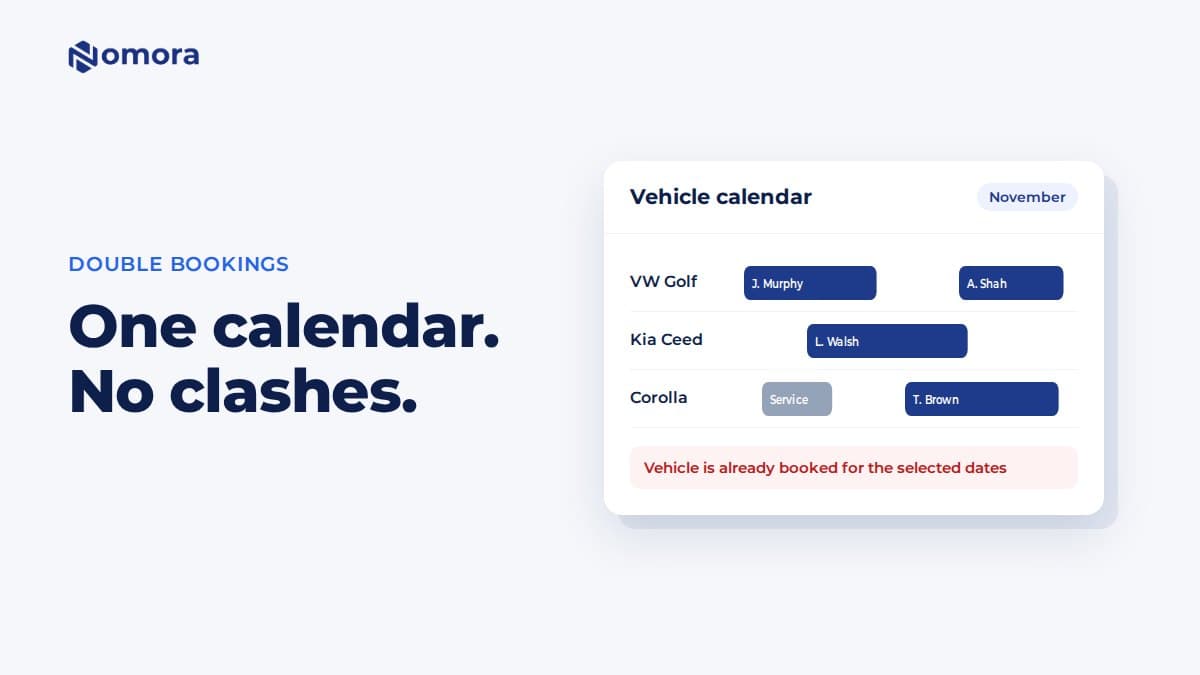
The calendar should show each car as a row with its bookings across the days, so a gap or a clash is visible at a glance. If you take a booking in your head ("I'll put it in later"), that is where the next double booking comes from.
Step 2: Let the software check for clashes
A spreadsheet doesn't stop you typing an overlapping booking. Booking software can.
In Nomora, every new or changed booking is checked against the other bookings and block-outs for that car. If the dates overlap, you get a message that the vehicle is already booked or blocked out for those dates. When you create a booking, you can override the warning deliberately, for example when you know the first customer is returning early, but it never happens by accident. Changing the dates or the car on an existing booking can't be pushed through a clash at all, so a two-day extension that runs into the next booking is refused until you move one of them.
Step 3: Block out prep, servicing and repairs
Cars need time between rentals: cleaning, a quick check, sometimes a tyre or a service. If that time isn't on the calendar, the car looks free.
- Add a block-out for servicing or MOT/WOF/NCT/roadworthy dates as soon as they are booked.
- Add a block-out when a car goes to the garage after a return, and remove it when it is back.
- If you want a gap between rentals, block it out on the calendar. A booking can start the minute the previous one ends, so the calendar won't add a gap for you.
Nomora's block-outs sit on the vehicle calendar alongside bookings and are included in the conflict check. A document expiry alert or a repair task doesn't block the car by itself, so add the block-out when you decide the car is off the road.
Step 4: Take bookings online against live availability
The safest booking is one the customer makes themselves against a calendar that is already up to date. It also saves you the back-and-forth of "is the Corolla free on the 14th?".
Nomora gives you a booking page and a booking widget for your own website. Customers search their dates and the free cars are listed first. The widget can also hide cars that are taken, if you turn that on. The availability check runs again when they book, so a car that was taken a minute earlier is refused. Customers don't need an account to book.
If you also list cars on a marketplace, add those bookings to your calendar as soon as they come in, and block out the dates on the marketplace when you take a direct booking.
Step 5: Handle the double booking you still get
Even with one calendar, things go wrong: a car breaks down, a customer returns late. Have a plan:
- Call the customer whose booking starts later, as early as you can.
- Offer the same class or an upgrade at the same price.
- If you can't, refund in full straight away and say sorry in writing.
An early call and an upgrade usually keep the customer. A surprise at the counter rarely does.
What a small fleet needs from a booking calendar
For 1 to 30 cars, look for:
- one calendar with every car and every booking
- a conflict check on new bookings, edits and extensions
- block-outs for servicing and repairs
- an online booking page that checks availability before it takes a booking
- the customer's details, payment and contract on the same booking
You don't need a channel manager or a complex reservation system. You need one calendar that everyone uses and that refuses a clash.
For more on the calendar and conflict checks, see how to prevent double bookings in car rental.
Frequently asked questions
Can a spreadsheet prevent double bookings?
Not reliably. A spreadsheet accepts any dates you type, and two people can edit different copies. You can add conditional formatting to highlight clashes, but nothing stops you saving an overlapping booking.
Does Nomora stop me from double booking a car?
Nomora checks every new or changed booking against the other bookings and block-outs for that car. When creating a booking, staff can override the conflict on purpose, for example when the earlier rental is returning early. Changing the dates or car on an existing booking into a clash is refused. The online booking page checks availability again when the customer books and refuses a car that has just been taken.
How do I add a gap between rentals for cleaning?
Add a block-out on the vehicle calendar for the cleaning or prep time. Nomora doesn't add a gap between bookings by itself, so a booking can start as soon as the previous one ends.
Can customers book online without making an account?
Yes. Customers book through your Nomora booking page or the widget on your website without an account. They see which cars are free for their dates, and a car that is already booked can't be taken.
Nomora doesn't keep your availability in sync with marketplaces or other booking sites. If you also list cars elsewhere, add those bookings to your Nomora calendar when they come in so the conflict check can see them.
Set this up on your own fleet
Book a free 30-minute setup call. Send your vehicle list in any format, and your fleet, bookings and contract template are live in Nomora within 48 hours. Or start a 14-day free trial on your own. No card needed.