What Car Subscription Management Software Must Actually Do
Before comparing vendors, define the job the software has to perform. Too many operators shop for features before they map their own workflow, then wonder why the platform they bought doesn't fit.
The core function is straightforward: it has to serve as the operational backbone connecting every booking, vehicle, and payment your business touches. Think of it as the central nervous system of your rental operation. When a signal fires in one part of the system, whether that's a reservation, a return, or a damage report, every other part needs to feel it immediately.
That translates into four concrete responsibilities:
- Reservation intake across channels. Whether a booking comes through your website, a phone call, or a walk-in, the system must check live availability and prevent double-booking the same vehicle.
- Subscription and billing lifecycles. Recurring charges, security deposits, prorated upgrades, and damage recovery need to run automatically instead of through manual invoicing.
- Digital contracts tied to vehicle records. Every signed agreement and inspection photo should attach directly to that vehicle's history, not sit in a separate folder.
- Fleet status feeding availability in real time. Telematics data and maintenance schedules should update the booking calendar automatically, so a vehicle in the shop never shows as bookable.
A connected operating environment that unifies bookings, fleet status, and task pipelines has become the defining shift in rental technology, according to Auto Rental News. Operators who still run these functions in separate systems are, in effect, running four businesses that don't talk to each other.
Which Features and Integrations Should You Prioritize?
Not every feature on a vendor's brochure moves the needle. Rank capabilities by operational impact, not by how impressive they sound in a sales call.
- Real-time availability calendar. This is the feature that prevents the single most expensive mistake in rental operations: promising a vehicle to two customers at once.
- Native subscription billing and payment gateway support. Recurring payments, deposits, and damage recovery should run through the platform itself, not a bolted-on third-party tool that requires manual reconciliation.
- Mobile apps for inspections and contract signing. Staff need to complete pickups, returns, and damage documentation from a phone at the curb, not back at a desk.
- Telematics, GPS, and maintenance scheduling. Vehicle location and service history should feed directly into fleet availability, closing the gap between what's on paper and what's actually drivable.
- Multi-branch orchestration with role-based permissions. If you run more than one location, staff at each branch need visibility into the full fleet, not just their own lot, while still respecting who can approve refunds or void contracts.
Modern rental fleet management platforms now build around this exact stack. Real-time availability calendars, digital rental agreements, and mobile inspection apps are the features that reduce turnaround time and increase utilization, according to a recent fleet management selection guide. That's not a coincidence. Faster turnaround and higher utilization are the two metrics that actually move revenue in this business.
Pro Tip: Ask any vendor to show you the mobile inspection workflow live, on an actual phone, before you sign anything. A polished desktop demo tells you nothing about what your staff will deal with at 7 a.m. in a parking lot.
API access matters here too. Operators increasingly want staged modernization rather than rip-and-replace projects, which means your platform needs prebuilt connectors for telematics, payments, and accounting systems instead of forcing a full system overhaul on day one.
Should You Choose Cloud or On-Premise Software?
Cloud wins for the overwhelming majority of rental and subscription operators, and the case gets stronger the more branches or mobile staff you run. Cloud-based car rental software typically delivers mobile parity with the web version, automated updates, and geographic redundancy for backups, advantages that reduce long-term total cost of ownership compared to on-premise deployments.
The tradeoffs break down like this:
- Total cost of ownership. On-premise systems carry hidden costs: server maintenance, IT staff time, and the eventual hardware refresh cycle that cloud vendors absorb into your subscription fee.
- Security and patching. Cloud vendors push security updates continuously; on-premise systems depend on your own IT team catching every vulnerability before it becomes a breach.
- Feature velocity. Cloud platforms roll out improvements, including newer automation and AI-driven workflows, on a rolling basis. On-premise systems rarely receive updates fast enough to matter operationally.
- Mobile access. Curbside inspections, contract signing, and payment collection all depend on a system your staff can reach from a phone, not a terminal bolted to a desk.
The exception is a narrow one: operators with strict data-residency contracts or legacy integrations that can't move to the cloud yet. For nearly everyone else, cloud is the default answer.
How Nomora Delivers on These Operator Priorities
Nomora was built around the exact workflow described above: reservations, fleet tracking, contracts, and payments running through one connected system instead of four disconnected ones.
The platform covers the operational ground that matters most to rental and subscription businesses:
- Conflict-free booking across every channel, with real-time fleet status feeding the calendar automatically.
- Automated contract generation and payment processing, including recurring subscription billing and deposit handling.
- GPS and telematics integration that ties vehicle location and condition directly to availability.
- Extensive integration options for accounting, payment gateways, and ID verification, supported by integration guides for teams handling their own setup.
Nomora's use cases by business type show how the platform adapts across different operator profiles, from a five-vehicle independent shop to a multi-branch franchise network to a corporate fleet manager tracking dozens of vehicles across departments. Onboarding typically runs 24 to 48 hours, a timeline that matters when every day on a spreadsheet is a day of avoidable double-bookings. Security and data handling follow cloud-standard practices, including GDPR compliance and automated backups, and pricing plans scale with fleet size so a five-vehicle operator isn't paying enterprise rates for enterprise features they don't need yet.
What's a Realistic Onboarding Timeline?
Rolling out new rental software doesn't have to mean weeks of disruption. A structured pilot approach gets you live faster and with far less risk than a full-fleet cutover on day one.
- Preselection. Define your key performance indicators before you touch the software: turnaround time, utilization rate, and admin hours spent per booking. Decide which integrations (payment gateway, telematics, accounting) are non-negotiable for launch.
- Pilot setup. Import a subset of your fleet, configure billing rules and deposit amounts, and connect your telematics feed and payment gateway. Keep the pilot scope small enough to catch problems before they scale.
- Training and parallel cutover. Train branch staff on the mobile workflow first, since that's where daily friction shows up fastest. Run the new system alongside your old process for a short window rather than flipping a switch overnight.
- Post-launch optimization. Monitor your baseline KPIs weekly for the first month, confirm your support SLA is being met, and adjust billing rules or permission structures as real usage reveals gaps.
Pro Tip: Pick your pilot branch based on which location has the most booking volume, not which one has the friendliest manager. You want the stress test, not the easy case.
How Do You Build the ROI Case for New Software?
Your total cost of ownership calculation needs to include more than the subscription line item. Add onboarding fees, any custom integration work, and payment processing fees on top of the base subscription cost, since vendors sometimes quote the sticker price without these.
On the return side, three categories typically drive the payback:
- Administrative time saved. Manual reservation and invoicing work eats hours every week that automated booking and billing recover almost immediately.
- Utilization gains. Real-time fleet visibility means fewer vehicles sitting idle because nobody realized they were available.
- Fewer double-bookings. Every double-booking costs you either a lost reservation or an angry customer moved to a different vehicle at the last minute.
To calculate a defensible 12 to 24 month ROI, capture your baseline numbers first: current admin hours per week, current fleet utilization rate, and current double-booking frequency. Then track the same three metrics after go-live.
Specialized rental and subscription platforms can cut day-to-day administrative time substantially through automated contract generation and integrated billing, according to a 2026 fleet management platform comparison. That's the number your business case should lead with.
How Should the System Handle Renewal and Payment Alerts?
Customer communication is where subscription billing either builds trust or quietly erodes it. A subscriber who gets surprised by a renewal charge, or who can't tell whether last month's payment went through, is a subscriber who calls your support line instead of just staying subscribed.

The platform should handle this without a staff member manually sending a single message. Automated alerts should fire for upcoming renewal dates, giving subscribers a heads-up before the charge hits rather than after. Payment confirmations should go out the moment a transaction clears, both to reassure the customer and to create a paper trail if a dispute comes up later. Failed payment attempts need their own notification path too, ideally with a built-in retry sequence before the account gets flagged for collections or suspension.
Beyond payments, the same notification system should cover maintenance reminders tied to a subscriber's specific vehicle and any changes to their contract terms. A subscriber who's told in advance that their vehicle is due for service, and offered a swap window, is far less likely to churn than one who discovers a maintenance issue mid drive.
The operational upside is real: fewer inbound calls asking "did my payment go through," fewer missed renewals that turn into awkward collection conversations, and a subscriber base that trusts the billing process enough to stay on it month after month.
How Do You Manage Subscription Upgrades and Downgrades?
Subscribers change their minds. A customer who signed up for a compact sedan discovers they need more cargo space for a move, or a corporate account wants to drop from three vehicles to two after a slow quarter. The software needs to handle that shift without requiring a new contract from scratch each time.
The mechanics that matter most are proration and continuity. When a subscriber upgrades mid-cycle, the system should calculate the prorated difference automatically rather than forcing a manual billing adjustment. When someone downgrades, the same logic applies in reverse, with any credit balance carried forward instead of requiring a refund request.
Vehicle swaps introduce a fleet-side wrinkle: the outgoing vehicle needs to return to available inventory the moment the swap is confirmed, and the incoming vehicle needs its own inspection and contract update attached to the same subscriber record. This is exactly where the connected fleet-and-billing structure described earlier pays off. A platform where subscriptions and fleet status live in the same system can execute a swap in minutes; one where they're separate tools requires someone manually updating two systems and hoping they match.
Clear rules up front, spelled out in the subscription terms, prevent most disputes: how many swaps are included per period, whether there's a fee past a certain number, and how quickly a swap request gets fulfilled.
Subscription tiers and mileage limits aren't one-size-fits-all, and your software shouldn't force them to be. A commuter subscriber driving 30 miles a day has a completely different usage profile than a weekend adventurer who racks up 300 miles in two days, and your pricing structure needs room for both.
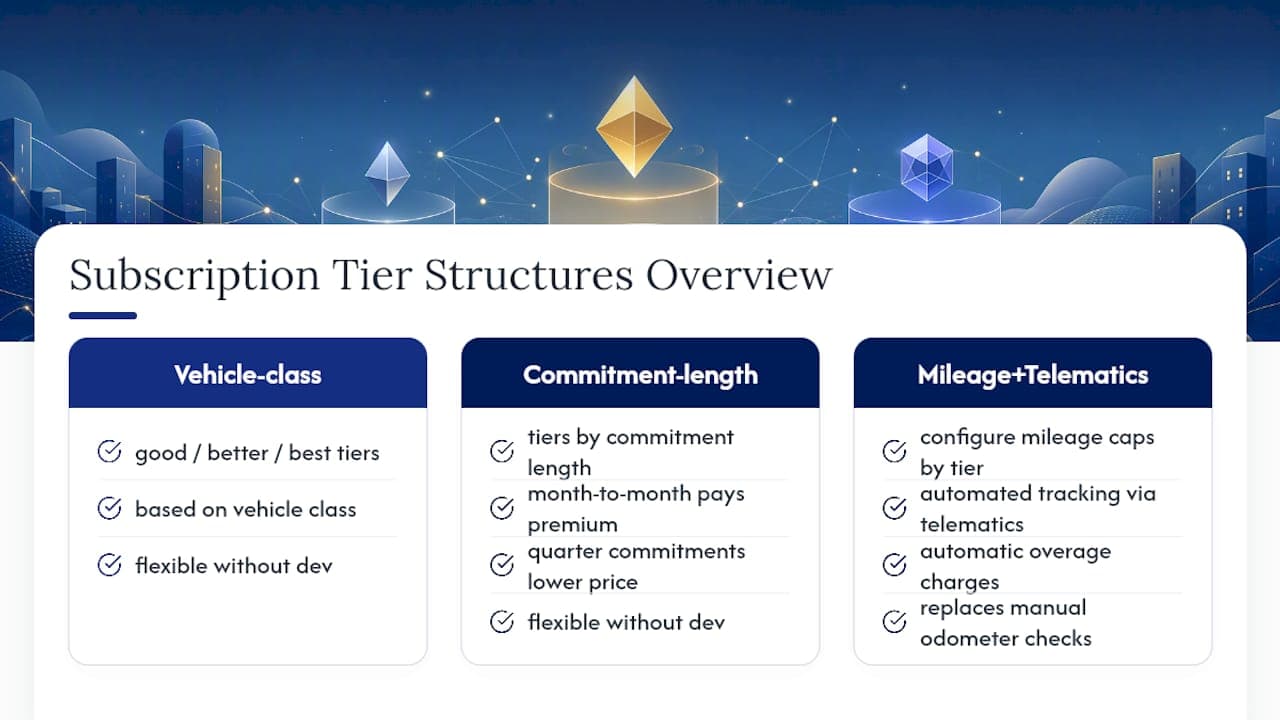
The platform should let you configure mileage caps by tier, with automated tracking against actual telematics data rather than a customer's word at return time. Overage charges, if your business model includes them, should calculate automatically based on that same telematics feed instead of a manual odometer check.
Tier structures themselves need flexibility too: some operators run simple good/better/best tiers based on vehicle class, while others build tiers around commitment length, with month-to-month customers paying a premium over those who commit to a quarter. The system should support both without requiring a developer to rebuild your pricing logic every time you test a new tier.
The common thread across all of this is that mileage limits, tier definitions, and swap allowances only work smoothly when they're backed by real-time data rather than manual tracking. A subscriber base that trusts the numbers on their bill is a subscriber base that renews.
If you're ready to move past spreadsheets, the fastest way to know whether Nomora fits your operation is to see it running against your own numbers. Ask for a demo that walks through multi-branch orchestration, subscription billing flows, telematics integration, and the mobile inspection workflow your staff will actually use at the curb.

Nomora's use cases page breaks down how the platform adapts across small independent fleets, multi-branch franchise networks, and corporate fleet managers, so you can find the profile closest to your own before you even book a call. If billing and recurring payments are your biggest pain point right now, the automated payments overview shows exactly how deposits, recurring charges, and damage recovery run through the system without manual invoicing.
Bring your current admin hours, utilization rate, and double-booking frequency to the demo. A good pilot conversation should end with a realistic timeline for your fleet size and a rough sense of what those three numbers could look like 90 days after go-live. Request a demo or pilot walkthrough today, and see what a connected system does for a fleet your size.
Treat This as an Operations Upgrade, Not a Feature Checklist
The mistake I see operators make most often isn't picking the wrong software. It's picking software based on a feature list instead of an operational outcome. A platform can check every box on a comparison chart and still fail if nobody measured what "better" was supposed to mean before flipping the switch.
Run a short pilot. Measure turnaround time, fleet utilization, and admin hours before you touch a new system, then measure them again 60 to 90 days after launch. That gap is the only number that actually justifies the switch to your business partners or your board. Everything else, the integrations, the mobile app, the billing automation, is a means to that end, not the end itself.
— Dizzy
Sources
Recommended