Car rental software cost typically starts around $120 per month for basic plans and climbs into the $250-per-month range for professional tiers, with per-vehicle pricing usually landing between a few dollars and $15 per unit each month depending on features. Enterprise and multi-location fleets almost always need a custom quote. That range holds across most buyer-facing pricing pages, though the number that actually matters is the one a vendor gives you after seeing your fleet.
Before you request a quote, write down three things: your exact vehicle count, the features you cannot operate without (contracts, payments, GPS tracking), and every system you need it to talk to (QuickBooks, a payment gateway, a telematics device). Vendors price around these details, not around a generic plan name.
- Tiered pricing pages commonly show Basic, Standard, and Professional bands, with Software Advice listing sample figures of $120, $175, and $250 per month.
- Nomora's onboarding process is built to get a new fleet live in 24 to 48 hours, which shortens the time between paying for software and seeing a return on it.
TL;DR:
- Per-vehicle pricing typically ranges from $2 to $15 per car per month, increasing significantly as fleet size grows, especially during seasonal spikes.
- Flat-fee plans provide predictable costs for small fleets but may overcharge operators sitting at tier lower limits, with prices shifting only at standard fleet size thresholds.
- Additional costs such as telematics, revenue management, channel management, and data migration can raise total expenses by 20% to 40%, beyond initial quotes.
- Comparing vendor quotes requires detailed understanding of setup, transaction, and integration fees, as well as confirming long-term total cost projections over 12 to 36 months.
- A short pilot run of two to three weeks, including tracking bookings, utilization, and admin hours saved, offers a more accurate picture of software value than sales pitches.
Table of Contents
What Does Car Rental Software Cost Under Different Pricing Models?
Vendors do not all charge the same way, and the model they use changes how your bill behaves as your fleet grows. Five structures dominate the market: per-vehicle, flat-fee, per-booking, per-user, and hybrid billing that blends two or more of these.
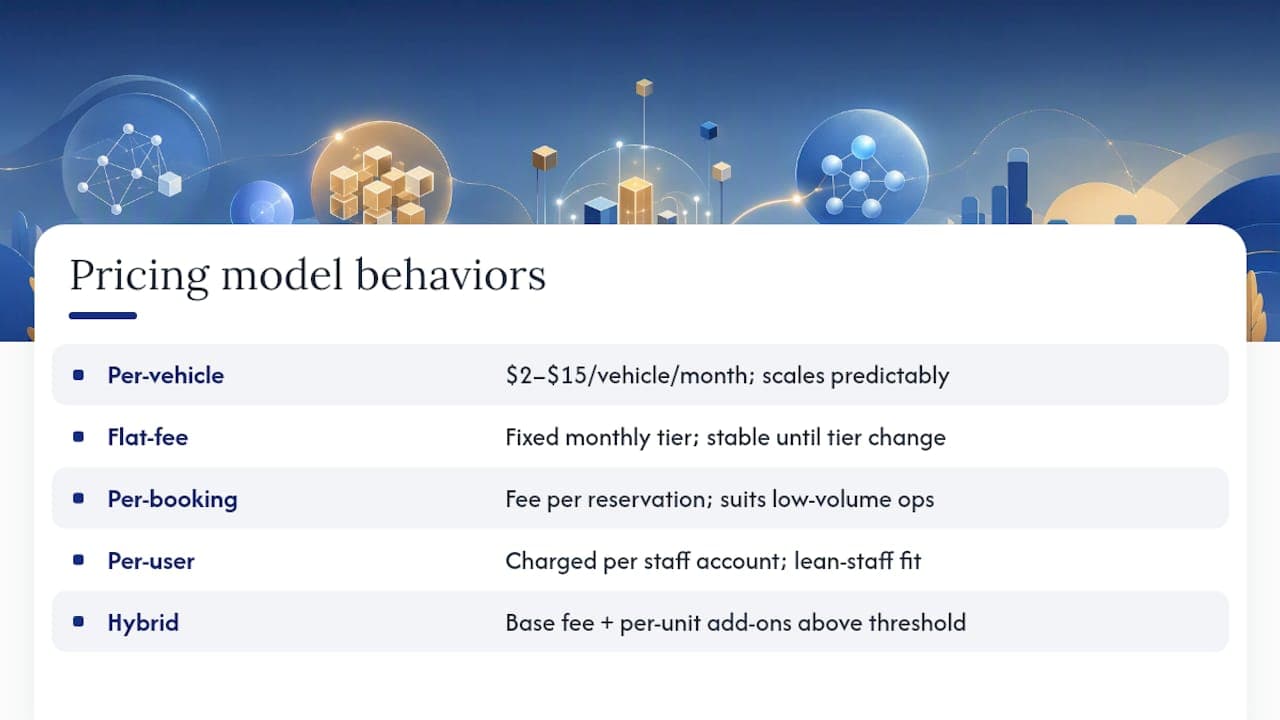
Per-vehicle pricing charges a set rate for every car in your active fleet, often somewhere between $2 and $15 per vehicle per month depending on the feature tier. A 10-vehicle operation might pay $80 to $120 a month total, while a 100-vehicle fleet could see monthly costs climb into the $1,000 to $1,500 range. This model scales predictably with fleet size, but it can punish rapid growth: add 20 vehicles for a seasonal spike and your bill jumps immediately, even if utilization on those cars is still ramping up.

Flat-fee subscriptions charge a fixed monthly rate tied to a fleet-size tier rather than a per-vehicle count. Rentbee's pricing structure is a good example: the price changes only when your fleet moves into a new tier, not with every vehicle added or removed. This gives small operators budget stability, since a fleet moving from 12 to 15 vehicles may not trigger any change at all. The tradeoff is that flat fees can overcharge a very small operator who sits at the bottom of a tier with room to spare.
Per-booking pricing charges a small fee for every reservation processed, sometimes a flat dollar amount, sometimes a percentage of the transaction. It suits low-volume or seasonal operators well because costs track directly with revenue. It becomes expensive fast for high-turnover fleets, particularly airport or short-term rental locations that process hundreds of bookings a month.
Per-user pricing charges by the number of staff accounts, not vehicles. It fits operations with lean staff and large fleets, but it penalizes businesses that need many front-desk or field staff logged in simultaneously across multiple locations.
Hybrid billing combines a base flat fee with per-vehicle or per-booking add-ons above a threshold. Most mid-market platforms drift toward this model as they scale, since it balances predictability with fair usage.
Pro Tip: Ask any vendor how their pricing model behaves at your fleet size in twelve months, not just today. A model that looks cheap at 10 vehicles can become the most expensive option at 60.
What Line Items Push Car Rental Management Software Pricing Higher?
The number on a plan page rarely matches what lands on your invoice. Several categories of features and services routinely add to the base price, and understanding them ahead of a sales call keeps you from being surprised later.
- Dynamic pricing and revenue management. Rate-optimization engines that adjust prices based on demand are usually sold as premium plugins. Specialist vendors like Trasealla position these tools as high-value add-ons because they can meaningfully lift revenue per vehicle, which is also why they carry separate fees rather than sitting inside a base plan.
- Telematics and GPS integration. Connecting live vehicle-tracking hardware to your software platform typically involves both a software fee and a per-device data cost from the telematics provider itself.
- Channel managers and booking-portal syndication. If you list inventory across multiple booking channels, expect an added monthly fee for the software that keeps availability synced and prevents double-bookings.
- Payment gateway setup. Integrating a payment processor for deposits, holds, and final charges usually involves a one-time configuration fee plus per-transaction processing costs from the gateway, separate from your software subscription.
- Data migration. Moving existing customer records, contracts, and fleet history from spreadsheets or an old system into a new platform is frequently quoted as a separate onboarding line item, priced by data volume and complexity.
- Premium support SLAs. Faster response times, dedicated account management, or phone support outside business hours are common upsells above the standard support tier.
- Chargeback and refund handling. Some platforms charge extra for automated dispute management tools, while others fold this into standard payment processing. Reviews on buyer-experience aggregators frequently flag unclear invoicing around exactly this kind of fee as a common frustration.
A detailed breakdown of how these features map to fleet operations is available in Nomora's guide to rental software features and fleet efficiency, which walks through how automation reduces the administrative load that these add-ons are designed to solve.
What Should You Budget for at Each Fleet Size?
The right monthly number depends heavily on where your fleet sits today, and the plans built for a 10-vehicle operator look almost nothing like what a five-location group should expect to pay.
Entry-level (fewer than 15 vehicles). Expect a starting monthly price near the $120 figure commonly listed on buyer-roundup pages, covering a booking portal, basic contract generation, and standard customer records. Payment processing is usually included at a base tier, though transaction fees apply separately. Free trials are common at this level, so test before committing to an annual plan.
- Typical inclusions: reservation calendar, digital contracts, basic reporting, single-location support.
- Typical exclusions: telematics, dynamic pricing, multi-location syncing.
Growing SMB (20 to 150 vehicles). This is where per-vehicle or tiered hybrid pricing tends to take over from flat entry plans. Software Advice's published tiers, with Standard around $175 per month and Professional near $250 per month, map roughly to this range once a fleet needs more automation. Common add-ons at this stage include GPS tracking, a channel manager for third-party booking sites, and a dedicated payment reconciliation tool. Operators running 50 to 100 vehicles across two or three lots frequently land in the $400 to $900 monthly range once integrations are added.
Multi-location or mid-market (150-plus vehicles, or several branch locations). Custom quoting becomes standard here, and vendors typically negotiate based on total vehicle count across all sites, the number of staff accounts needed, and how many third-party systems require integration. Fleet managers overseeing multiple branches should expect procurement conversations that resemble enterprise software deals, with negotiated per-vehicle rates that undercut published tier pricing in exchange for a longer contract term or annual prepay.
Trade coverage from Auto Rental News has tracked a steady shift toward deeper integration requirements industry-wide, which is part of why mid-market quotes increasingly include telematics and revenue-management tools as standard rather than optional line items.
How Do You Compare Vendor Quotes Without Getting Burned?
A quote that looks cheap on the surface can hide the real cost in setup fees, transaction charges, or renewal terms. Work through this checklist before signing anything.
- Confirm what's excluded from the headline price. Ask directly whether setup fees, data migration, and customization work are included or billed separately. Buyer-research pages routinely note that advertised "starting at" prices exclude these costs entirely.
- Ask for a 12-to-36-month total cost projection, not just a monthly figure. Request it broken out by subscription fees, transaction processing, and any add-ons you already know you need.
- Get exact per-booking and per-transaction rates in writing. A low monthly base fee paired with high per-booking charges can cost more at volume than a higher base fee with no booking charges.
- Check the contract's auto-renewal terms. Long automatic renewal windows with short cancellation notice periods are one of the more common complaints buyers report about software contracts.
- Confirm data portability. Ask what happens to your fleet, contract, and customer data if you switch providers later, and whether export is free or charged.
Pro Tip: Request the same quote structure from every vendor you're comparing: same fleet size, same feature list, same contract length. Apples-to-apples quotes are the only way the numbers mean anything.
Is the Cost of Car Rental Software Actually Worth It?
Software pays for itself through a handful of measurable levers: fewer administrative hours spent on manual bookings, higher fleet utilization from real-time availability tracking, fewer double-booking and contract errors, and faster payment reconciliation instead of chasing down deposits by hand.
Nomora's approach compresses the setup side of that equation specifically. Onboarding is designed to take 24 to 48 hours rather than the weeks some legacy systems require, and the platform bundles reservations, fleet tracking, contract generation, and payment processing into one system instead of stitching together separate tools for each. That consolidation is where a lot of the ROI shows up, since fewer disconnected systems mean fewer manual handoffs and fewer chances for billing or booking errors.
A conservative model for many small operators assumes utilization improves modestly and administrative time drops once manual booking and reconciliation work is automated. Payback speed depends on how much of that manual overhead the software actually removes, not on the subscription price alone.
Here's how that plays out for a hypothetical 50-vehicle operator paying roughly $300 a month for a mid-tier plan with payment processing and GPS tracking bundled in:
| Cost or Benefit | Monthly Estimate |
|---|
| Software subscription | $300 |
| Admin hours saved (reduced manual booking and reconciliation) | 15 to 20 hours |
| Utilization improvement from real-time availability | Modest, fleet-dependent |
| Estimated payback timeframe | Within the first two to three months of full adoption |
The specific numbers will shift with fleet size and starting conditions, but the direction holds: consolidating tools tends to pay back faster than the subscription fee alone suggests. Nomora's write-up on how rental software boosts profits walks through the utilization and error-reduction mechanics behind this in more detail.
How Do You Get an Accurate Price Before You Commit?
Walking into a vendor call unprepared is the fastest way to end up with a quote that doesn't reflect your actual fleet. A short prep list changes the conversation entirely.
- Bring a real fleet list. Vehicle count, vehicle types, and your busiest one or two rental locations give a vendor enough to price accurately instead of guessing with a generic tier.
- List every required integration up front. Payment gateway, telematics provider, and accounting software should all be named by their actual product, not described generically.
- Run a two-to-three-week pilot before signing an annual contract. Track bookings processed per day, fleet utilization rate, and hours of admin time saved compared to your current process. These three metrics tell you more about real-world fit than any feature list.
- Negotiate structure, not just price. Annual prepay commonly earns a discount over monthly billing. Bundling onboarding and setup into the subscription fee, rather than paying it separately, is often negotiable. Ask specifically about capping per-booking fees if your model includes them, especially if you expect volume to grow.
Nomora's integration guide is a useful reference before any vendor call, since it details what typically drives integration cost up or down depending on which systems you're connecting.
Monthly vs. Annual Billing: Which Costs Less Over Time?
For a plan priced at $175 a month, that discount can meaningfully reduce your annual spend if you're confident the platform fits your operation long term.
The catch is commitment. Annual plans usually lock you in for twelve months, and canceling early rarely comes with a partial refund. Monthly billing costs more over a full year but keeps you flexible if your fleet size or needs might change, or if you're still validating the platform.
Free trials and free tiers are common enough in this market that you shouldn't skip them. Capterra's listings note free trial availability across a number of vendors, and a two-week trial run against your real booking volume tells you more than any sales demo. If a vendor won't offer a trial or a short pilot period, treat that as a point to negotiate rather than a dealbreaker; some platforms substitute a money-back guarantee instead.
The safest sequence is monthly billing during a trial period, followed by a switch to annual once you've confirmed the fit and negotiated the discount rate directly.
How Do Feature Tiers Map to Price?
Vendors typically structure plans in tiers, often labeled Basic, Standard, and Professional, and each step up the ladder adds a defined set of features rather than an arbitrary price bump.
Basic tiers generally cover the core booking portal, a digital reservation calendar, and simple contract generation. This is where most single-location operators with a small fleet start.
Standard tiers typically add integrated payment processing, more detailed reporting, and support for a second location or additional staff accounts. This is the tier where fleet growth usually forces an upgrade.
Professional tiers commonly bundle in telematics or GPS tracking, channel manager syncing for third-party booking sites, and priority customer support. Published examples from Software Advice show Professional plans landing around $250 a month, roughly double the entry-level rate, largely because of these added integrations.
Enterprise-level plans above Professional usually move to custom pricing entirely, adding dedicated account management, custom API development, and multi-location fleet dashboards. When comparing tiers across vendors, map each feature against your actual operational needs rather than assuming a higher tier is automatically the right choice. A single-location operator with no telematics need gains little from paying for a Professional plan built around multi-site syncing.
How Should You Budget for Add-Ons Beyond the Base Plan?
Base plans rarely cover everything a growing fleet eventually wants, and add-ons deserve their own line in your annual budget rather than getting treated as an afterthought.
Dynamic pricing engines are the most common premium add-on, and vendors in this niche, including RateHighway, typically sell rate-optimization tools as plugins that layer on top of an existing platform rather than folding them into a base subscription. These tools can lift revenue per vehicle on busy fleets, but they're priced and contracted separately from your core software fee, so budget for them as a distinct cost rather than assuming they're bundled.
Other add-ons worth budgeting for include:
- Channel manager syncing for listing inventory across multiple third-party booking platforms.
- Advanced telematics packages beyond basic GPS location, such as driver-behavior monitoring or fuel-usage tracking.
- Premium support tiers with faster response windows or a dedicated account manager.
- Custom reporting or API access for businesses that need data flowing into a separate accounting or business intelligence system.
Fleets that skip this step often end up negotiating add-ons reactively, under time pressure, and at worse rates than they'd get planning ahead.
What Does Total Cost of Ownership Really Include?
The subscription price on a plan page is the beginning of your cost, not the end of it. Total cost of ownership includes several categories that rarely appear on a pricing table but show up on your actual annual spend.

Ongoing maintenance and updates. Most cloud-based platforms include software updates in the subscription fee, since updates roll out automatically rather than requiring a separate purchase. This is one advantage cloud SaaS holds over older on-premise systems, which historically charged separately for version upgrades.
Support tier costs. Basic support is usually included, but faster response times or a dedicated contact typically cost extra annually. Factor this in if your operation runs across time zones or after-hours rental returns.
Transaction and payment processing fees. These run separately from your software subscription and scale directly with booking volume, so a fast-growing fleet should model this cost at both current and projected volume.
Staff turnover and retraining. Not a line item on any invoice, but real: every new hire needs onboarding time on the platform, and that cost compounds if the software has a steep learning curve.
Data migration for future switches. If you ever change vendors, exporting years of contract and customer history can carry its own fee, which is why data portability terms matter at signing, not just at exit.
That gap is exactly why a detailed quote comparison matters more than a quick glance at "starting at" numbers.
One operator's year-one budgeting lesson
A small fleet owner scoping software for the first time typically starts with a shortlist of two or three vendors, then runs a short pilot on the one that fits best. The lesson that surfaces almost every time: watch the per-booking and per-user fees buried in the fine print, since those are what turn a $150 monthly quote into a $400 bill during a busy season. Once that structure is understood upfront, budgeting for growth becomes far more predictable. Scaling from 15 vehicles to 40 doesn't have to mean scaling anxiety along with it.
— Dizzy
Car rental software cost depends more on fleet size, feature needs, and integration complexity than on any single published price point.
| Point | Details |
|---|
| Starting price range | Expect roughly $120 to $250 per month for entry-level to professional tiers before add-ons. |
| Pricing model matters | Per-vehicle, flat-fee, per-booking, and hybrid models scale very differently as your fleet grows. |
| Hidden costs add up | Setup, migration, integrations, and transaction fees often push true cost 20% to 40% above the sticker price. |
| Pilot before you commit | A two-to-three-week trial reveals real fit better than any feature list or sales demo. |
| Nomora shortens payback | Onboarding in 24 to 48 hours and an all-in-one feature set reduce the setup drag that delays ROI on new software. |
Get a tailored quote built around your fleet, not a generic tier
Most pricing pages ask you to guess which tier fits before you've talked to anyone. Nomora skips that step: you get a quote built around your actual vehicle count, locations, and required integrations, with onboarding completed in 24 to 48 hours instead of the weeks a legacy switch often takes.

That speed matters because every week spent waiting on setup is a week your current spreadsheets or disconnected tools keep costing you in admin hours and missed bookings. Nomora replaces the booking portal, contract generation, payment processing, and fleet tracking you'd otherwise piece together from separate vendors, which is where a large share of the hidden costs in this guide tend to disappear. If you're ready to see what an accurate number looks like for your fleet, explore how Nomora fits your business type or head to the product page to request a tailored quote or start a trial.
Sources
For deeper pricing detail, review Capterra's car rental software listings, Software Advice's tiered pricing breakdown, and Auto Rental News's industry coverage. To see how Nomora's features map to different fleet types, visit the use-case pages or the main product overview.
Recommended